コンテンツにスキップ

Blog

Zensical 0.0.64でブログ機能がリリース

以前からMaterial for MkDocsのリリースページには以下のように「Material for MkDocsは2026年11月5日でサポート終了になるのでZensicalへの移行を検討してください」という趣旨のメッセージが掲載されていました。

Warning

Material for MkDocs is approaching end of life

Material for MkDocs is scheduled to reach end of life on November 5, 2026. Until then, maintenance is limited to critical bug fixes and security updates. After this date, the project will remain available on PyPI and GitHub, but no further maintenance is planned except in exceptional circumstances.

For users looking for a long-term, actively developed successor, we're building Zensical – a next-generation static site generator designed for technical documentation. If you're planning a new documentation project or evaluating your long-term options, we invite you to take a look.

Organizations requiring support beyond this date are welcome to get in touch to discuss available options.

Read the full announcement on our blog

しかし、Zensicalには長らくブログ機能が実装されなかった為、ブログ機能を利用しているユーザはMaterial for MkDocsを利用し続けざるを得ませんでした。ですが、ついに待望のブログ機能を実装したZensical 0.0.64がリリースされました!

リリースノートには以下の記載があります。「MkDocsのブログ機能をそのまま移植した」ようであり、良い意味でも「従来の設定がそのまま利用可能」ですが、新機能も無いようです。とは言え、「ブログ機能の為だけにMkDocsを利用し続ける必要がなくなった」ことは大きく、喜ばしいニュースです!

Many of you have been waiting for this one: Zensical now includes native blog support. As a direct port of the Material for MkDocs blog plugin, it preserves the familiar configuration, metadata, URLs, archives, categories, authors, pagination, and more. We're happy to finally put it into your hands, with more flexible blogging functionality planned for the future.
CMLで「リンク一覧表示」「LinkDown/Up」するPythonスクリプト

以前にCMLでリンクの遅延などを一覧表示するPythonスクリプトというメモを書きました。リンクの一覧表示に加え、「指定したリンクのLinkDown/Up」も実行できるように修正したスクリプトをメモしておきます。CMLへのアクセス情報はハードコードしています。

Cisco CML上でdnsmasqコンテナにhostsでDNS応答させる

dnsmasqはCisco CMLでも利用できるよう、以下でバイナリやDockerfileが公開されています。

デフォルト状態でもCMLのUI上でdnsmasqのコンフィグから「hosts」にエントリーを追加すれば、dnsmasqはDNS応答に利用してくれます。但し、この「hosts」は実際には(「/etc/hosts」では無く)「/etc/banner_add_hosts」にマウントされている、という点には注意が必要です。

Google Chromeをインストールする

GUIをインストールしていないAmazon Linux 2023やUbuntu 26.04LTSへGoogle Chromeをインストールする方法をメモしておきます。インストールされるバイナリやライブラリのファイルサイズはそれなりに大きいので注意します。

AWS Organizationsで閉鎖したアカウントは最大90日間、残り続ける

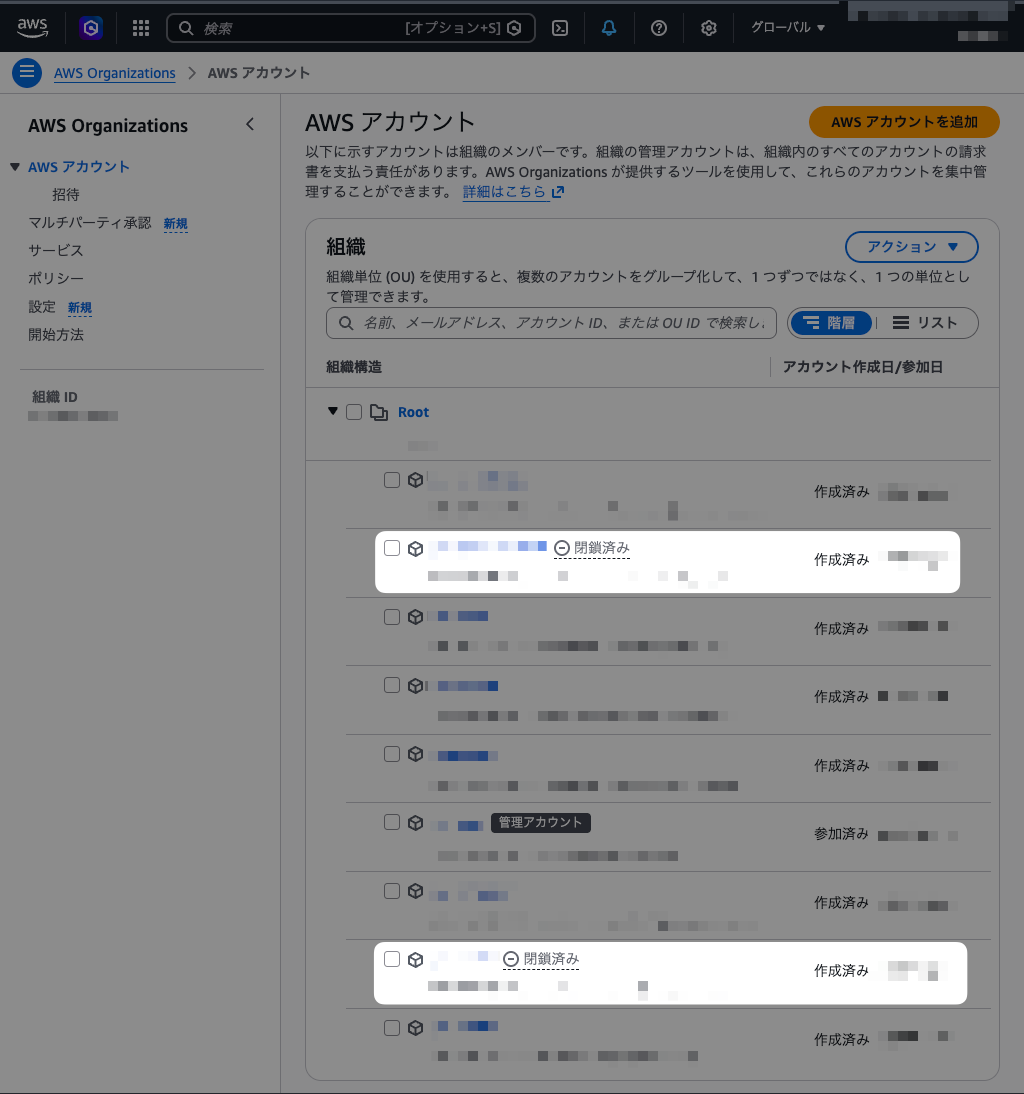
AWS Organizationsでアカウントを閉鎖すると該当アカウントに「閉鎖済み」(CLOSED)ラベルが表示されるものの、アカウントそのものは表示されたまま残り続けます。これは「閉鎖アカウントが完全に削除されるまで最大90日かかる」という仕様の為です。

image

AWS公式ドキュメントには以下の記載があります。機械翻訳の影響だと思われますが、日本語版ドキュメントのタイトルが不自然です…。

Closing a member account in an organization with AWS Organizations

Any member account that you close will display a CLOSED label next to its account name in the AWS Organizations console for up to 90 days after the original closure date. After 90 days, the member account will be permanently closed and will no longer be displayed in the AWS Organizations console. Please note that it may take a few days for the account to be removed from the organization after permanent closure.

を使用して組織のメンバーアカウントを閉鎖する AWS Organizations

閉じたメンバーアカウントは、元の終了日から最大 90 日間、 AWS Organizations コンソールのアカウント名の横に CLOSED ラベルがに表示されます。90 日後、メンバーアカウントは完全に閉鎖され、 AWS Organizations コンソールに表示されなくなります。アカウントは、永続的な閉鎖後に組織から削除されるまでに数日かかる場合があります。

Goで作成したツールをpkg.go.devに登録する

Goで作成したツールをpkg.go.devに登録する方法をメモしておきます。CLIから登録するには以下を実行します。

curl -X POST https://pkg.go.dev/fetch/github.com/USER/REPO@TAG

例えば以下のように実行します。

curl -X POST https://pkg.go.dev/fetch/github.com/sig9org/gotasky@v0.0.1

以下を実行してステータスコード「200」が返ってくればインデックスされています。

curl -sI https://pkg.go.dev/github.com/sig9org/gotasky@v0.0.1

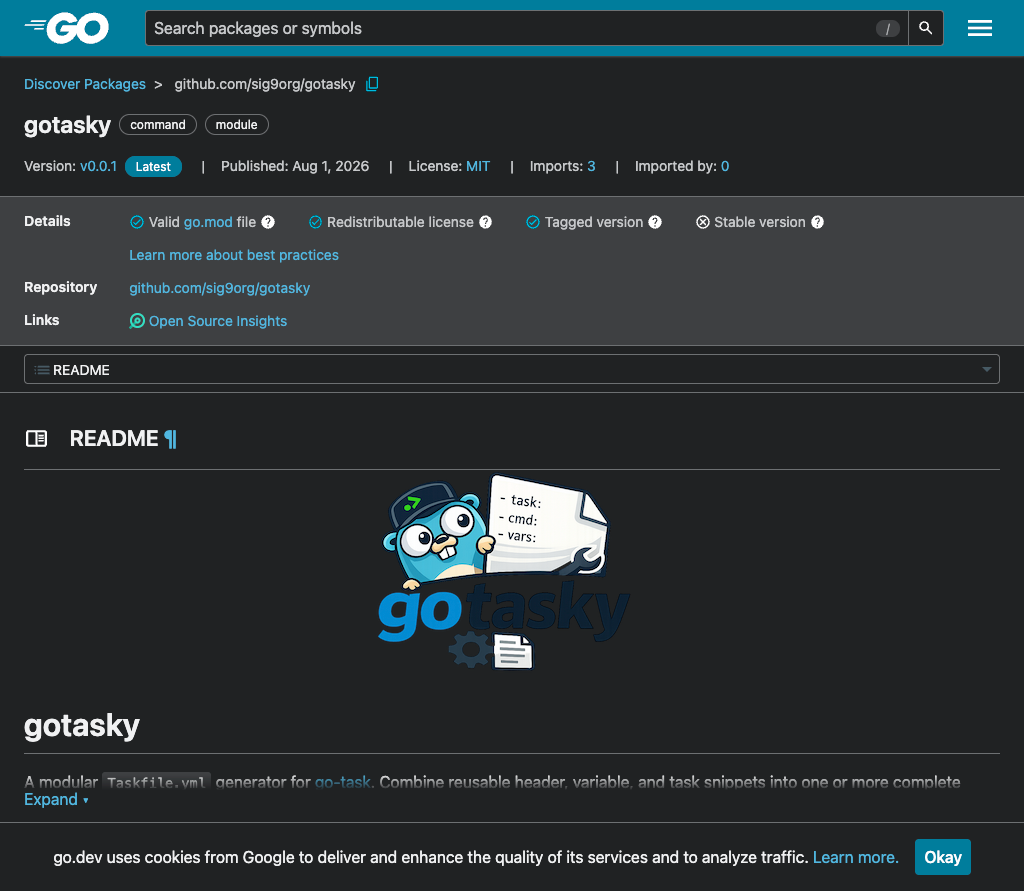
Webブラウザで以下のようなURLへアクセスすれば登録されたページが閲覧できるはずです。

https://pkg.go.dev/github.com/sig9org/gotasky

image