SRX 同士のルートベース VPN 設定
SRX100 同士でルートベース VPN を設定する際のコンフィグをメモしておきます。SRX は両機ともに以下のものを使いました。
構成図
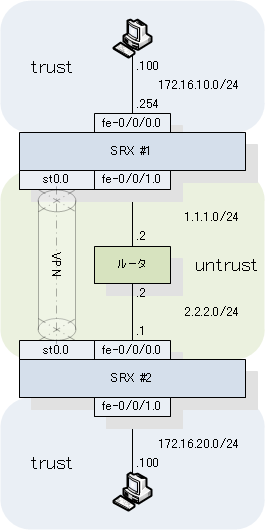
SRX-1 の設定
## Step 0: Base Config

set system host-name SRX-1
delete system services dhcp

delete interfaces vlan unit 0 family inet address 192.168.1.1/24

set interfaces fe-0/0/0 unit 0 family inet address 1.1.1.1/24

delete interfaces fe-0/0/1 unit 0 family ethernet-switching vlan members vlan-trust
delete interfaces fe-0/0/1 unit 0 family ethernet-switching
set interfaces fe-0/0/1 unit 0 family inet address 172.16.10.254/24
set security zones security-zone trust interfaces fe-0/0/1.0

delete interfaces fe-0/0/2 unit 0 family ethernet-switching vlan members vlan-trust
delete interfaces fe-0/0/2 unit 0 family ethernet-switching
set interfaces fe-0/0/2 unit 0 family inet address 192.168.253.101/24
set security zones security-zone trust interfaces fe-0/0/2.0

## Step 1:  Build the secure tunnel interface

set interfaces st0 unit 0 family inet
set security zones security-zone VPN-ZONE interfaces st0.0

## Step 2: Create the route(s) for the remote networks going across the tunnel

set routing-options static route 0.0.0.0/0 next-hop 1.1.1.2
set routing-options static route 172.16.20.0/24 next-hop st0.0

## Step 3: Set up the IKE Proposal

set security ike proposal PHASE-1 authentication-method pre-shared-keys
set security ike proposal PHASE-1 dh-group group2
set security ike proposal PHASE-1 authentication-algorithm sha-256
set security ike proposal PHASE-1 encryption-algorithm aes-256-cbc

## Step 4: Set up IKE Policy and define the remove VPN Gateway

set security ike policy IKE-POLICY mode main
set security ike policy IKE-POLICY proposals PHASE-1
set security ike policy IKE-POLICY pre-shared-key ascii-text PRE-SHARED-KEY
set security ike gateway IKE-GATEWAY address 2.2.2.1
set security ike gateway IKE-GATEWAY external-interface fe-0/0/0.0
set security ike gateway IKE-GATEWAY ike-policy IKE-POLICY

## Step 5:  Set up IPSEC Policy

set security ipsec proposal PHASE-2 protocol esp
set security ipsec proposal PHASE-2 authentication-algorithm hmac-sha-256-128
set security ipsec proposal PHASE-2 encryption-algorithm aes-256-cbc
set security ipsec policy IPSEC-POLICY proposals PHASE-2
set security ipsec policy IPSEC-POLICY perfect-forward-secrecy keys group2

## Step 6: Build the VPN and Join Everything Together

set security ipsec vpn VPN ike gateway IKE-GATEWAY
set security ipsec vpn VPN ike ipsec-policy IPSEC-POLICY
set security ipsec vpn VPN establish-tunnels immediately
set security ipsec vpn VPN bind-interface st0.02

## Step 7: Security Policy

set security zones security-zone trust address-book address LOCAL-NET 172.16.10.0/24
set security zones security-zone VPN-ZONE address-book address REMOTE-NET 172.16.20.0/24

set security policies from-zone trust to-zone VPN-ZONE policy OutboundVPN_Permit match source-address LOCAL-NET
set security policies from-zone trust to-zone VPN-ZONE policy OutboundVPN_Permit match destination-address REMOTE-NET
set security policies from-zone trust to-zone VPN-ZONE policy OutboundVPN_Permit match application any
set security policies from-zone trust to-zone VPN-ZONE policy OutboundVPN_Permit then permit

set security policies from-zone VPN-ZONE to-zone trust policy OutboundVPN_Permit match source-address REMOTE-NET
set security policies from-zone VPN-ZONE to-zone trust policy OutboundVPN_Permit match destination-address LOCAL-NET
set security policies from-zone VPN-ZONE to-zone trust policy OutboundVPN_Permit match application any
set security policies from-zone VPN-ZONE to-zone trust policy OutboundVPN_Permit then permit
SRX-2 の設定
## Step 0: Base Config

set system host-name SRX-2
delete system services dhcp

delete interfaces vlan unit 0 family inet address 192.168.1.1/24

set interfaces fe-0/0/0 unit 0 family inet address 2.2.2.1/24

delete interfaces fe-0/0/1 unit 0 family ethernet-switching vlan members vlan-trust
delete interfaces fe-0/0/1 unit 0 family ethernet-switching
set interfaces fe-0/0/1 unit 0 family inet address 172.16.20.254/24
set security zones security-zone trust interfaces fe-0/0/1.0

delete interfaces fe-0/0/2 unit 0 family ethernet-switching vlan members vlan-trust
delete interfaces fe-0/0/2 unit 0 family ethernet-switching
set interfaces fe-0/0/2 unit 0 family inet address 192.168.253.102/24
set security zones security-zone trust interfaces fe-0/0/2.0

## Step 1:  Build the secure tunnel interface

set interfaces st0 unit 0 family inet
set security zones security-zone VPN-ZONE interfaces st0.0

## Step 2: Create the route(s) for the remote networks going across the tunnel

set routing-options static route 0.0.0.0/0 next-hop 2.2.2.2
set routing-options static route 172.16.10.0/24 next-hop st0.0

## Step 3: Set up the IKE Proposal

set security ike proposal PHASE-1 authentication-method pre-shared-keys
set security ike proposal PHASE-1 dh-group group2
set security ike proposal PHASE-1 authentication-algorithm sha-256
set security ike proposal PHASE-1 encryption-algorithm aes-256-cbc

## Step 4: Set up IKE Policy and define the remove VPN Gateway

set security ike policy IKE-POLICY mode main
set security ike policy IKE-POLICY proposals PHASE-1
set security ike policy IKE-POLICY pre-shared-key ascii-text PRE-SHARED-KEY
set security ike gateway IKE-GATEWAY address 1.1.1.1
set security ike gateway IKE-GATEWAY external-interface fe-0/0/0.0
set security ike gateway IKE-GATEWAY ike-policy IKE-POLICY

## Step 5:  Set up IPSEC Policy

set security ipsec proposal PHASE-2 protocol esp
set security ipsec proposal PHASE-2 authentication-algorithm hmac-sha-256-128
set security ipsec proposal PHASE-2 encryption-algorithm aes-256-cbc
set security ipsec policy IPSEC-POLICY proposals PHASE-2
set security ipsec policy IPSEC-POLICY perfect-forward-secrecy keys group2

## Step 6: Build the VPN and Join Everything Together

set security ipsec vpn VPN ike gateway IKE-GATEWAY
set security ipsec vpn VPN ike ipsec-policy IPSEC-POLICY
set security ipsec vpn VPN establish-tunnels immediately
set security ipsec vpn VPN bind-interface st0.0

## Step 7: Security Policy

set security zones security-zone trust address-book address LOCAL-NET 172.16.20.0/24
set security zones security-zone VPN-ZONE address-book address REMOTE-NET 172.16.10.0/24

set security policies from-zone trust to-zone VPN-ZONE policy OutboundVPN_Permit match source-address LOCAL-NET
set security policies from-zone trust to-zone VPN-ZONE policy OutboundVPN_Permit match destination-address REMOTE-NET
set security policies from-zone trust to-zone VPN-ZONE policy OutboundVPN_Permit match application any
set security policies from-zone trust to-zone VPN-ZONE policy OutboundVPN_Permit then permit

set security policies from-zone VPN-ZONE to-zone trust policy OutboundVPN_Permit match source-address REMOTE-NET
set security policies from-zone VPN-ZONE to-zone trust policy OutboundVPN_Permit match destination-address LOCAL-NET
set security policies from-zone VPN-ZONE to-zone trust policy OutboundVPN_Permit match application any
set security policies from-zone VPN-ZONE to-zone trust policy OutboundVPN_Permit then permit
参考
- ROUTE-BASED IPSEC VPN BETWEEN SRX SERIES OR J SERIES AND SSG SERIES DEVICES - IPsec VPN Interoperability Configurations and Junos OS Troubleshooting Basics
- SRX Getting Started - Configure Chassis Cluster (High Availability) on a SRX100 device
- Troubleshooting a Site to Site VPN on a SRX Series Gateway