DockerHub へイメージを登録する
DockerHub にイメージをアップロードするには GitHub と連携させるのが簡単です。 ですが、Changes to Docker Hub Autobuilds で下記のように書かれている通り、2021 年 6 月 18 日から DockerHub の無料アカウントでは GitHub 連携が出来なくなっています。
As many of you are aware, it has been a difficult period for companies offering free cloud compute [1]. Unfortunately, Docker’s Autobuild service has been targeted by the same bad actors, so today we are disappointed to announce that we will be discontinuing Autobuilds on the free tier starting from June 18, 2021.
DockerHub の 料金プランとサブスクリプション を見ても「無料のパーソナル版は GitHub 連携をサポートしない」と明記されています。
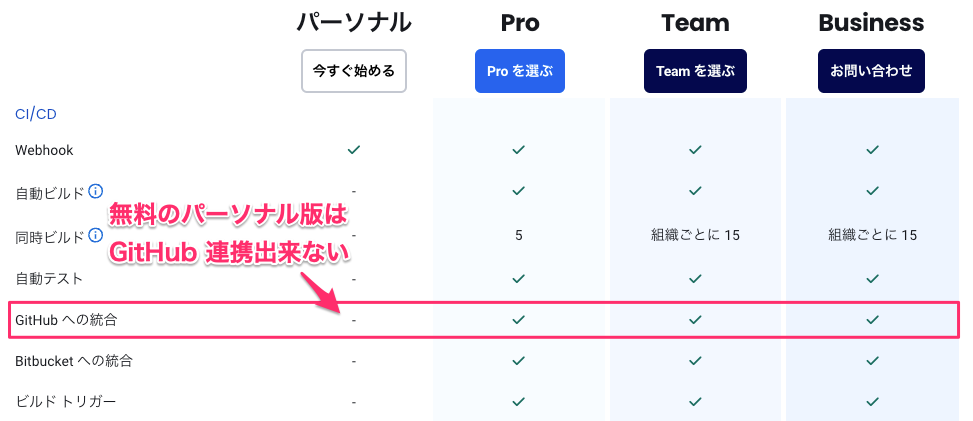
作成したコンテナイメージを手動で DockerHub をアップロードするには以下の手順を実行します。
docker loginで DockerHub へログインするdocker pushでコンテナイメージをアップロードする
DockerHub へログインする
docker login を実行し、DockerHub へログインします。 DockerHub のユーザ名とパスワードを入力します。
$ docker login
Log in with your Docker ID or email address to push and pull images from Docker Hub. If you don't have a Docker ID, head over to https://hub.docker.com/ to create one.
You can log in with your password or a Personal Access Token (PAT). Using a limited-scope PAT grants better security and is required for organizations using SSO. Learn more at https://docs.docker.com/go/access-tokens/

Username: ACCOUNT
Password: PASSWORD
WARNING! Your password will be stored unencrypted in /root/.docker/config.json.
Configure a credential helper to remove this warning. See
https://docs.docker.com/engine/reference/commandline/login/#credentials-store

Login Succeeded
コンテナイメージをアップロードする
docker push でコンテナイメージをアップロードします。 下記は sig9/gitbucket:latest というコンテナをアップロードする例です。