CML 上に Terraform でラボを作成する
Terraform には CML 用の Provider があります。 現時点で最新バージョンは 0.7.0 でした。 今回はごく基本的な利用方法を学ぶ為に以下を参照し、小規模なラボを作成してみました。
検証環境
| 対象 | バージョン |
|---|---|
| CML | 2.6.1 |
| Terraform | 1.7.3 |
.tf ファイル
テスト用に作成した .tf ファイルは以下です。 cml2_lab (Resource) に掲載されているサンプルをそのまま利用しています。
terraform {
  required_providers {
    cml2 = {
      source = "registry.terraform.io/ciscodevnet/cml2"
   version = "~> 0.7.0"
    }
  }
}

provider "cml2" {
  address = "https://10.0.0.1"
  username = "admin"
  password = "password"
  skip_verify = true
}

resource "cml2_lab" "twonode" {
  title       = "two node lab"
  description = "nodes are connected with two links"
  notes       = <<-EOT
  # Heading
  - topic one
  - topic two
  EOT
}

resource "cml2_node" "r1" {
  lab_id         = cml2_lab.twonode.id
  label          = "R1"
  nodedefinition = "alpine"
  ram            = 512
  x              = 200
  y              = 130
  tags           = ["group1"]
}

resource "cml2_node" "r2" {
  lab_id         = cml2_lab.twonode.id
  label          = "R2"
  nodedefinition = "alpine"
  x              = 100
  y              = 130
}

resource "cml2_link" "l0" {
  lab_id = cml2_lab.twonode.id
  node_a = cml2_node.r1.id
  slot_a = 3
  node_b = cml2_node.r2.id
  slot_b = 3
}

resource "cml2_link" "l1" {
  lab_id = cml2_lab.twonode.id
  node_a = cml2_node.r1.id
  slot_a = 2
  node_b = cml2_node.r2.id
  slot_b = 2
}
実行
terraform を実行していきます。
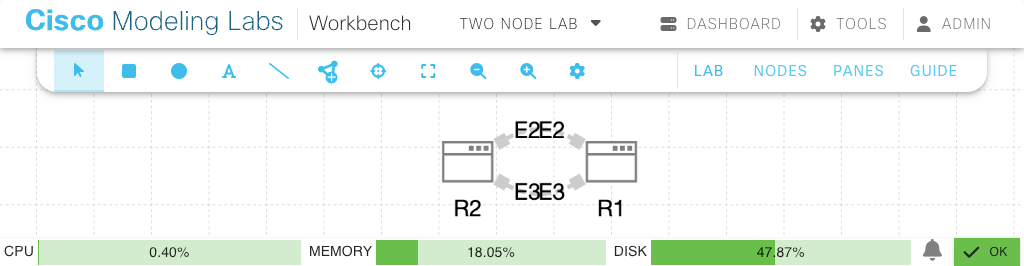
CML 上に作成されたラボ
下記のラボが作成されました。 .tf ファイルで指定している X/Y 座標の通りではあるのですが、「左側が R2」「右側が R1」になっています…