Docker Compose で GitLab / Runner を起動し、CI/CD する
以前に Docker Compose で GitLab を起動する というメモを書きました。 今回は Docker Copmose で gitlab と gitlab-runner を構築する手順をメモしておきます。 Runner は Ubuntu をコンテナとして起動させ、Specific Runner として登録する方針とします。
検証環境
| 対象 | バージョン |
|---|---|
| Ubuntu | 22.04.4LTS |
| Docker Engine - Community | 25.0.3 |
| Docker Compose | 2.24.5 |
| GitLab | gitlab/gitlab-ce:16.10.0-ce.0 |
| GitLab Runner | gitlab/gitlab-runner:ubuntu-v16.10.0 |
Runner の種類
Runner は以下の 3 種類、存在します。 冒頭に記載した通り、今回は Specific Runner を利用します。
| 種類 | 説明 |
|---|---|
| Specific Runner | 特定リポジトリで利用可能 |
| Group Runner | 特定グループで利用可能 |
| Shared Runner | 全リポジトリで利用可能 |
GitLab のアドレスを設計する
以前に ホストと異なる専用 IP アドレスで Docker コンテナを起動する というメモを書きました。 GitLab を公開する場合、以下 2 つのアクセス方法について設計する必要があります。
| アクセス方法 | 用途 |
|---|---|
| Web (HTTP/HTTPS) | git clone 用、GitLab 自体の管理画面アクセス用 |
| SSH | git clone 用 |
GitLab / Runnter を Docker Compose で起動する
まず、作業用のディレクトリを作成します。
作業用ディレクトリ内に、今回は以下の内容で docker-compose.yml ファイルを作成しました。 external_url は実際に GitLab を更改する FQDN に合わせて修正します。 共有メモリである /dev/shm の容量を定義する shm_size も環境に合わせて調整します。
version: '3.7'
services:
  gitlab:
    container_name: 'gitlab'
    image: gitlab/gitlab-ce:16.10.0-ce.0
    restart: always
    hostname: 'gitlab.example.com'
    environment:
      GITLAB_OMNIBUS_CONFIG: |
        external_url 'http://10.0.0.99'
    ports:
      - '10.0.0.99:22:22'
      - '10.0.0.99:80:80'
    volumes:
      - './gitlab-config-gitlab:/etc/gitlab'
      - './gitlab-data:/var/opt/gitlab'
      - './gitlab-logs:/var/log/gitlab'
    shm_size: '256m'
    networks:
      - gitlab-network
  runner:
    container_name: 'gitlab-ci'
    image: gitlab/gitlab-runner:ubuntu-v16.10.0
    restart: always
    volumes:
      - '/var/run/docker.sock:/var/run/docker.sock'
      - './gitlab-config-runner:/etc/gitlab-runner'
    networks:
      - gitlab-network
volumes:
  gitlab-config-gitlab:
  gitlab-config-runner:
  gitlab-data:
  gitlab-logs:
networks:
  gitlab-network:
    name: gitlab-network
ここまでの準備が完了したら Docker Compose で起動します。
ブラウザで http://ADDRESS にアクセスしたらログインフォームが表示されます。 上記の設定例であれば http://10.0.0.99 へアクセスします。

初期ユーザ名は root です。 パスワードはコンテナ作成時にランダムなものが発行されている為、以下何れかのコマンドで確認します。 どのコマンドでも得られる結果は同じです。
docker compose exec gitlab grep 'Password:' /etc/gitlab/initial_root_passworddocker exec -it gitlab grep 'Password:' /etc/gitlab/initial_root_passwordcat config-app/initial_root_password
実際の実行例は以下です。
# docker compose exec gitlab grep 'Password:' /etc/gitlab/initial_root_password
Password: ABCDEFGHIJABCDEFGHIJABCDEFGHIJABCDEFGHIJABC=
ユーザ名は root、パスワードは上記コマンドで表示されたものを入力してログインします。

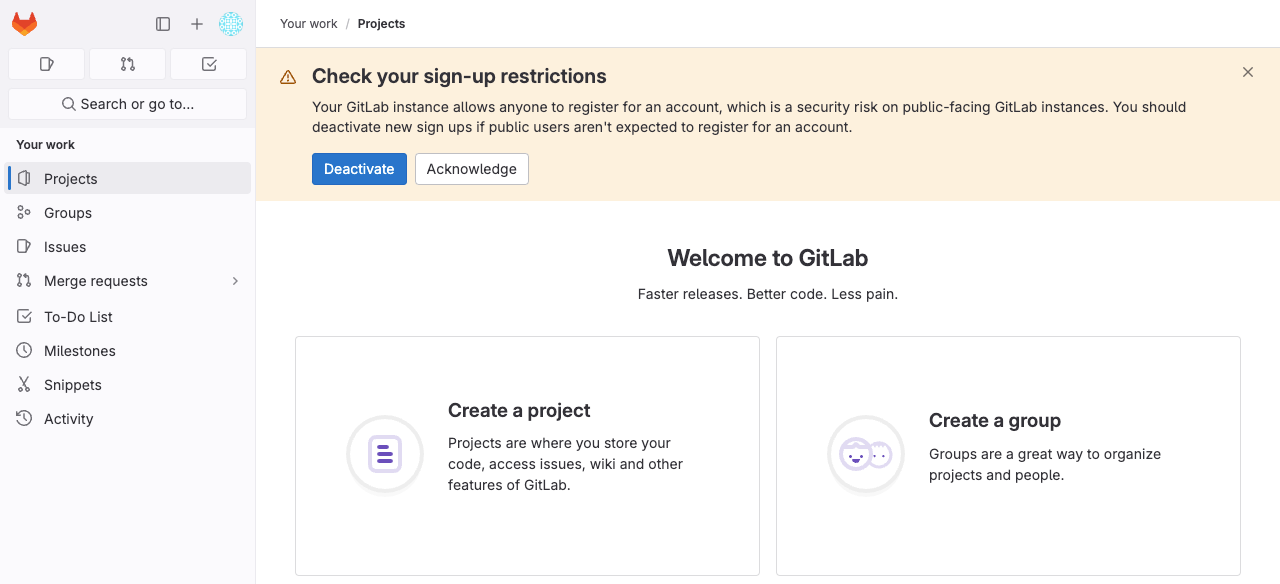
ログイン出来ると以下のような画面が表示されます。
プロジェクトを新規作成する
今回は Specific Runner を利用しますので、まず Runner を紐づけるプロジェクトを新規作成します。
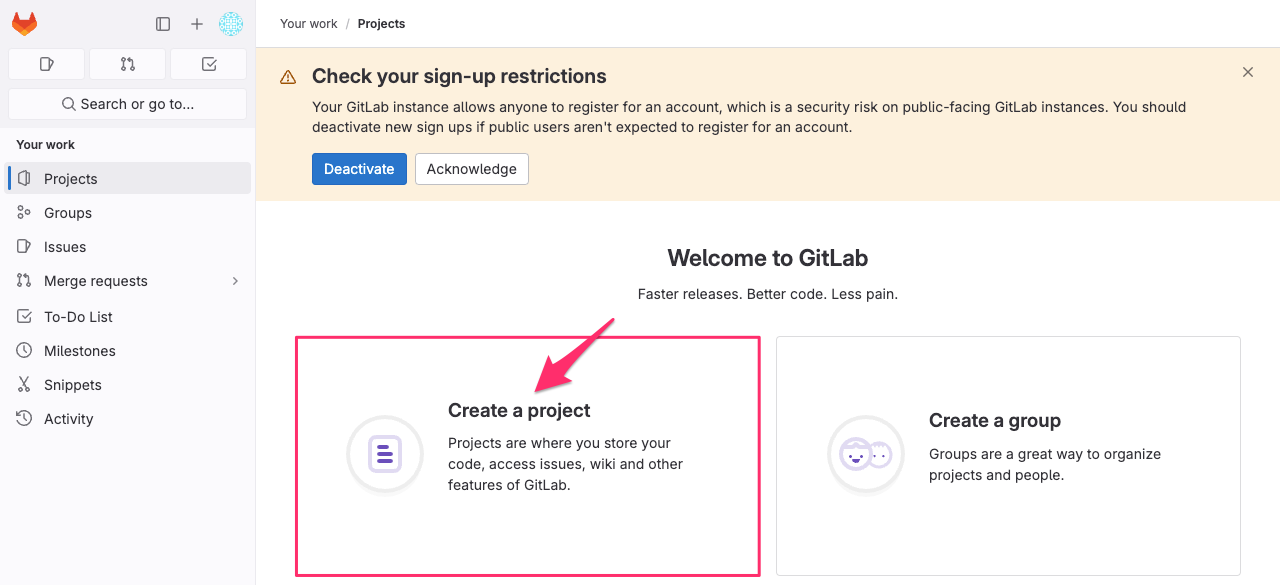
Step.1
Create a project をクリックします。
Step.2
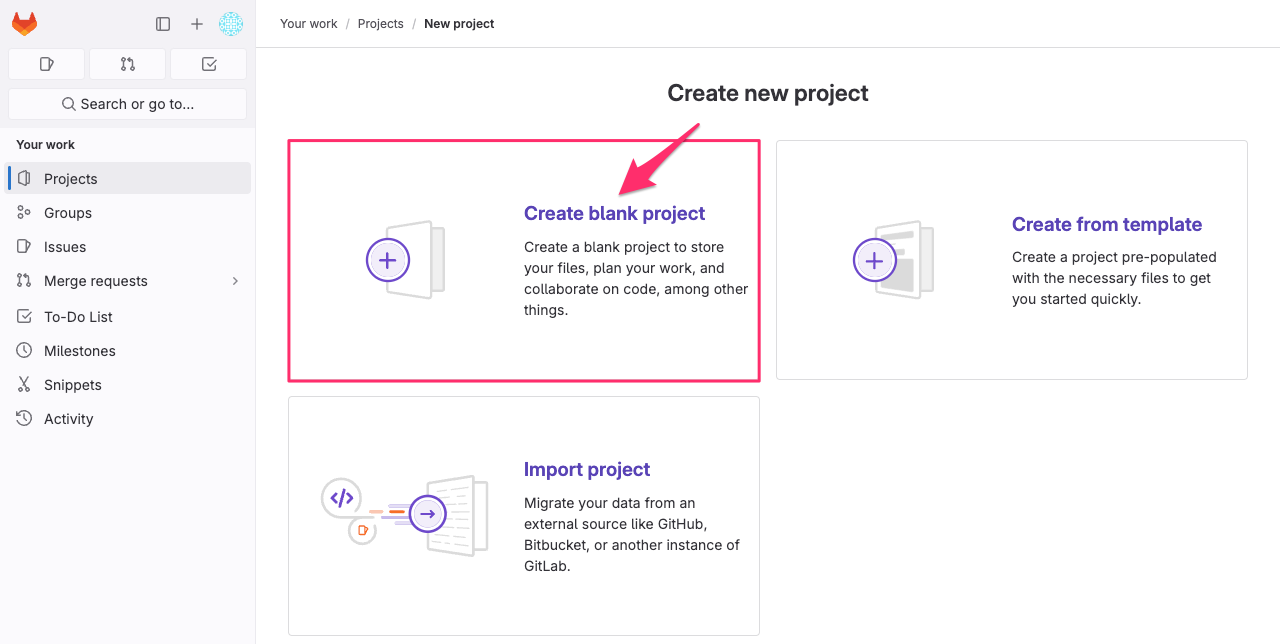
プロジェクトの作り方を選択します。 今回は何も無い状態からプロジェクトを作成しますので Create blank project をクリックします。
Step.3
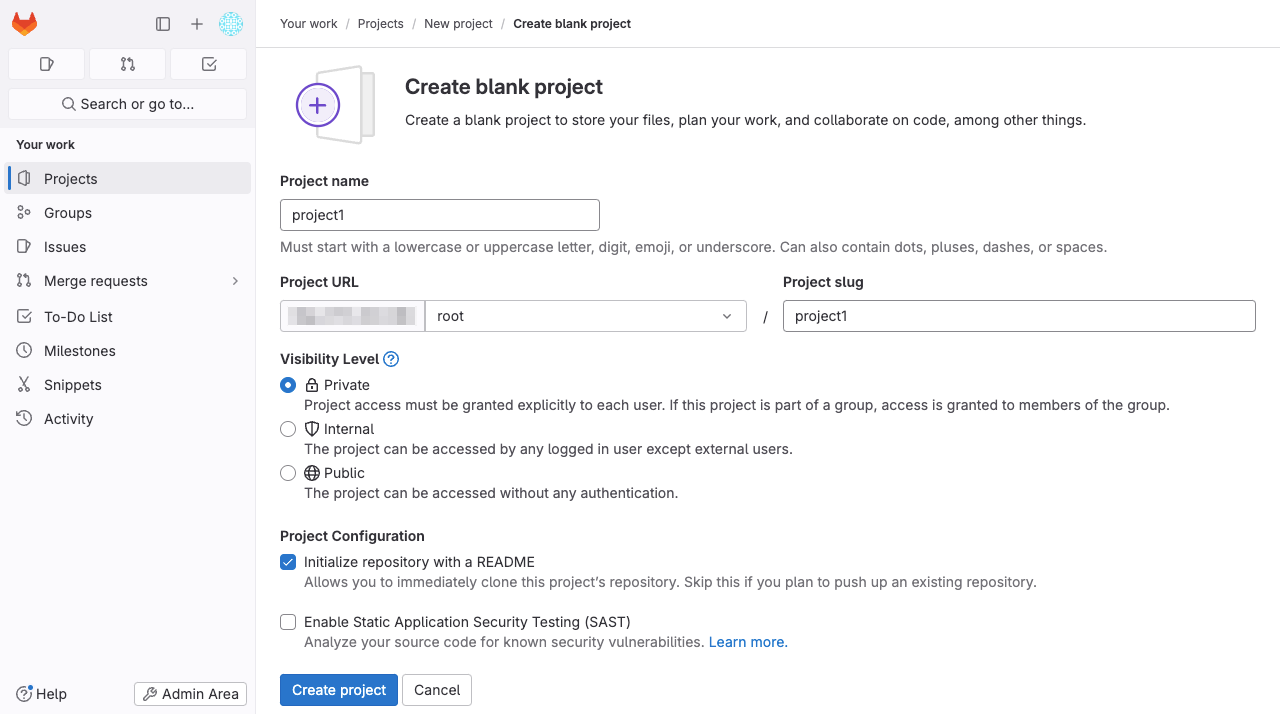
以下のような画面が表示されます。
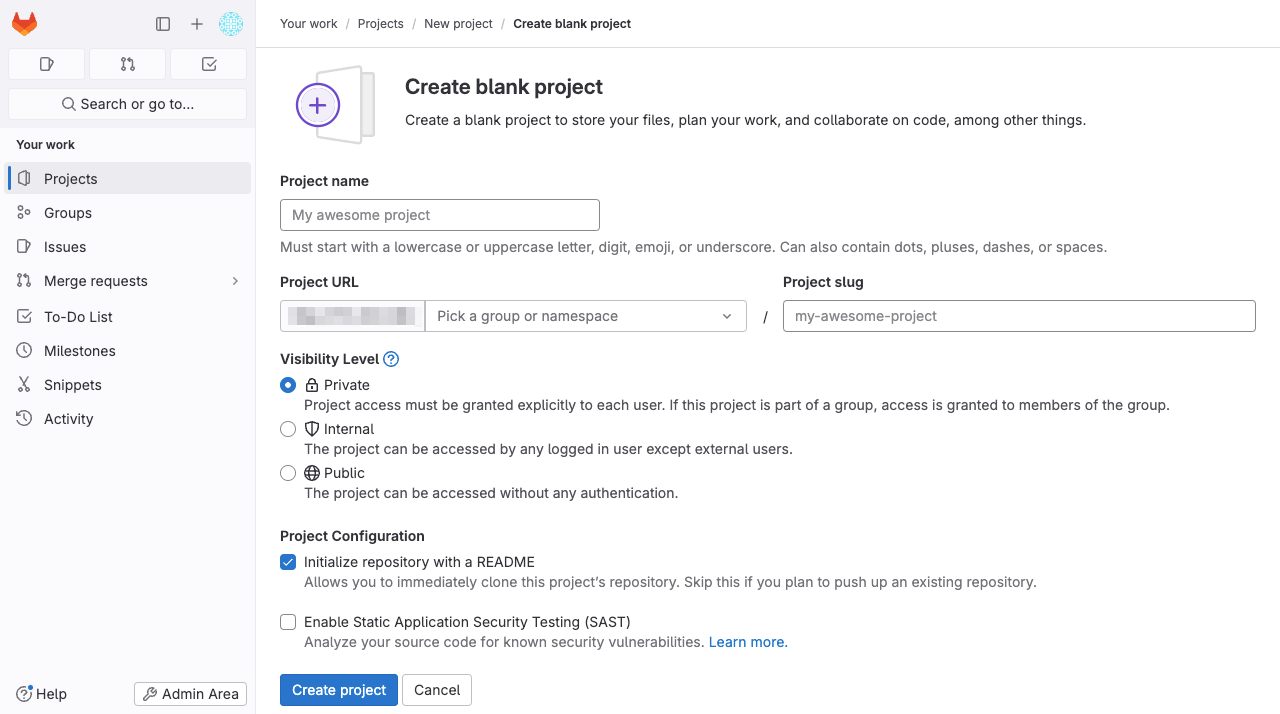
最低限、Project name や Project URL、Projdct slug を入力して Create project をクリックします。
Step.4
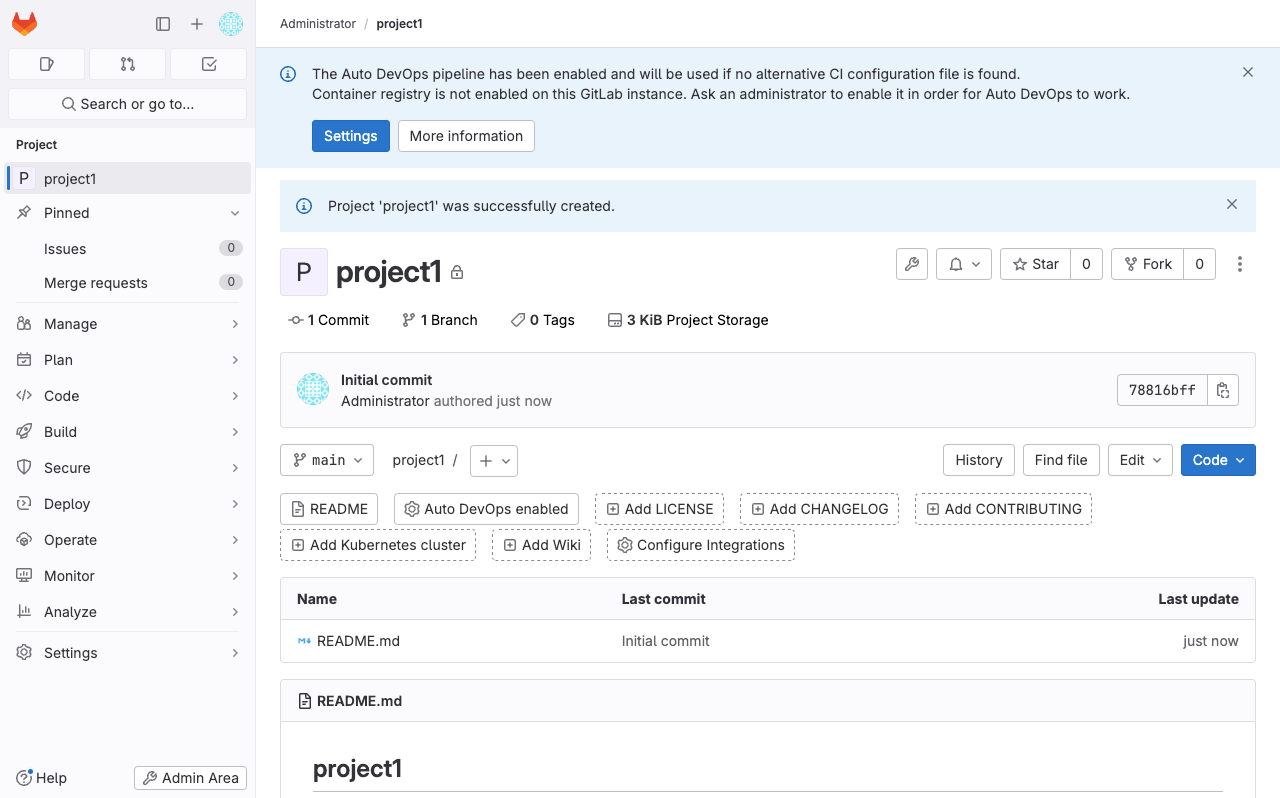
プロジェクトが新規作成されました。
Runner を登録する
作成したプロジェクトに Specific Runner を登録します。
Step.1
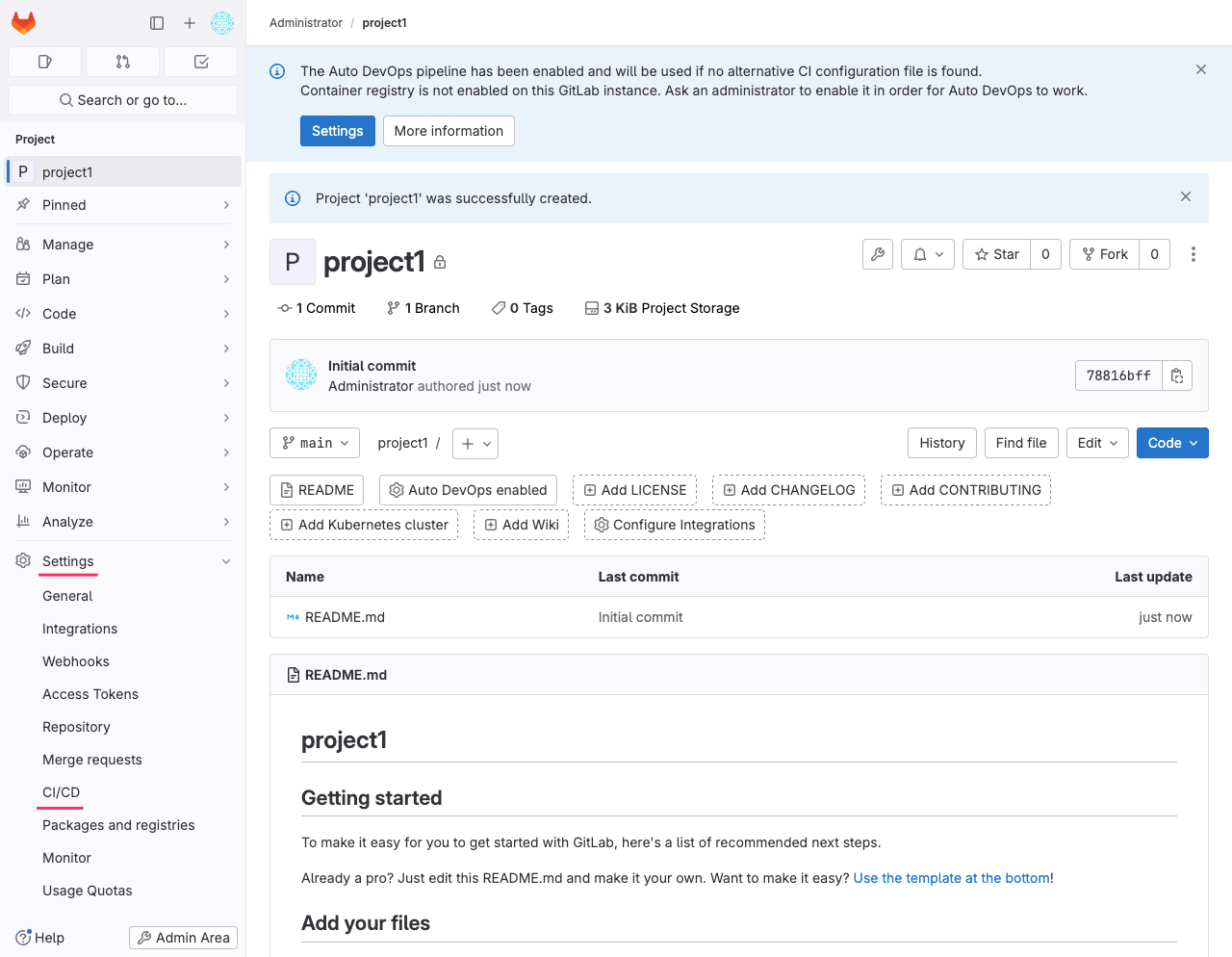
プロジェクトが選択された状態で左側のナビゲーションメニューから Settings → CI/CD をクリックします。
Step.2
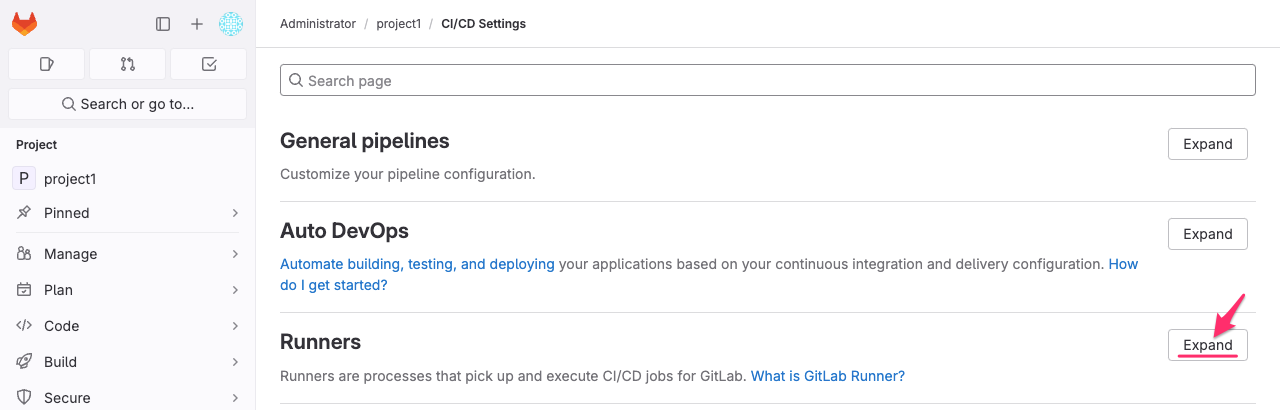
Runners → Expand をクリックします。
Step.3
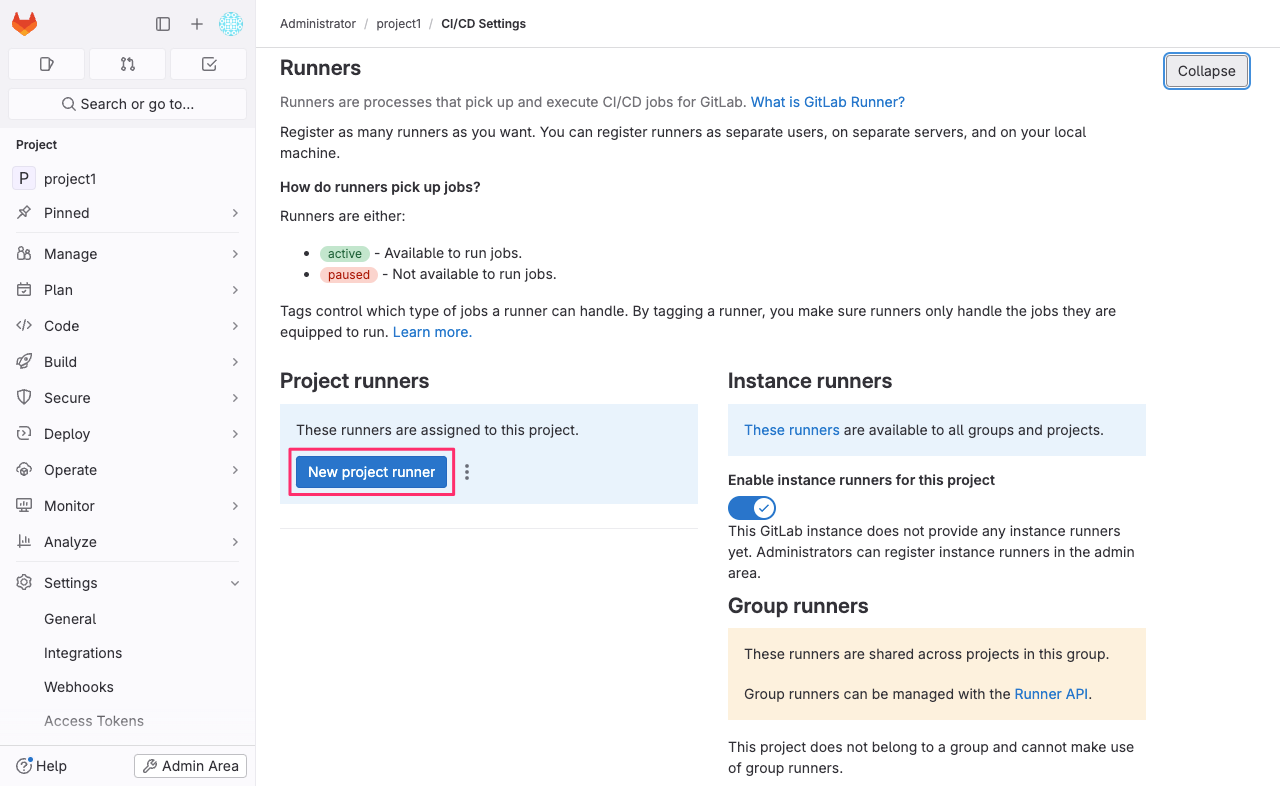
New project runner をクリックします。
Step.4
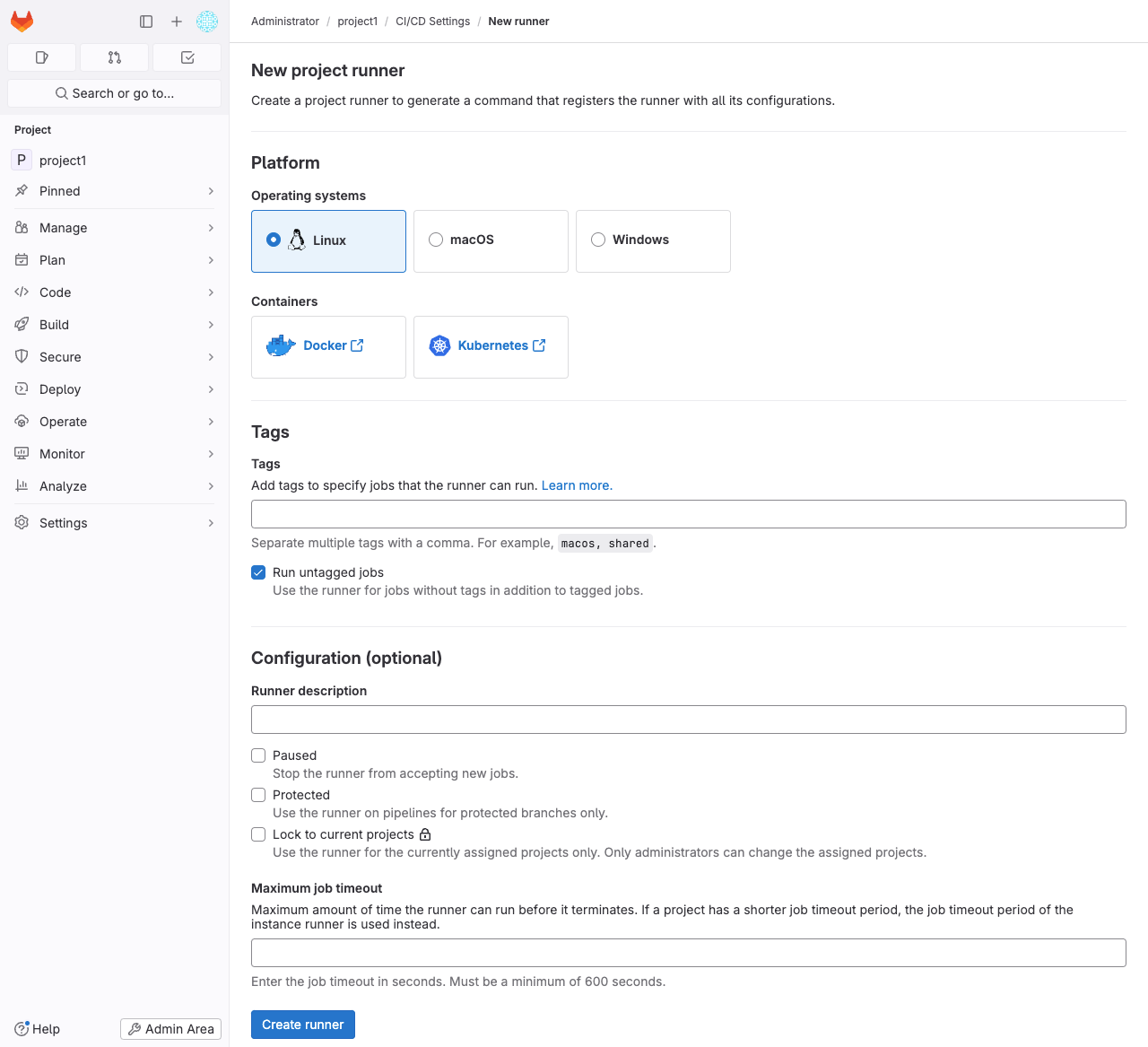
必要なパラメータを入力します。 特定タグが付いた Commit があった場合に CI/CD Action させるのであれば Tags を設定します。 今回は Run untagged jobs にチェックだけ入れたら Create runner をクリックして次へ進みます。
Step.5
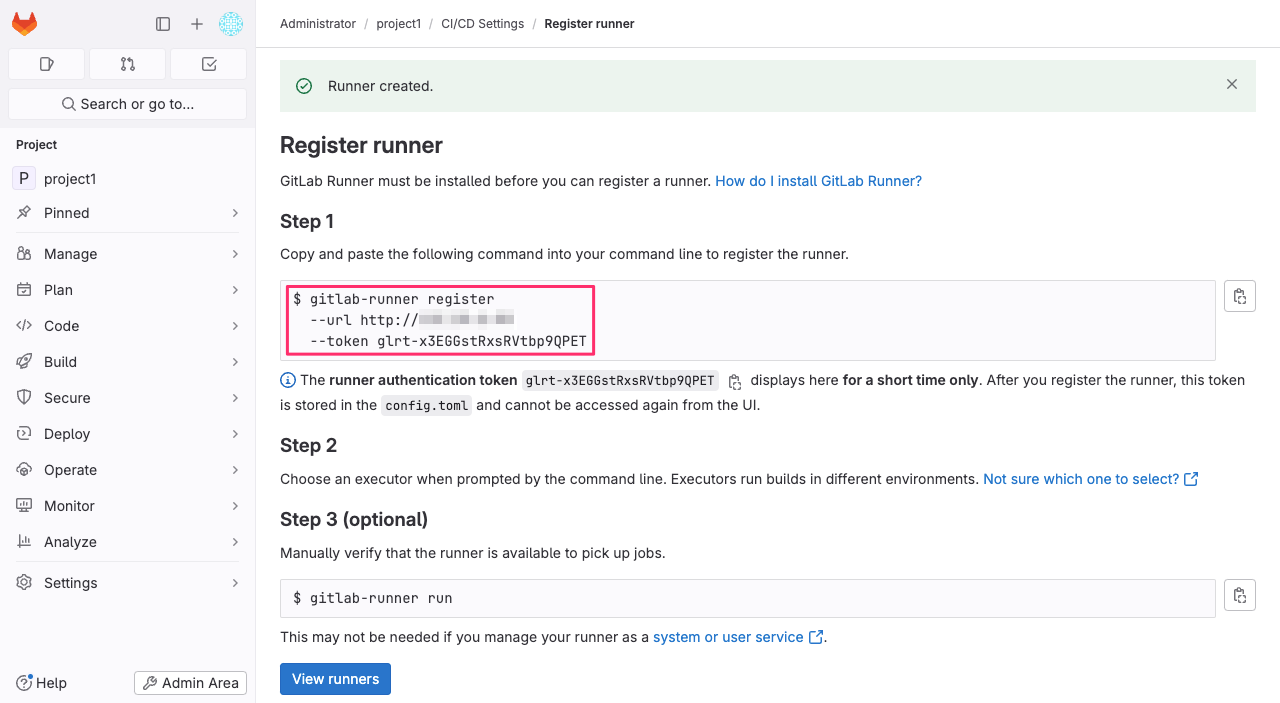
Runner を登録する為の Token が発行され、登録コマンド (gitlab-runner register) の実行例が表示されます。
Step.6
ひとつ前のステップで表示されたコマンドを Runner 用のコンテナに対して実行します。 token の値はひとつ前のステップで表示されたものに置き換えます。
docker compose exec runner gitlab-runner register --non-interactive --url http://ADDRESS --token glrt-XXXXXXXXXXXXXXXXXXXX --executor shell
Step.6
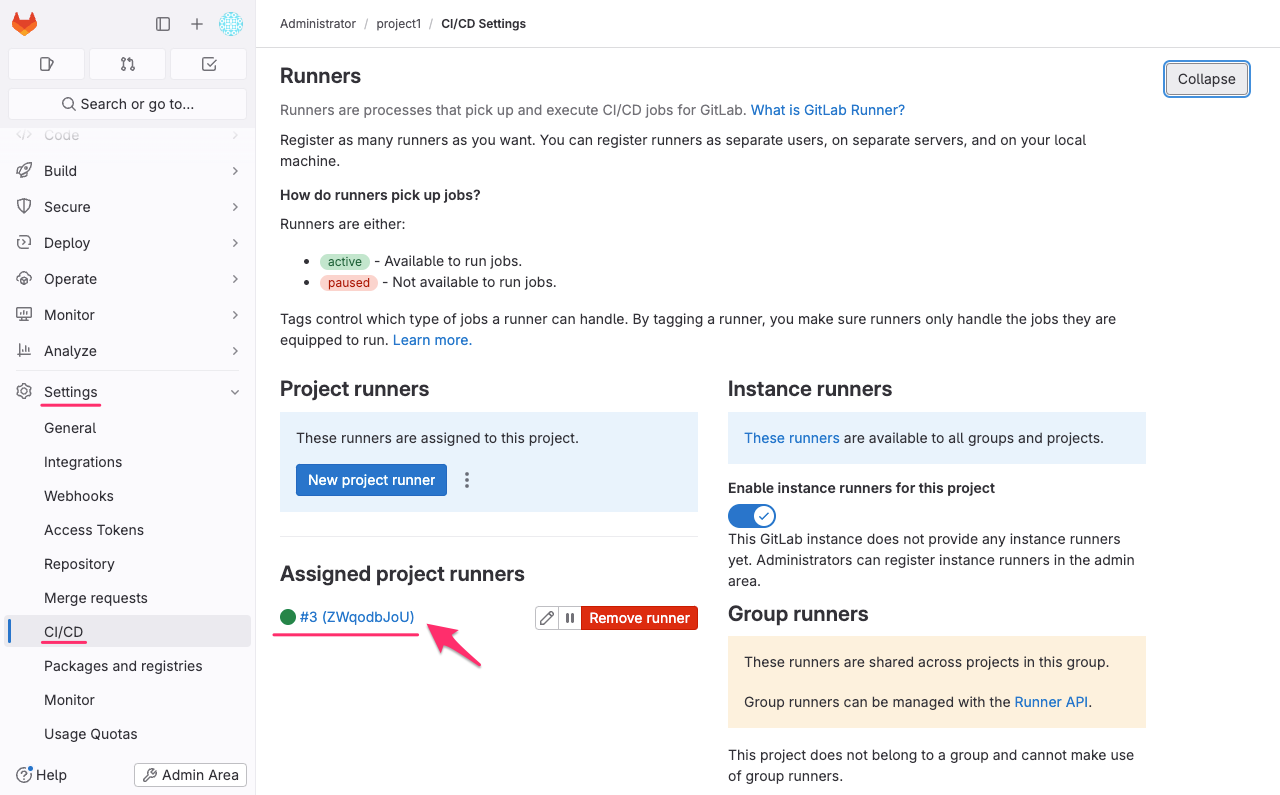
これで Runner が登録されました。
参考
gitlab-runner コマンドのヘルプ
# gitlab-runner --help
NAME:
   gitlab-runner - a GitLab Runner

USAGE:
   gitlab-runner [global options] command [command options] [arguments...]

VERSION:
   16.10.0 (81ab07f6)

AUTHOR:
   GitLab Inc. <support@gitlab.com>

COMMANDS:
   exec                  execute a build locally
   list                  List all configured runners
   run                   run multi runner service
   register              register a new runner
   reset-token           reset a runner's token
   install               install service
   uninstall             uninstall service
   start                 start service
   stop                  stop service
   restart               restart service
   status                get status of a service
   run-single            start single runner
   unregister            unregister specific runner
   verify                verify all registered runners
   artifacts-downloader  download and extract build artifacts (internal)
   artifacts-uploader    create and upload build artifacts (internal)
   cache-archiver        create and upload cache artifacts (internal)
   cache-extractor       download and extract cache artifacts (internal)
   cache-init            changed permissions for cache paths (internal)
   health-check          check health for a specific address
   read-logs             reads job logs from a file, used by kubernetes executor (internal)
   help, h               Shows a list of commands or help for one command

GLOBAL OPTIONS:
   --cpuprofile value           write cpu profile to file [$CPU_PROFILE]
   --debug                      debug mode [$RUNNER_DEBUG]
   --log-format value           Choose log format (options: runner, text, json) [$LOG_FORMAT]
   --log-level value, -l value  Log level (options: debug, info, warn, error, fatal, panic) [$LOG_LEVEL]
   --help, -h                   show help
   --version, -v                print the version
gitlab-runner register コマンドのヘルプ
# gitlab-runner register --help
Runtime platform arch=amd64 os=linux pid=53 revision=81ab07f6 version=16.10.0
NAME:
gitlab-runner register - register a new runner
USAGE:
gitlab-runner register [command options] [arguments...]
OPTIONS:
-c value, --config value Config file (default: "/etc/gitlab-runner/config.toml") [$CONFIG_FILE]
--template-config value Path to the configuration template file [$TEMPLATE_CONFIG_FILE]
--tag-list value Tag list [$RUNNER_TAG_LIST]
-n, --non-interactive Run registration unattended [$REGISTER_NON_INTERACTIVE]
--leave-runner Don't remove runner if registration fails [$REGISTER_LEAVE_RUNNER]
-r value, --registration-token value Runner's registration token [$REGISTRATION_TOKEN]
--run-untagged Register to run untagged builds; defaults to 'true' when 'tag-list' is empty [$REGISTER_RUN_UNTAGGED]
--locked Lock Runner for current project, defaults to 'true' [$REGISTER_LOCKED]
--access-level value Set access_level of the runner to not_protected or ref_protected; defaults to not_protected [$REGISTER_ACCESS_LEVEL]
--maximum-timeout value What is the maximum timeout (in seconds) that will be set for job when using this Runner (default: "0") [$REGISTER_MAXIMUM_TIMEOUT]
--paused Set Runner to be paused, defaults to 'false' [$REGISTER_PAUSED]
--maintenance-note value Runner's maintenance note [$REGISTER_MAINTENANCE_NOTE]
--name value, --description value Runner name (default: "c0c7323369aa") [$RUNNER_NAME]
--limit value Maximum number of builds processed by this runner (default: "0") [$RUNNER_LIMIT]
--output-limit value Maximum build trace size in kilobytes (default: "0") [$RUNNER_OUTPUT_LIMIT]
--request-concurrency value Maximum concurrency for job requests (default: "0") [$RUNNER_REQUEST_CONCURRENCY]
--unhealthy-requests-limit value The number of 'unhealthy' responses to new job requests after which a runner worker will be disabled (default: "0") [$RUNNER_UNHEALTHY_REQUESTS_LIMIT]
--unhealthy-interval value Duration for which a runner worker is disabled after exceeding the unhealthy requests limit. Supports syntax like '3600s', '1h30min' etc
-u value, --url value GitLab instance URL [$CI_SERVER_URL]
-t value, --token value Runner token [$CI_SERVER_TOKEN]
--tls-ca-file value File containing the certificates to verify the peer when using HTTPS [$CI_SERVER_TLS_CA_FILE]
--tls-cert-file value File containing certificate for TLS client auth when using HTTPS [$CI_SERVER_TLS_CERT_FILE]
--tls-key-file value File containing private key for TLS client auth when using HTTPS [$CI_SERVER_TLS_KEY_FILE]
--executor value Select executor, eg. shell, docker, etc. [$RUNNER_EXECUTOR]
--builds-dir value Directory where builds are stored [$RUNNER_BUILDS_DIR]
--cache-dir value Directory where build cache is stored [$RUNNER_CACHE_DIR]
--clone-url value Overwrite the default URL used to clone or fetch the git ref [$CLONE_URL]
--env value Custom environment variables injected to build environment [$RUNNER_ENV]
--pre-clone-script value [DEPRECATED] Use pre_get_sources_script instead [$RUNNER_PRE_CLONE_SCRIPT]
--post-clone-script value [DEPRECATED] Use post_get_sources_script instead [$RUNNER_POST_CLONE_SCRIPT]
--pre-get-sources-script value Runner-specific commands to be executed on the runner before updating the Git repository an updating submodules. [$RUNNER_PRE_GET_SOURCES_SCRIPT]
--post-get-sources-script value Runner-specific commands to be executed on the runner after updating the Git repository and updating submodules. [$RUNNER_POST_GET_SOURCES_SCRIPT]
--pre-build-script value Runner-specific command script executed just before build executes [$RUNNER_PRE_BUILD_SCRIPT]
--post-build-script value Runner-specific command script executed just after build executes [$RUNNER_POST_BUILD_SCRIPT]
--debug-trace-disabled When set to true Runner will disable the possibility of using the CI_DEBUG_TRACE feature [$RUNNER_DEBUG_TRACE_DISABLED]
--safe-directory-checkout value When set to true, Git global configuration will get a safe.directory directive pointing the job's working directory' [$RUNNER_SAFE_DIRECTORY_CHECKOUT]
--shell value Select bash, sh, cmd, pwsh or powershell [$RUNNER_SHELL]
--custom_build_dir-enabled Enable job specific build directories [$CUSTOM_BUILD_DIR_ENABLED]
--cache-type value Select caching method [$CACHE_TYPE]
--cache-path value Name of the path to prepend to the cache URL [$CACHE_PATH]
--cache-shared Enable cache sharing between runners. [$CACHE_SHARED]
--cache-max_uploaded_archive_size value Limit the size of the cache archive being uploaded to cloud storage, in bytes. (default: "0") [$CACHE_MAXIMUM_UPLOADED_ARCHIVE_SIZE]
--cache-s3-server-address value A host:port to the used S3-compatible server [$CACHE_S3_SERVER_ADDRESS]
--cache-s3-access-key value S3 Access Key [$CACHE_S3_ACCESS_KEY]
--cache-s3-secret-key value S3 Secret Key [$CACHE_S3_SECRET_KEY]
--cache-s3-session-token value S3 Session Token [$CACHE_S3_SESSION_TOKEN]
--cache-s3-bucket-name value Name of the bucket where cache will be stored [$CACHE_S3_BUCKET_NAME]
--cache-s3-bucket-location value Name of S3 region [$CACHE_S3_BUCKET_LOCATION]
--cache-s3-insecure Use insecure mode (without https) [$CACHE_S3_INSECURE]
--cache-s3-authentication_type value IAM or credentials [$CACHE_S3_AUTHENTICATION_TYPE]
--cache-s3-server-side-encryption value Server side encryption type (S3, or KMS) [$CACHE_S3_SERVER_SIDE_ENCRYPTION]
--cache-s3-server-side-encryption-key-id value Server side encryption key ID (alias or Key ID) [$CACHE_S3_SERVER_SIDE_ENCRYPTION_KEY_ID]
--cache-gcs-access-id value ID of GCP Service Account used to access the storage [$CACHE_GCS_ACCESS_ID]
--cache-gcs-private-key value Private key used to sign GCS requests [$CACHE_GCS_PRIVATE_KEY]
--cache-gcs-credentials-file value File with GCP credentials, containing AccessID and PrivateKey [$GOOGLE_APPLICATION_CREDENTIALS]
--cache-gcs-bucket-name value Name of the bucket where cache will be stored [$CACHE_GCS_BUCKET_NAME]
--cache-azure-account-name value Account name for Azure Blob Storage [$CACHE_AZURE_ACCOUNT_NAME]
--cache-azure-account-key value Access key for Azure Blob Storage [$CACHE_AZURE_ACCOUNT_KEY]
--cache-azure-container-name value Name of the Azure container where cache will be stored [$CACHE_AZURE_CONTAINER_NAME]
--cache-azure-storage-domain value Domain name of the Azure storage (e.g. blob.core.windows.net) [$CACHE_AZURE_STORAGE_DOMAIN]
--feature-flags value Enable/Disable feature flags https://docs.gitlab.com/runner/configuration/feature-flags.html (default: "{}") [$FEATURE_FLAGS]
--ssh-user value User name [$SSH_USER]
--ssh-password value User password [$SSH_PASSWORD]
--ssh-host value Remote host [$SSH_HOST]
--ssh-port value Remote host port [$SSH_PORT]
--ssh-identity-file value Identity file to be used [$SSH_IDENTITY_FILE]
--ssh-disable-strict-host-key-checking value Disable SSH strict host key checking [$DISABLE_STRICT_HOST_KEY_CHECKING]
--ssh-known-hosts-file value Location of known_hosts file. Defaults to ~/.ssh/known_hosts [$KNOWN_HOSTS_FILE]
--docker-host value Docker daemon address [$DOCKER_HOST]
--docker-cert-path value Certificate path [$DOCKER_CERT_PATH]
--docker-tlsverify Use TLS and verify the remote [$DOCKER_TLS_VERIFY]
--docker-hostname value Custom container hostname [$DOCKER_HOSTNAME]
--docker-image value Docker image to be used [$DOCKER_IMAGE]
--docker-runtime value Docker runtime to be used [$DOCKER_RUNTIME]
--docker-memory value Memory limit (format: <number>[<unit>]). Unit can be one of b, k, m, or g. Minimum is 4M. [$DOCKER_MEMORY]
--docker-memory-swap value Total memory limit (memory + swap, format: <number>[<unit>]). Unit can be one of b, k, m, or g. [$DOCKER_MEMORY_SWAP]
--docker-memory-reservation value Memory soft limit (format: <number>[<unit>]). Unit can be one of b, k, m, or g. [$DOCKER_MEMORY_RESERVATION]
--docker-cgroup-parent value String value containing the cgroup parent to use [$DOCKER_CGROUP_PARENT]
--docker-cpuset-cpus value String value containing the cgroups CpusetCpus to use [$DOCKER_CPUSET_CPUS]
--docker-cpus value Number of CPUs [$DOCKER_CPUS]
--docker-cpu-shares value Number of CPU shares (default: "0") [$DOCKER_CPU_SHARES]
--docker-dns value A list of DNS servers for the container to use [$DOCKER_DNS]
--docker-dns-search value A list of DNS search domains [$DOCKER_DNS_SEARCH]
--docker-privileged Give extended privileges to container [$DOCKER_PRIVILEGED]
--docker-services_privileged value When set this will give or remove extended privileges to container services [$DOCKER_SERVICES_PRIVILEGED]
--docker-disable-entrypoint-overwrite Disable the possibility for a container to overwrite the default image entrypoint [$DOCKER_DISABLE_ENTRYPOINT_OVERWRITE]
--docker-user value Run all commands in the container as the specified user. [$DOCKER_USER]
--docker-allowed_users value List of allowed users under which to run commands in the build container. [$DOCKER_ALLOWED_USERS]
--docker-group-add value Add additional groups to join [$DOCKER_GROUP_ADD]
--docker-userns value User namespace to use [$DOCKER_USERNS_MODE]
--docker-cap-add value Add Linux capabilities [$DOCKER_CAP_ADD]
--docker-cap-drop value Drop Linux capabilities [$DOCKER_CAP_DROP]
--docker-oom-kill-disable Do not kill processes in a container if an out-of-memory (OOM) error occurs [$DOCKER_OOM_KILL_DISABLE]
--docker-oom-score-adjust value Adjust OOM score (default: "0") [$DOCKER_OOM_SCORE_ADJUST]
--docker-security-opt value Security Options [$DOCKER_SECURITY_OPT]
--docker-services-security-opt value Security Options for container services [$DOCKER_SERVICES_SECURITY_OPT]
--docker-devices value Add a host device to the container [$DOCKER_DEVICES]
--docker-device-cgroup-rules value Add a device cgroup rule to the container [$DOCKER_DEVICE_CGROUP_RULES]
--docker-gpus value Request GPUs to be used by Docker [$DOCKER_GPUS]
--docker-disable-cache Disable all container caching [$DOCKER_DISABLE_CACHE]
--docker-volumes value Bind-mount a volume and create it if it doesn't exist prior to mounting. Can be specified multiple times once per mountpoint, e.g. --docker-volumes 'test0:/test0' --docker-volumes 'test1:/test1' [$DOCKER_VOLUMES]
--docker-volume-driver value Volume driver to be used [$DOCKER_VOLUME_DRIVER]
--docker-volume-driver-ops value A toml table/json object with the format key=values. Volume driver ops to be specified (default: "{}") [$DOCKER_VOLUME_DRIVER_OPS]
--docker-cache-dir value Directory where to store caches [$DOCKER_CACHE_DIR]
--docker-extra-hosts value Add a custom host-to-IP mapping [$DOCKER_EXTRA_HOSTS]
--docker-volumes-from value A list of volumes to inherit from another container [$DOCKER_VOLUMES_FROM]
--docker-network-mode value Add container to a custom network [$DOCKER_NETWORK_MODE]
--docker-ipcmode value Select IPC mode for container [$DOCKER_IPC_MODE]
--docker-mac-address value Container MAC address (e.g., 92:d0:c6:0a:29:33) [$DOCKER_MAC_ADDRESS]
--docker-links value Add link to another container [$DOCKER_LINKS]
--docker-services-limit value The maximum amount of services allowed [$DOCKER_SERVICES_LIMIT]
--docker-service-memory value Service memory limit (format: <number>[<unit>]). Unit can be one of b (if omitted), k, m, or g. Minimum is 4M. [$DOCKER_SERVICE_MEMORY]
--docker-service-memory-swap value Service total memory limit (memory + swap, format: <number>[<unit>]). Unit can be one of b (if omitted), k, m, or g. [$DOCKER_SERVICE_MEMORY_SWAP]
--docker-service-memory-reservation value Service memory soft limit (format: <number>[<unit>]). Unit can be one of b (if omitted), k, m, or g. [$DOCKER_SERVICE_MEMORY_RESERVATION]
--docker-service-cgroup-parent value String value containing the cgroup parent to use for service [$DOCKER_SERVICE_CGROUP_PARENT]
--docker-service-cpuset-cpus value String value containing the cgroups CpusetCpus to use for service [$DOCKER_SERVICE_CPUSET_CPUS]
--docker-service-cpus value Number of CPUs for service [$DOCKER_SERVICE_CPUS]
--docker-service-cpu-shares value Number of CPU shares for service (default: "0") [$DOCKER_SERVICE_CPU_SHARES]
--docker-wait-for-services-timeout value How long to wait for service startup (default: "0") [$DOCKER_WAIT_FOR_SERVICES_TIMEOUT]
--docker-allowed-images value Image allowlist [$DOCKER_ALLOWED_IMAGES]
--docker-allowed-privileged-images value Privileged image allowlist [$DOCKER_ALLOWED_PRIVILEGED_IMAGES]
--docker-allowed-privileged-services value Privileged Service allowlist [$DOCKER_ALLOWED_PRIVILEGED_SERVICES]
--docker-allowed-pull-policies value Pull policy allowlist [$DOCKER_ALLOWED_PULL_POLICIES]
--docker-allowed-services value Service allowlist [$DOCKER_ALLOWED_SERVICES]
--docker-pull-policy value Image pull policy: never, if-not-present, always [$DOCKER_PULL_POLICY]
--docker-isolation value Container isolation technology. Windows only [$DOCKER_ISOLATION]
--docker-shm-size value Shared memory size for docker images (in bytes) (default: "0") [$DOCKER_SHM_SIZE]
--docker-tmpfs value A toml table/json object with the format key=values. When set this will mount the specified path in the key as a tmpfs volume in the main container, using the options specified as key. For the supported options, see the documentation for the unix 'mount' command (default: "{}") [$DOCKER_TMPFS]
--docker-services-tmpfs value A toml table/json object with the format key=values. When set this will mount the specified path in the key as a tmpfs volume in all the service containers, using the options specified as key. For the supported options, see the documentation for the unix 'mount' command (default: "{}") [$DOCKER_SERVICES_TMPFS]
--docker-sysctls value Sysctl options, a toml table/json object of key=value. Value is expected to be a string. (default: "{}") [$DOCKER_SYSCTLS]
--docker-helper-image value [ADVANCED] Override the default helper image used to clone repos and upload artifacts [$DOCKER_HELPER_IMAGE]
--docker-helper-image-flavor value Set helper image flavor (alpine, ubuntu), defaults to alpine [$DOCKER_HELPER_IMAGE_FLAVOR]
--docker-container-labels value A toml table/json object of key-value. Value is expected to be a string. When set, this will create containers with the given container labels. Environment variables will be substituted for values here. (default: "{}")
--docker-enable-ipv6 Enable IPv6 for automatically created networks. This is only takes affect when the feature flag FF_NETWORK_PER_BUILD is enabled.
--docker-ulimit value Ulimit options for container (default: "{}") [$DOCKER_ULIMIT]
--docker-network-mtu value MTU of the Docker network created for the job IFF the FF_NETWORK_PER_BUILD feature-flag was specified. (default: "0")
--parallels-base-name value VM name to be used [$PARALLELS_BASE_NAME]
--parallels-template-name value VM template to be created [$PARALLELS_TEMPLATE_NAME]
--parallels-disable-snapshots Disable snapshoting to speedup VM creation [$PARALLELS_DISABLE_SNAPSHOTS]
--parallels-time-server value Timeserver to sync the guests time from. Defaults to time.apple.com [$PARALLELS_TIME_SERVER]
--parallels-allowed-images value Image (base_name) allowlist [$PARALLELS_ALLOWED_IMAGES]
--virtualbox-base-name value VM name to be used [$VIRTUALBOX_BASE_NAME]
--virtualbox-base-snapshot value Name or UUID of a specific VM snapshot to clone [$VIRTUALBOX_BASE_SNAPSHOT]
--virtualbox-base-folder value Folder in which to save the new VM. If empty, uses VirtualBox default [$VIRTUALBOX_BASE_FOLDER]
--virtualbox-disable-snapshots Disable snapshoting to speedup VM creation [$VIRTUALBOX_DISABLE_SNAPSHOTS]
--virtualbox-allowed-images value Image allowlist [$VIRTUALBOX_ALLOWED_IMAGES]
--virtualbox-start-type value Graphical front-end type [$VIRTUALBOX_START_TYPE]
--machine-max-growth-rate value Maximum machines being provisioned concurrently, set to 0 for unlimited (default: "0") [$MACHINE_MAX_GROWTH_RATE]
--machine-idle-nodes value Maximum idle machines (default: "0") [$MACHINE_IDLE_COUNT]
--machine-idle-scale-factor value (Experimental) Defines what factor of in-use machines should be used as current idle value, but never more then defined IdleCount. 0.0 means use IdleCount as a static number (defaults to 0.0). Must be defined as float number. (default: "0") [$MACHINE_IDLE_SCALE_FACTOR]
--machine-idle-count-min value Minimal number of idle machines when IdleScaleFactor is in use. Defaults to 1. (default: "0") [$MACHINE_IDLE_COUNT_MIN]
--machine-idle-time value Minimum time after node can be destroyed (default: "0") [$MACHINE_IDLE_TIME]
--machine-max-builds value Maximum number of builds processed by machine (default: "0") [$MACHINE_MAX_BUILDS]
--machine-machine-driver value The driver to use when creating machine [$MACHINE_DRIVER]
--machine-machine-name value The template for machine name (needs to include %s) [$MACHINE_NAME]
--machine-machine-options value Additional machine creation options [$MACHINE_OPTIONS]
--kubernetes-host value Optional Kubernetes master host URL (auto-discovery attempted if not specified) [$KUBERNETES_HOST]
--kubernetes-cert-file value Optional Kubernetes master auth certificate [$KUBERNETES_CERT_FILE]
--kubernetes-key-file value Optional Kubernetes master auth private key [$KUBERNETES_KEY_FILE]
--kubernetes-ca-file value Optional Kubernetes master auth ca certificate [$KUBERNETES_CA_FILE]
--kubernetes-bearer_token_overwrite_allowed Bool to authorize builds to specify their own bearer token for creation. [$KUBERNETES_BEARER_TOKEN_OVERWRITE_ALLOWED]
--kubernetes-bearer_token value Optional Kubernetes service account token used to start build pods. [$KUBERNETES_BEARER_TOKEN]
--kubernetes-image value Default docker image to use for builds when none is specified [$KUBERNETES_IMAGE]
--kubernetes-namespace value Namespace to run Kubernetes jobs in [$KUBERNETES_NAMESPACE]
--kubernetes-namespace_overwrite_allowed value Regex to validate 'KUBERNETES_NAMESPACE_OVERWRITE' value [$KUBERNETES_NAMESPACE_OVERWRITE_ALLOWED]
--kubernetes-namespace_per_job Use separate namespace for each job. If set, 'KUBERNETES_NAMESPACE' and 'KUBERNETES_NAMESPACE_OVERWRITE_ALLOWED' are ignored. [$KUBERNETES_NAMESPACE_PER_JOB]
--kubernetes-privileged value Run all containers with the privileged flag enabled [$KUBERNETES_PRIVILEGED]
--kubernetes-runtime-class-name value A Runtime Class to use for all created pods, errors if the feature is unsupported by the cluster [$KUBERNETES_RUNTIME_CLASS_NAME]
--kubernetes-allow-privilege-escalation value Run all containers with the security context allowPrivilegeEscalation flag enabled. When empty, it does not define the allowPrivilegeEscalation flag in the container SecurityContext and allows Kubernetes to use the default privilege escalation behavior. [$KUBERNETES_ALLOW_PRIVILEGE_ESCALATION]
--kubernetes-cpu-limit value The CPU allocation given to build containers [$KUBERNETES_CPU_LIMIT]
--kubernetes-cpu-limit-overwrite-max-allowed value If set, the max amount the cpu limit can be set to. Used with the KUBERNETES_CPU_LIMIT variable in the build. [$KUBERNETES_CPU_LIMIT_OVERWRITE_MAX_ALLOWED]
--kubernetes-cpu-request value The CPU allocation requested for build containers [$KUBERNETES_CPU_REQUEST]
--kubernetes-cpu-request-overwrite-max-allowed value If set, the max amount the cpu request can be set to. Used with the KUBERNETES_CPU_REQUEST variable in the build. [$KUBERNETES_CPU_REQUEST_OVERWRITE_MAX_ALLOWED]
--kubernetes-memory-limit value The amount of memory allocated to build containers [$KUBERNETES_MEMORY_LIMIT]
--kubernetes-memory-limit-overwrite-max-allowed value If set, the max amount the memory limit can be set to. Used with the KUBERNETES_MEMORY_LIMIT variable in the build. [$KUBERNETES_MEMORY_LIMIT_OVERWRITE_MAX_ALLOWED]
--kubernetes-memory-request value The amount of memory requested from build containers [$KUBERNETES_MEMORY_REQUEST]
--kubernetes-memory-request-overwrite-max-allowed value If set, the max amount the memory request can be set to. Used with the KUBERNETES_MEMORY_REQUEST variable in the build. [$KUBERNETES_MEMORY_REQUEST_OVERWRITE_MAX_ALLOWED]
--kubernetes-ephemeral-storage-limit value The amount of ephemeral storage allocated to build containers [$KUBERNETES_EPHEMERAL_STORAGE_LIMIT]
--kubernetes-ephemeral-storage-limit-overwrite-max-allowed value If set, the max amount the ephemeral limit can be set to. Used with the KUBERNETES_EPHEMERAL_STORAGE_LIMIT variable in the build. [$KUBERNETES_EPHEMERAL_STORAGE_LIMIT_OVERWRITE_MAX_ALLOWED]
--kubernetes-ephemeral-storage-request value The amount of ephemeral storage requested from build containers [$KUBERNETES_EPHEMERAL_STORAGE_REQUEST]
--kubernetes-ephemeral-storage-request-overwrite-max-allowed value If set, the max amount the ephemeral storage request can be set to. Used with the KUBERNETES_EPHEMERAL_STORAGE_REQUEST variable in the build. [$KUBERNETES_EPHEMERAL_STORAGE_REQUEST_OVERWRITE_MAX_ALLOWED]
--kubernetes-service-cpu-limit value The CPU allocation given to build service containers [$KUBERNETES_SERVICE_CPU_LIMIT]
--kubernetes-service-cpu-limit-overwrite-max-allowed value If set, the max amount the service cpu limit can be set to. Used with the KUBERNETES_SERVICE_CPU_LIMIT variable in the build. [$KUBERNETES_SERVICE_CPU_LIMIT_OVERWRITE_MAX_ALLOWED]
--kubernetes-service-cpu-request value The CPU allocation requested for build service containers [$KUBERNETES_SERVICE_CPU_REQUEST]
--kubernetes-service-cpu-request-overwrite-max-allowed value If set, the max amount the service cpu request can be set to. Used with the KUBERNETES_SERVICE_CPU_REQUEST variable in the build. [$KUBERNETES_SERVICE_CPU_REQUEST_OVERWRITE_MAX_ALLOWED]
--kubernetes-service-memory-limit value The amount of memory allocated to build service containers [$KUBERNETES_SERVICE_MEMORY_LIMIT]
--kubernetes-service-memory-limit-overwrite-max-allowed value If set, the max amount the service memory limit can be set to. Used with the KUBERNETES_SERVICE_MEMORY_LIMIT variable in the build. [$KUBERNETES_SERVICE_MEMORY_LIMIT_OVERWRITE_MAX_ALLOWED]
--kubernetes-service-memory-request value The amount of memory requested for build service containers [$KUBERNETES_SERVICE_MEMORY_REQUEST]
--kubernetes-service-memory-request-overwrite-max-allowed value If set, the max amount the service memory request can be set to. Used with the KUBERNETES_SERVICE_MEMORY_REQUEST variable in the build. [$KUBERNETES_SERVICE_MEMORY_REQUEST_OVERWRITE_MAX_ALLOWED]
--kubernetes-service-ephemeral_storage-limit value The amount of ephemeral storage allocated to build service containers [$KUBERNETES_SERVICE_EPHEMERAL_STORAGE_LIMIT]
--kubernetes-service-ephemeral_storage-limit-overwrite-max-allowed value If set, the max amount the service ephemeral storage limit can be set to. Used with the KUBERNETES_SERVICE_EPHEMERAL_STORAGE_LIMIT variable in the build. [$KUBERNETES_SERVICE_EPHEMERAL_STORAGE_LIMIT_OVERWRITE_MAX_ALLOWED]
--kubernetes-service-ephemeral_storage-request value The amount of ephemeral storage requested for build service containers [$KUBERNETES_SERVICE_EPHEMERAL_STORAGE_REQUEST]
--kubernetes-service-ephemeral_storage-request-overwrite-max-allowed value If set, the max amount the service ephemeral storage request can be set to. Used with the KUBERNETES_SERVICE_EPHEMERAL_STORAGE_REQUEST variable in the build. [$KUBERNETES_SERVICE_EPHEMERAL_STORAGE_REQUEST_OVERWRITE_MAX_ALLOWED]
--kubernetes-helper-cpu-limit value The CPU allocation given to build helper containers [$KUBERNETES_HELPER_CPU_LIMIT]
--kubernetes-helper-cpu-limit-overwrite-max-allowed value If set, the max amount the helper cpu limit can be set to. Used with the KUBERNETES_HELPER_CPU_LIMIT variable in the build. [$KUBERNETES_HELPER_CPU_LIMIT_OVERWRITE_MAX_ALLOWED]
--kubernetes-helper-cpu-request value The CPU allocation requested for build helper containers [$KUBERNETES_HELPER_CPU_REQUEST]
--kubernetes-helper-cpu-request-overwrite-max-allowed value If set, the max amount the helper cpu request can be set to. Used with the KUBERNETES_HELPER_CPU_REQUEST variable in the build. [$KUBERNETES_HELPER_CPU_REQUEST_OVERWRITE_MAX_ALLOWED]
--kubernetes-helper-memory-limit value The amount of memory allocated to build helper containers [$KUBERNETES_HELPER_MEMORY_LIMIT]
--kubernetes-helper-memory-limit-overwrite-max-allowed value If set, the max amount the helper memory limit can be set to. Used with the KUBERNETES_HELPER_MEMORY_LIMIT variable in the build. [$KUBERNETES_HELPER_MEMORY_LIMIT_OVERWRITE_MAX_ALLOWED]
--kubernetes-helper-memory-request value The amount of memory requested for build helper containers [$KUBERNETES_HELPER_MEMORY_REQUEST]
--kubernetes-helper-memory-request-overwrite-max-allowed value If set, the max amount the helper memory request can be set to. Used with the KUBERNETES_HELPER_MEMORY_REQUEST variable in the build. [$KUBERNETES_HELPER_MEMORY_REQUEST_OVERWRITE_MAX_ALLOWED]
--kubernetes-helper-ephemeral_storage-limit value The amount of ephemeral storage allocated to build helper containers [$KUBERNETES_HELPER_EPHEMERAL_STORAGE_LIMIT]
--kubernetes-helper-ephemeral_storage-limit-overwrite-max-allowed value If set, the max amount the helper ephemeral storage limit can be set to. Used with the KUBERNETES_HELPER_EPHEMERAL_STORAGE_LIMIT variable in the build. [$KUBERNETES_HELPER_EPHEMERAL_STORAGE_LIMIT_OVERWRITE_MAX_ALLOWED]
--kubernetes-helper-ephemeral_storage-request value The amount of ephemeral storage requested for build helper containers [$KUBERNETES_HELPER_EPHEMERAL_STORAGE_REQUEST]
--kubernetes-helper-ephemeral_storage-request-overwrite-max-allowed value If set, the max amount the helper ephemeral storage request can be set to. Used with the KUBERNETES_HELPER_EPHEMERAL_STORAGE_REQUEST variable in the build. [$KUBERNETES_HELPER_EPHEMERAL_STORAGE_REQUEST_OVERWRITE_MAX_ALLOWED]
--kubernetes-allowed-images value Image allowlist [$KUBERNETES_ALLOWED_IMAGES]
--kubernetes-allowed-pull-policies value Pull policy allowlist [$KUBERNETES_ALLOWED_PULL_POLICIES]
--kubernetes-allowed-services value Service allowlist [$KUBERNETES_ALLOWED_SERVICES]
--kubernetes-pull-policy value Policy for if/when to pull a container image (never, if-not-present, always). The cluster default will be used if not set [$KUBERNETES_PULL_POLICY]
--kubernetes-node-selector value A toml table/json object of key:value. Value is expected to be a string. When set this will create pods on k8s nodes that match all the key:value pairs. Only one selector is supported through environment variable configuration. (default: "{}") [$KUBERNETES_NODE_SELECTOR]
--kubernetes-node_selector_overwrite_allowed value Regex to validate 'KUBERNETES_NODE_SELECTOR_*' values [$KUBERNETES_NODE_SELECTOR_OVERWRITE_ALLOWED]
--kubernetes-node-tolerations value A toml table/json object of key=value:effect. Value and effect are expected to be strings. When set, pods will tolerate the given taints. Only one toleration is supported through environment variable configuration. (default: "{}") [$KUBERNETES_NODE_TOLERATIONS]
--kubernetes-node_tolerations_overwrite_allowed value Regex to validate 'KUBERNETES_NODE_TOLERATIONS_*' values [$KUBERNETES_NODE_TOLERATIONS_OVERWRITE_ALLOWED]
--kubernetes-image-pull-secrets value A list of image pull secrets that are used for pulling docker image [$KUBERNETES_IMAGE_PULL_SECRETS]
--kubernetes-use-service-account-image-pull-secrets Do not provide any image pull secrets to the Pod created, so the secrets from the ServiceAccount can be used [$KUBERNETES_USE_SERVICE_ACCOUNT_IMAGE_PULL_SECRETS]
--kubernetes-helper-image value [ADVANCED] Override the default helper image used to clone repos and upload artifacts [$KUBERNETES_HELPER_IMAGE]
--kubernetes-helper-image-flavor value Set helper image flavor (alpine, ubuntu), defaults to alpine [$KUBERNETES_HELPER_IMAGE_FLAVOR]
--kubernetes-helper-image-autoset-arch-and-os When set, it uses the underlying OS to set the Helper Image ARCH and OS [$KUBERNETES_HELPER_IMAGE_AUTOSET_ARCH_AND_OS]
--kubernetes-terminationGracePeriodSeconds value Duration after the processes running in the pod are sent a termination signal and the time when the processes are forcibly halted with a kill signal.DEPRECATED: use KUBERNETES_POD_TERMINATION_GRACE_PERIOD_SECONDS and KUBERNETES_CLEANUP_GRACE_PERIOD_SECONDS instead. [$KUBERNETES_TERMINATIONGRACEPERIODSECONDS]
--kubernetes-pod_termination_grace_period_seconds value Pod-level setting which determines the duration in seconds which the pod has to terminate gracefully. After this, the processes are forcibly halted with a kill signal. Ignored if KUBERNETES_TERMINATIONGRACEPERIODSECONDS is specified. [$KUBERNETES_POD_TERMINATION_GRACE_PERIOD_SECONDS]
--kubernetes-cleanup_grace_period_seconds value When cleaning up a pod on completion of a job, the duration in seconds which the pod has to terminate gracefully. After this, the processes are forcibly halted with a kill signal. Ignored if KUBERNETES_TERMINATIONGRACEPERIODSECONDS is specified. [$KUBERNETES_CLEANUP_GRACE_PERIOD_SECONDS]
--kubernetes-cleanup_resources_timeout value The total amount of time for Kubernetes resources to be cleaned up after the job completes. Supported syntax: '1h30m', '300s', '10m'. Default is 5 minutes ('5m'). [$KUBERNETES_CLEANUP_RESOURCES_TIMEOUT]
--kubernetes-poll-interval value How frequently, in seconds, the runner will poll the Kubernetes pod it has just created to check its status (default: "0") [$KUBERNETES_POLL_INTERVAL]
--kubernetes-poll-timeout value The total amount of time, in seconds, that needs to pass before the runner will timeout attempting to connect to the pod it has just created (useful for queueing more builds that the cluster can handle at a time) (default: "0") [$KUBERNETES_POLL_TIMEOUT]
--kubernetes-resource-availability-check-max-attempts value The maximum number of attempts to check if a resource (service account and/or pull secret) set is available before giving up. There is 5 seconds interval between each attempt (default: "0") [$KUBERNETES_RESOURCE_AVAILABILITY_CHECK_MAX_ATTEMPTS]
--kubernetes-retry-limit value The maximum number of attempts to communicate with Kubernetes API. The retry interval between each attempt is based on a backoff algorithm starting at 500 ms (default: "0") [$KUBERNETES_REQUEST_RETRY_LIMIT]
--kubernetes-retry-limits value How many times each request error is to be retried (default: "{}") [$KUBERNETES_RETRY_LIMITS]
--kubernetes-pod-labels value A toml table/json object of key-value. Value is expected to be a string. When set, this will create pods with the given pod labels. Environment variables will be substituted for values here. (default: "{}")
--kubernetes-pod_labels_overwrite_allowed value Regex to validate 'KUBERNETES_POD_LABELS_*' values [$KUBERNETES_POD_LABELS_OVERWRITE_ALLOWED]
--kubernetes-scheduler-name value Pods will be scheduled using this scheduler, if it exists [$KUBERNETES_SCHEDULER_NAME]
--kubernetes-service-account value Executor pods will use this Service Account to talk to kubernetes API [$KUBERNETES_SERVICE_ACCOUNT]
--kubernetes-service_account_overwrite_allowed value Regex to validate 'KUBERNETES_SERVICE_ACCOUNT' value [$KUBERNETES_SERVICE_ACCOUNT_OVERWRITE_ALLOWED]
--kubernetes-automount-service-account-token value Boolean to control the automount of the service account token in the build pod. [$KUBERNETES_AUTOMOUNT_SERVICE_ACCOUNT_TOKEN]
--kubernetes-pod-annotations value A toml table/json object of key-value. Value is expected to be a string. When set, this will create pods with the given annotations. Can be overwritten in build with KUBERNETES_POD_ANNOTATION_* variables (default: "{}")
--kubernetes-pod_annotations_overwrite_allowed value Regex to validate 'KUBERNETES_POD_ANNOTATIONS_*' values [$KUBERNETES_POD_ANNOTATIONS_OVERWRITE_ALLOWED]
--kubernetes-pod-security-context-fs-group value A special supplemental group that applies to all containers in a pod [$KUBERNETES_POD_SECURITY_CONTEXT_FS_GROUP]
--kubernetes-pod-security-context-run-as-group value The GID to run the entrypoint of the container process [$KUBERNETES_POD_SECURITY_CONTEXT_RUN_AS_GROUP]
--kubernetes-pod-security-context-run-as-non-root value Indicates that the container must run as a non-root user [$KUBERNETES_POD_SECURITY_CONTEXT_RUN_AS_NON_ROOT]
--kubernetes-pod-security-context-run-as-user value The UID to run the entrypoint of the container process [$KUBERNETES_POD_SECURITY_CONTEXT_RUN_AS_USER]
--kubernetes-pod-security-context-supplemental-groups value A list of groups applied to the first process run in each container, in addition to the container's primary GID
--kubernetes-pod-security-context-selinux-type value The SELinux type label that applies to all containers in a pod
--kubernetes-init_permissions_container_security_context-capabilities-add value List of capabilities to add to the build container [$KUBERNETES_INIT_PERMISSIONS_CONTAINER_SECURITY_CONTEXT_CAPABILITIES_ADD]
--kubernetes-init_permissions_container_security_context-capabilities-drop value List of capabilities to drop from the build container [$KUBERNETES_INIT_PERMISSIONS_CONTAINER_SECURITY_CONTEXT_CAPABILITIES_DROP]
--kubernetes-init_permissions_container_security_context-privileged value Run container in privileged mode [$KUBERNETES_INIT_PERMISSIONS_CONTAINER_SECURITY_CONTEXT_PRIVILEGED]
--kubernetes-init_permissions_container_security_context-run-as-user value The UID to run the entrypoint of the container process [$KUBERNETES_INIT_PERMISSIONS_CONTAINER_SECURITY_CONTEXT_RUN_AS_USER]
--kubernetes-init_permissions_container_security_context-run-as-group value The GID to run the entrypoint of the container process [$KUBERNETES_INIT_PERMISSIONS_CONTAINER_SECURITY_CONTEXT_RUN_AS_GROUP]
--kubernetes-init_permissions_container_security_context-run-as-non-root value Indicates that the container must run as a non-root user [$KUBERNETES_INIT_PERMISSIONS_CONTAINER_SECURITY_CONTEXT_RUN_AS_NON_ROOT]
--kubernetes-init_permissions_container_security_context-read-only-root-filesystem value Whether this container has a read-only root filesystem. [$KUBERNETES_INIT_PERMISSIONS_CONTAINER_SECURITY_CONTEXT_READ_ONLY_ROOT_FILESYSTEM]
--kubernetes-init_permissions_container_security_context-allow-privilege-escalation value AllowPrivilegeEscalation controls whether a process can gain more privileges than its parent process [$KUBERNETES_INIT_PERMISSIONS_CONTAINER_SECURITY_CONTEXT_ALLOW_PRIVILEGE_ESCALATION]
--kubernetes-init_permissions_container_security_context-selinux-type value The SELinux type label that is associated with the container process
--kubernetes-init_permissions_container_security_context-proc-mount value Denotes the type of proc mount to use for the container. Valid values: default | unmasked. Set to unmasked if this container will be used to build OCI images. [$KUBERNETES_INIT_PERMISSIONS_CONTAINER_SECURITY_CONTEXT_PROC_MOUNT]
--kubernetes-build_container_security_context-capabilities-add value List of capabilities to add to the build container [$KUBERNETES_BUILD_CONTAINER_SECURITY_CONTEXT_CAPABILITIES_ADD]
--kubernetes-build_container_security_context-capabilities-drop value List of capabilities to drop from the build container [$KUBERNETES_BUILD_CONTAINER_SECURITY_CONTEXT_CAPABILITIES_DROP]
--kubernetes-build_container_security_context-privileged value Run container in privileged mode [$KUBERNETES_BUILD_CONTAINER_SECURITY_CONTEXT_PRIVILEGED]
--kubernetes-build_container_security_context-run-as-user value The UID to run the entrypoint of the container process [$KUBERNETES_BUILD_CONTAINER_SECURITY_CONTEXT_RUN_AS_USER]
--kubernetes-build_container_security_context-run-as-group value The GID to run the entrypoint of the container process [$KUBERNETES_BUILD_CONTAINER_SECURITY_CONTEXT_RUN_AS_GROUP]
--kubernetes-build_container_security_context-run-as-non-root value Indicates that the container must run as a non-root user [$KUBERNETES_BUILD_CONTAINER_SECURITY_CONTEXT_RUN_AS_NON_ROOT]
--kubernetes-build_container_security_context-read-only-root-filesystem value Whether this container has a read-only root filesystem. [$KUBERNETES_BUILD_CONTAINER_SECURITY_CONTEXT_READ_ONLY_ROOT_FILESYSTEM]
--kubernetes-build_container_security_context-allow-privilege-escalation value AllowPrivilegeEscalation controls whether a process can gain more privileges than its parent process [$KUBERNETES_BUILD_CONTAINER_SECURITY_CONTEXT_ALLOW_PRIVILEGE_ESCALATION]
--kubernetes-build_container_security_context-selinux-type value The SELinux type label that is associated with the container process
--kubernetes-build_container_security_context-proc-mount value Denotes the type of proc mount to use for the container. Valid values: default | unmasked. Set to unmasked if this container will be used to build OCI images. [$KUBERNETES_BUILD_CONTAINER_SECURITY_CONTEXT_PROC_MOUNT]
--kubernetes-helper_container_security_context-capabilities-add value List of capabilities to add to the build container [$KUBERNETES_HELPER_CONTAINER_SECURITY_CONTEXT_CAPABILITIES_ADD]
--kubernetes-helper_container_security_context-capabilities-drop value List of capabilities to drop from the build container [$KUBERNETES_HELPER_CONTAINER_SECURITY_CONTEXT_CAPABILITIES_DROP]
--kubernetes-helper_container_security_context-privileged value Run container in privileged mode [$KUBERNETES_HELPER_CONTAINER_SECURITY_CONTEXT_PRIVILEGED]
--kubernetes-helper_container_security_context-run-as-user value The UID to run the entrypoint of the container process [$KUBERNETES_HELPER_CONTAINER_SECURITY_CONTEXT_RUN_AS_USER]
--kubernetes-helper_container_security_context-run-as-group value The GID to run the entrypoint of the container process [$KUBERNETES_HELPER_CONTAINER_SECURITY_CONTEXT_RUN_AS_GROUP]
--kubernetes-helper_container_security_context-run-as-non-root value Indicates that the container must run as a non-root user [$KUBERNETES_HELPER_CONTAINER_SECURITY_CONTEXT_RUN_AS_NON_ROOT]
--kubernetes-helper_container_security_context-read-only-root-filesystem value Whether this container has a read-only root filesystem. [$KUBERNETES_HELPER_CONTAINER_SECURITY_CONTEXT_READ_ONLY_ROOT_FILESYSTEM]
--kubernetes-helper_container_security_context-allow-privilege-escalation value AllowPrivilegeEscalation controls whether a process can gain more privileges than its parent process [$KUBERNETES_HELPER_CONTAINER_SECURITY_CONTEXT_ALLOW_PRIVILEGE_ESCALATION]
--kubernetes-helper_container_security_context-selinux-type value The SELinux type label that is associated with the container process
--kubernetes-helper_container_security_context-proc-mount value Denotes the type of proc mount to use for the container. Valid values: default | unmasked. Set to unmasked if this container will be used to build OCI images. [$KUBERNETES_HELPER_CONTAINER_SECURITY_CONTEXT_PROC_MOUNT]
--kubernetes-service_container_security_context-capabilities-add value List of capabilities to add to the build container [$KUBERNETES_SERVICE_CONTAINER_SECURITY_CONTEXT_CAPABILITIES_ADD]
--kubernetes-service_container_security_context-capabilities-drop value List of capabilities to drop from the build container [$KUBERNETES_SERVICE_CONTAINER_SECURITY_CONTEXT_CAPABILITIES_DROP]
--kubernetes-service_container_security_context-privileged value Run container in privileged mode [$KUBERNETES_SERVICE_CONTAINER_SECURITY_CONTEXT_PRIVILEGED]
--kubernetes-service_container_security_context-run-as-user value The UID to run the entrypoint of the container process [$KUBERNETES_SERVICE_CONTAINER_SECURITY_CONTEXT_RUN_AS_USER]
--kubernetes-service_container_security_context-run-as-group value The GID to run the entrypoint of the container process [$KUBERNETES_SERVICE_CONTAINER_SECURITY_CONTEXT_RUN_AS_GROUP]
--kubernetes-service_container_security_context-run-as-non-root value Indicates that the container must run as a non-root user [$KUBERNETES_SERVICE_CONTAINER_SECURITY_CONTEXT_RUN_AS_NON_ROOT]
--kubernetes-service_container_security_context-read-only-root-filesystem value Whether this container has a read-only root filesystem. [$KUBERNETES_SERVICE_CONTAINER_SECURITY_CONTEXT_READ_ONLY_ROOT_FILESYSTEM]
--kubernetes-service_container_security_context-allow-privilege-escalation value AllowPrivilegeEscalation controls whether a process can gain more privileges than its parent process [$KUBERNETES_SERVICE_CONTAINER_SECURITY_CONTEXT_ALLOW_PRIVILEGE_ESCALATION]
--kubernetes-service_container_security_context-selinux-type value The SELinux type label that is associated with the container process
--kubernetes-service_container_security_context-proc-mount value Denotes the type of proc mount to use for the container. Valid values: default | unmasked. Set to unmasked if this container will be used to build OCI images. [$KUBERNETES_SERVICE_CONTAINER_SECURITY_CONTEXT_PROC_MOUNT]
--kubernetes-host_aliases value Add a custom host-to-IP mapping
--kubernetes-cap-add value Add Linux capabilities [$KUBERNETES_CAP_ADD]
--kubernetes-cap-drop value Drop Linux capabilities [$KUBERNETES_CAP_DROP]
--kubernetes-dns-policy value How Kubernetes should try to resolve DNS from the created pods. If unset, Kubernetes will use the default 'ClusterFirst'. Valid values are: none, default, cluster-first, cluster-first-with-host-net [$KUBERNETES_DNS_POLICY]
--kubernetes-priority_class_name value If set, the Kubernetes Priority Class to be set to the Pods [$KUBERNETES_PRIORITY_CLASS_NAME]
--custom-config-exec value Executable that allows to inject configuration values to the executor [$CUSTOM_CONFIG_EXEC]
--custom-config-args value Arguments for the config executable
--custom-config-exec-timeout value Timeout for the config executable (in seconds) [$CUSTOM_CONFIG_EXEC_TIMEOUT]
--custom-prepare-exec value Executable that prepares executor [$CUSTOM_PREPARE_EXEC]
--custom-prepare-args value Arguments for the prepare executable
--custom-prepare-exec-timeout value Timeout for the prepare executable (in seconds) [$CUSTOM_PREPARE_EXEC_TIMEOUT]
--custom-run-exec value Executable that runs the job script in executor [$CUSTOM_RUN_EXEC]
--custom-run-args value Arguments for the run executable
--custom-cleanup-exec value Executable that cleanups after executor run [$CUSTOM_CLEANUP_EXEC]
--custom-cleanup-args value Arguments for the cleanup executable
--custom-cleanup-exec-timeout value Timeout for the cleanup executable (in seconds) [$CUSTOM_CLEANUP_EXEC_TIMEOUT]
--custom-graceful-kill-timeout value Graceful timeout for scripts execution after SIGTERM is sent to the process (in seconds). This limits the time given for scripts to perform the cleanup before exiting [$CUSTOM_GRACEFUL_KILL_TIMEOUT]
--custom-force-kill-timeout value Force timeout for scripts execution (in seconds). Counted from the force kill call; if process will be not terminated, Runner will abandon process termination and log an error [$CUSTOM_FORCE_KILL_TIMEOUT]