Ubuntu 22.04.4LTS へ JupyterHub をインストールする
JupyterLab はユーザごとの認証機能が無い為、複数ユーザでの利用には向きません。 複数人で利用したい場合は JupyterHub を利用します。 今回は Ubuntu 22.04.4LTS へ JupyterHub をインストールする手順をメモしておきます。
検証環境
Python は Ubuntu 標準リポジトリに存在するものを利用します。
| 対象 | バージョン |
|---|---|
| Ubuntu | 22.04.4LTS |
| jupyterhub | 4.1.3 |
| jupyterhub-systemdspawner | 1.0.1 |
| jupyterlab | 4.1.5 |
| Python | 3.10.12 |
インストール
インストールします。
apt -y install npm nodejs libnode72
python3 -m pip install \
  ipywidgets \
  jupyterhub \
  jupyterhub-systemdspawner \
  jupyterlab \
  notebook \
  wheel
npm install -g configurable-http-proxy
設定ファイルの作成
今回、JupyterHub 用の設定ファイルは /etc/jupyterhub/ 配下に配置する設計にします。 まず、このディレクトリを作成します。
設定ファイルのテンプレートは jupyterhub --generate-config を実行することで作成出来ます。 コマンドを実行したディレクトリに jupyterhub_config.py というテンプレートが作成されます。
パラメータは任意にチューニングします。 今回は /etc/jupyterhub/config.py というファイルを以下の内容で作成しました。
c = get_config()
c.JupyterHub.ip = '0.0.0.0'
c.JupyterHub.port = 8000
c.Spawner.default_url = '/lab'
c.Spawner.notebook_dir = '~/notebook'
c.Authenticator.admin_users ={'jadmin'}
c.Authenticator.allowed_users = {'juser'}
ユーザの作成
今回、JupyterHub へのログインには Linux OS のユーザを利用します。 複数、ユーザを作成する場合は 対話入力無く、ワンライナーでユーザにパスワードを設定する の手順を利用するのが便利です。 今回は前述の jupyterhub_config.py 中で定義している jadmin と juser を作成します。
adduser 'jadmin' --disabled-password --gecos ''
echo 'jadmin':'jadmin' | /usr/sbin/chpasswd

adduser 'juser' --disabled-password --gecos ''
echo 'juser':'juser' | /usr/sbin/chpasswd
ノートブックを配置するディレクトリを作成しておきます。 ノートブックの保存先として指定したディレクトリが存在しない場合、該当ユーザでのログインには失敗し、Jupyter のプロセスを Spawn 出来ないようです。
install -d -m 0755 -o jadmin -g jadmin /home/jadmin/notebook/
install -d -m 0755 -o juser  -g juser  /home/juser/notebook/
JupyterHub の起動
JupyterHub を起動します。
Web ブラウザで http://ADDRESS:8000 へアクセスします。 ここまでの手順に問題が無ければ以下のようにログインフォームが表示されるはずです。
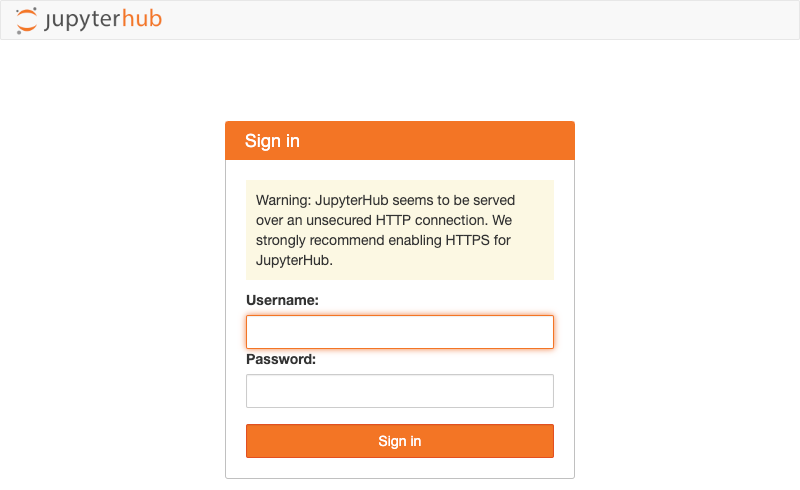
先の手順で作成した Linux OS のユーザでログイン出来します。 設定に問題無ければユーザごとの Jupyter プロセスが起動するはずです。
デーモンとして登録
デーモンとして登録するには Systemd 用の Unit ファイルを作成します。 今回は /etc/systemd/system/jupyterhub.service というファイルを以下の内容で作成しました。
[Unit]
Description=JupyterHub
After=syslog.target network.target

[Service]
WorkingDirectory=/etc/jupyterhub
Restart=always
ExecStart=/usr/local/bin/jupyterhub -f "/etc/jupyterhub/config.py"
User=root
Group=root
StandardOutput=file:/var/log/jupyterhub.log
StandardError=file:/var/log/jupyterhub.log

[Install]
WantedBy=multi-user.target
登録したサービスを起動&自動起動設定しておきます。
systemctl status jupyterhub.service で状態確認しておきます。
$ systemctl status jupyterhub.service
● jupyterhub.service - JupyterHub
     Loaded: loaded (/etc/systemd/system/jupyterhub.service; enabled; vendor preset: enabled)
     Active: active (running) since Sat 2024-03-30 15:32:12 JST; 8s ago
   Main PID: 5021 (jupyterhub)
      Tasks: 9 (limit: 4557)
     Memory: 76.8M
        CPU: 1.144s
     CGroup: /system.slice/jupyterhub.service
             ├─5021 /usr/bin/python3 /usr/local/bin/jupyterhub -f /etc/jupyterhub/config.py
             └─5123 node /usr/local/bin/configurable-http-proxy --ip 0.0.0.0 --port 8000 --api-ip 127.0.0.1 --api-port 8001 --error-target h>

Mar 30 15:32:12 172-29-0-99 systemd[1]: Started JupyterHub.
参考
jupyterhub --generate-config で生成されるテンプレートの内容
# Configuration file for jupyterhub.

c = get_config()  #noqa

#------------------------------------------------------------------------------
# Application(SingletonConfigurable) configuration
#------------------------------------------------------------------------------
## This is an application.

## The date format used by logging formatters for %(asctime)s
#  Default: '%Y-%m-%d %H:%M:%S'
# c.Application.log_datefmt = '%Y-%m-%d %H:%M:%S'

## The Logging format template
#  Default: '[%(name)s]%(highlevel)s %(message)s'
# c.Application.log_format = '[%(name)s]%(highlevel)s %(message)s'

## Set the log level by value or name.
#  Choices: any of [0, 10, 20, 30, 40, 50, 'DEBUG', 'INFO', 'WARN', 'ERROR', 'CRITICAL']
#  Default: 30
# c.Application.log_level = 30

## Configure additional log handlers.
#
#  The default stderr logs handler is configured by the log_level, log_datefmt
#  and log_format settings.
#
#  This configuration can be used to configure additional handlers (e.g. to
#  output the log to a file) or for finer control over the default handlers.
#
#  If provided this should be a logging configuration dictionary, for more
#  information see:
#  https://docs.python.org/3/library/logging.config.html#logging-config-
#  dictschema
#
#  This dictionary is merged with the base logging configuration which defines
#  the following:
#
#  * A logging formatter intended for interactive use called
#    ``console``.
#  * A logging handler that writes to stderr called
#    ``console`` which uses the formatter ``console``.
#  * A logger with the name of this application set to ``DEBUG``
#    level.
#
#  This example adds a new handler that writes to a file:
#
#  .. code-block:: python
#
#     c.Application.logging_config = {
#         "handlers": {
#             "file": {
#                 "class": "logging.FileHandler",
#                 "level": "DEBUG",
#                 "filename": "<path/to/file>",
#             }
#         },
#         "loggers": {
#             "<application-name>": {
#                 "level": "DEBUG",
#                 # NOTE: if you don't list the default "console"
#                 # handler here then it will be disabled
#                 "handlers": ["console", "file"],
#             },
#         },
#     }
#  Default: {}
# c.Application.logging_config = {}

## Instead of starting the Application, dump configuration to stdout
#  Default: False
# c.Application.show_config = False

## Instead of starting the Application, dump configuration to stdout (as JSON)
#  Default: False
# c.Application.show_config_json = False

#------------------------------------------------------------------------------
# JupyterHub(Application) configuration
#------------------------------------------------------------------------------
## An Application for starting a Multi-User Jupyter Notebook server.

## Maximum number of concurrent servers that can be active at a time.
#
#  Setting this can limit the total resources your users can consume.
#
#  An active server is any server that's not fully stopped. It is considered
#  active from the time it has been requested until the time that it has
#  completely stopped.
#
#  If this many user servers are active, users will not be able to launch new
#  servers until a server is shutdown. Spawn requests will be rejected with a 429
#  error asking them to try again.
#
#  If set to 0, no limit is enforced.
#  Default: 0
# c.JupyterHub.active_server_limit = 0

## Duration (in seconds) to determine the number of active users.
#  Default: 1800
# c.JupyterHub.active_user_window = 1800

## Resolution (in seconds) for updating activity
#
#  If activity is registered that is less than activity_resolution seconds more
#  recent than the current value, the new value will be ignored.
#
#  This avoids too many writes to the Hub database.
#  Default: 30
# c.JupyterHub.activity_resolution = 30

## DEPRECATED since version 2.0.0.
#
#          The default admin role has full permissions, use custom RBAC scopes instead to
#          create restricted administrator roles.
#          https://jupyterhub.readthedocs.io/en/stable/rbac/index.html
#  Default: False
# c.JupyterHub.admin_access = False

## DEPRECATED since version 0.7.2, use Authenticator.admin_users instead.
#  Default: set()
# c.JupyterHub.admin_users = set()

## Allow named single-user servers per user
#  Default: False
# c.JupyterHub.allow_named_servers = False

## Answer yes to any questions (e.g. confirm overwrite)
#  Default: False
# c.JupyterHub.answer_yes = False

## The default amount of records returned by a paginated endpoint
#  Default: 50
# c.JupyterHub.api_page_default_limit = 50

## The maximum amount of records that can be returned at once
#  Default: 200
# c.JupyterHub.api_page_max_limit = 200

## PENDING DEPRECATION: consider using services
#
#          Dict of token:username to be loaded into the database.
#
#          Allows ahead-of-time generation of API tokens for use by externally managed services,
#          which authenticate as JupyterHub users.
#
#          Consider using services for general services that talk to the
#  JupyterHub API.
#  Default: {}
# c.JupyterHub.api_tokens = {}

## Authentication for prometheus metrics
#  Default: True
# c.JupyterHub.authenticate_prometheus = True

## Class for authenticating users.
#
#          This should be a subclass of :class:`jupyterhub.auth.Authenticator`
#
#          with an :meth:`authenticate` method that:
#
#          - is a coroutine (asyncio or tornado)
#          - returns username on success, None on failure
#          - takes two arguments: (handler, data),
#            where `handler` is the calling web.RequestHandler,
#            and `data` is the POST form data from the login page.
#
#          .. versionchanged:: 1.0
#              authenticators may be registered via entry points,
#              e.g. `c.JupyterHub.authenticator_class = 'pam'`
#
#  Currently installed:
#    - default: jupyterhub.auth.PAMAuthenticator
#    - dummy: jupyterhub.auth.DummyAuthenticator
#    - null: jupyterhub.auth.NullAuthenticator
#    - pam: jupyterhub.auth.PAMAuthenticator
#  Default: 'jupyterhub.auth.PAMAuthenticator'
# c.JupyterHub.authenticator_class = 'jupyterhub.auth.PAMAuthenticator'

## The base URL of the entire application.
#
#          Add this to the beginning of all JupyterHub URLs.
#          Use base_url to run JupyterHub within an existing website.
#
#          .. deprecated: 0.9
#              Use JupyterHub.bind_url
#  Default: '/'
# c.JupyterHub.base_url = '/'

## The public facing URL of the whole JupyterHub application.
#
#          This is the address on which the proxy will bind.
#          Sets protocol, ip, base_url
#  Default: 'http://:8000'
# c.JupyterHub.bind_url = 'http://:8000'

## Whether to shutdown the proxy when the Hub shuts down.
#
#          Disable if you want to be able to teardown the Hub while leaving the
#  proxy running.
#
#          Only valid if the proxy was starting by the Hub process.
#
#          If both this and cleanup_servers are False, sending SIGINT to the Hub will
#          only shutdown the Hub, leaving everything else running.
#
#          The Hub should be able to resume from database state.
#  Default: True
# c.JupyterHub.cleanup_proxy = True

## Whether to shutdown single-user servers when the Hub shuts down.
#
#          Disable if you want to be able to teardown the Hub while leaving the
#  single-user servers running.
#
#          If both this and cleanup_proxy are False, sending SIGINT to the Hub will
#          only shutdown the Hub, leaving everything else running.
#
#          The Hub should be able to resume from database state.
#  Default: True
# c.JupyterHub.cleanup_servers = True

## Maximum number of concurrent users that can be spawning at a time.
#
#  Spawning lots of servers at the same time can cause performance problems for
#  the Hub or the underlying spawning system. Set this limit to prevent bursts of
#  logins from attempting to spawn too many servers at the same time.
#
#  This does not limit the number of total running servers. See
#  active_server_limit for that.
#
#  If more than this many users attempt to spawn at a time, their requests will
#  be rejected with a 429 error asking them to try again. Users will have to wait
#  for some of the spawning services to finish starting before they can start
#  their own.
#
#  If set to 0, no limit is enforced.
#  Default: 100
# c.JupyterHub.concurrent_spawn_limit = 100

## The config file to load
#  Default: 'jupyterhub_config.py'
# c.JupyterHub.config_file = 'jupyterhub_config.py'

## DEPRECATED: does nothing
#  Default: False
# c.JupyterHub.confirm_no_ssl = False

## Enable `__Host-` prefix on authentication cookies.
#
#          The `__Host-` prefix on JupyterHub cookies provides further
#          protection against cookie tossing when untrusted servers
#          may control subdomains of your jupyterhub deployment.
#
#          _However_, it also requires that cookies be set on the path `/`,
#          which means they are shared by all JupyterHub components,
#          so a compromised server component will have access to _all_ JupyterHub-related
#          cookies of the visiting browser.
#          It is recommended to only combine `__Host-` cookies with per-user domains.
#
#          .. versionadded:: 4.1
#  Default: False
# c.JupyterHub.cookie_host_prefix_enabled = False

## Number of days for a login cookie to be valid.
#          Default is two weeks.
#  Default: 14
# c.JupyterHub.cookie_max_age_days = 14

## The cookie secret to use to encrypt cookies.
#
#          Loaded from the JPY_COOKIE_SECRET env variable by default.
#
#          Should be exactly 256 bits (32 bytes).
#  Default: traitlets.Undefined
# c.JupyterHub.cookie_secret = traitlets.Undefined

## File in which to store the cookie secret.
#  Default: 'jupyterhub_cookie_secret'
# c.JupyterHub.cookie_secret_file = 'jupyterhub_cookie_secret'

## Custom scopes to define.
#
#          For use when defining custom roles,
#          to grant users granular permissions
#
#          All custom scopes must have a description,
#          and must start with the prefix `custom:`.
#
#          For example::
#
#              custom_scopes = {
#                  "custom:jupyter_server:read": {
#                      "description": "read-only access to a single-user server",
#                  },
#              }
#  Default: {}
# c.JupyterHub.custom_scopes = {}

## The location of jupyterhub data files (e.g. /usr/local/share/jupyterhub)
#  Default: '/usr/local/share/jupyterhub'
# c.JupyterHub.data_files_path = '/usr/local/share/jupyterhub'

## Include any kwargs to pass to the database connection.
#          See sqlalchemy.create_engine for details.
#  Default: {}
# c.JupyterHub.db_kwargs = {}

## url for the database. e.g. `sqlite:///jupyterhub.sqlite`
#  Default: 'sqlite:///jupyterhub.sqlite'
# c.JupyterHub.db_url = 'sqlite:///jupyterhub.sqlite'

## log all database transactions. This has A LOT of output
#  Default: False
# c.JupyterHub.debug_db = False

## DEPRECATED since version 0.8: Use ConfigurableHTTPProxy.debug
#  Default: False
# c.JupyterHub.debug_proxy = False

## If named servers are enabled, default name of server to spawn or open when no
#  server is specified, e.g. by user-redirect.
#
#  Note: This has no effect if named servers are not enabled, and does _not_
#  change the existence or behavior of the default server named `''` (the empty
#  string). This only affects which named server is launched when no server is
#  specified, e.g. by links to `/hub/user-redirect/lab/tree/mynotebook.ipynb`.
#  Default: ''
# c.JupyterHub.default_server_name = ''

## The default URL for users when they arrive (e.g. when user directs to "/")
#
#  By default, redirects users to their own server.
#
#  Can be a Unicode string (e.g. '/hub/home') or a callable based on the handler
#  object:
#
#  ::
#
#      def default_url_fn(handler):
#          user = handler.current_user
#          if user and user.admin:
#              return '/hub/admin'
#          return '/hub/home'
#
#      c.JupyterHub.default_url = default_url_fn
#  Default: traitlets.Undefined
# c.JupyterHub.default_url = traitlets.Undefined

## Dict authority:dict(files). Specify the key, cert, and/or
#          ca file for an authority. This is useful for externally managed
#          proxies that wish to use internal_ssl.
#
#          The files dict has this format (you must specify at least a cert)::
#
#              {
#                  'key': '/path/to/key.key',
#                  'cert': '/path/to/cert.crt',
#                  'ca': '/path/to/ca.crt'
#              }
#
#          The authorities you can override: 'hub-ca', 'notebooks-ca',
#          'proxy-api-ca', 'proxy-client-ca', and 'services-ca'.
#
#          Use with internal_ssl
#  Default: {}
# c.JupyterHub.external_ssl_authorities = {}

## DEPRECATED.
#
#  If you need to register additional HTTP endpoints please use services instead.
#  Default: []
# c.JupyterHub.extra_handlers = []

## DEPRECATED: use output redirection instead, e.g.
#
#  jupyterhub &>> /var/log/jupyterhub.log
#  Default: ''
# c.JupyterHub.extra_log_file = ''

## Extra log handlers to set on JupyterHub logger
#  Default: []
# c.JupyterHub.extra_log_handlers = []

## Alternate header to use as the Host (e.g., X-Forwarded-Host)
#          when determining whether a request is cross-origin
#
#          This may be useful when JupyterHub is running behind a proxy that rewrites
#          the Host header.
#  Default: ''
# c.JupyterHub.forwarded_host_header = ''

## Generate certs used for internal ssl
#  Default: False
# c.JupyterHub.generate_certs = False

## Generate default config file
#  Default: False
# c.JupyterHub.generate_config = False

## The URL on which the Hub will listen. This is a private URL for internal
#  communication. Typically set in combination with hub_connect_url. If a unix
#  socket, hub_connect_url **must** also be set.
#
#  For example:
#
#      "http://127.0.0.1:8081"
#      "unix+http://%2Fsrv%2Fjupyterhub%2Fjupyterhub.sock"
#
#  .. versionadded:: 0.9
#  Default: ''
# c.JupyterHub.hub_bind_url = ''

## The ip or hostname for proxies and spawners to use
#          for connecting to the Hub.
#
#          Use when the bind address (`hub_ip`) is 0.0.0.0, :: or otherwise different
#          from the connect address.
#
#          Default: when `hub_ip` is 0.0.0.0 or ::, use `socket.gethostname()`,
#  otherwise use `hub_ip`.
#
#          Note: Some spawners or proxy implementations might not support hostnames. Check your
#          spawner or proxy documentation to see if they have extra requirements.
#
#          .. versionadded:: 0.8
#  Default: ''
# c.JupyterHub.hub_connect_ip = ''

## DEPRECATED
#
#  Use hub_connect_url
#
#  .. versionadded:: 0.8
#
#  .. deprecated:: 0.9
#      Use hub_connect_url
#  Default: 0
# c.JupyterHub.hub_connect_port = 0

## The URL for connecting to the Hub. Spawners, services, and the proxy will use
#  this URL to talk to the Hub.
#
#  Only needs to be specified if the default hub URL is not connectable (e.g.
#  using a unix+http:// bind url).
#
#  .. seealso::
#      JupyterHub.hub_connect_ip
#      JupyterHub.hub_bind_url
#
#  .. versionadded:: 0.9
#  Default: ''
# c.JupyterHub.hub_connect_url = ''

## The ip address for the Hub process to *bind* to.
#
#          By default, the hub listens on localhost only. This address must be accessible from
#          the proxy and user servers. You may need to set this to a public ip or '' for all
#          interfaces if the proxy or user servers are in containers or on a different host.
#
#          See `hub_connect_ip` for cases where the bind and connect address should differ,
#          or `hub_bind_url` for setting the full bind URL.
#  Default: '127.0.0.1'
# c.JupyterHub.hub_ip = '127.0.0.1'

## The internal port for the Hub process.
#
#          This is the internal port of the hub itself. It should never be accessed directly.
#          See JupyterHub.port for the public port to use when accessing jupyterhub.
#          It is rare that this port should be set except in cases of port conflict.
#
#          See also `hub_ip` for the ip and `hub_bind_url` for setting the full
#  bind URL.
#  Default: 8081
# c.JupyterHub.hub_port = 8081

## The routing prefix for the Hub itself.
#
#  Override to send only a subset of traffic to the Hub. Default is to use the
#  Hub as the default route for all requests.
#
#  This is necessary for normal jupyterhub operation, as the Hub must receive
#  requests for e.g. `/user/:name` when the user's server is not running.
#
#  However, some deployments using only the JupyterHub API may want to handle
#  these events themselves, in which case they can register their own default
#  target with the proxy and set e.g. `hub_routespec = /hub/` to serve only the
#  hub's own pages, or even `/hub/api/` for api-only operation.
#
#  Note: hub_routespec must include the base_url, if any.
#
#  .. versionadded:: 1.4
#  Default: '/'
# c.JupyterHub.hub_routespec = '/'

## Trigger implicit spawns after this many seconds.
#
#          When a user visits a URL for a server that's not running,
#          they are shown a page indicating that the requested server
#          is not running with a button to spawn the server.
#
#          Setting this to a positive value will redirect the user
#          after this many seconds, effectively clicking this button
#          automatically for the users,
#          automatically beginning the spawn process.
#
#          Warning: this can result in errors and surprising behavior
#          when sharing access URLs to actual servers,
#          since the wrong server is likely to be started.
#  Default: 0
# c.JupyterHub.implicit_spawn_seconds = 0

## Timeout (in seconds) to wait for spawners to initialize
#
#  Checking if spawners are healthy can take a long time if many spawners are
#  active at hub start time.
#
#  If it takes longer than this timeout to check, init_spawner will be left to
#  complete in the background and the http server is allowed to start.
#
#  A timeout of -1 means wait forever, which can mean a slow startup of the Hub
#  but ensures that the Hub is fully consistent by the time it starts responding
#  to requests. This matches the behavior of jupyterhub 1.0.
#
#  .. versionadded: 1.1.0
#  Default: 10
# c.JupyterHub.init_spawners_timeout = 10

## The location to store certificates automatically created by
#          JupyterHub.
#
#          Use with internal_ssl
#  Default: 'internal-ssl'
# c.JupyterHub.internal_certs_location = 'internal-ssl'

## Enable SSL for all internal communication
#
#          This enables end-to-end encryption between all JupyterHub components.
#          JupyterHub will automatically create the necessary certificate
#          authority and sign notebook certificates as they're created.
#  Default: False
# c.JupyterHub.internal_ssl = False

## The public facing ip of the whole JupyterHub application
#          (specifically referred to as the proxy).
#
#          This is the address on which the proxy will listen. The default is to
#          listen on all interfaces. This is the only address through which JupyterHub
#          should be accessed by users.
#
#          .. deprecated: 0.9
#              Use JupyterHub.bind_url
#  Default: ''
# c.JupyterHub.ip = ''

## Supply extra arguments that will be passed to Jinja environment.
#  Default: {}
# c.JupyterHub.jinja_environment_options = {}

## Interval (in seconds) at which to update last-activity timestamps.
#  Default: 300
# c.JupyterHub.last_activity_interval = 300

## Dict of `{'group': {'users':['usernames'], 'properties': {}}`  to load at
#  startup.
#
#  Example::
#
#      c.JupyterHub.load_groups = {
#          'groupname': {
#              'users': ['usernames'],
#              'properties': {'key': 'value'},
#          },
#      }
#
#  This strictly *adds* groups and users to groups. Properties, if defined,
#  replace all existing properties.
#
#  Loading one set of groups, then starting JupyterHub again with a different set
#  will not remove users or groups from previous launches. That must be done
#  through the API.
#
#  .. versionchanged:: 3.2
#    Changed format of group from list of usernames to dict
#  Default: {}
# c.JupyterHub.load_groups = {}

## List of predefined role dictionaries to load at startup.
#
#          For instance::
#
#              load_roles = [
#                              {
#                                  'name': 'teacher',
#                                  'description': 'Access to users' information and group membership',
#                                  'scopes': ['users', 'groups'],
#                                  'users': ['cyclops', 'gandalf'],
#                                  'services': [],
#                                  'groups': []
#                              }
#                          ]
#
#          All keys apart from 'name' are optional.
#          See all the available scopes in the JupyterHub REST API documentation.
#
#          Default roles are defined in roles.py.
#  Default: []
# c.JupyterHub.load_roles = []

## The date format used by logging formatters for %(asctime)s
#  See also: Application.log_datefmt
# c.JupyterHub.log_datefmt = '%Y-%m-%d %H:%M:%S'

## The Logging format template
#  See also: Application.log_format
# c.JupyterHub.log_format = '[%(name)s]%(highlevel)s %(message)s'

## Set the log level by value or name.
#  See also: Application.log_level
# c.JupyterHub.log_level = 30

##
#  See also: Application.logging_config
# c.JupyterHub.logging_config = {}

## Specify path to a logo image to override the Jupyter logo in the banner.
#  Default: ''
# c.JupyterHub.logo_file = ''

## Maximum number of concurrent named servers that can be created by a user at a
#  time.
#
#  Setting this can limit the total resources a user can consume.
#
#  If set to 0, no limit is enforced.
#
#  Can be an integer or a callable/awaitable based on the handler object:
#
#  ::
#
#      def named_server_limit_per_user_fn(handler):
#          user = handler.current_user
#          if user and user.admin:
#              return 0
#          return 5
#
#      c.JupyterHub.named_server_limit_per_user = named_server_limit_per_user_fn
#  Default: 0
# c.JupyterHub.named_server_limit_per_user = 0

## Expiry (in seconds) of OAuth access tokens.
#
#          The default is to expire when the cookie storing them expires,
#          according to `cookie_max_age_days` config.
#
#          These are the tokens stored in cookies when you visit
#          a single-user server or service.
#          When they expire, you must re-authenticate with the Hub,
#          even if your Hub authentication is still valid.
#          If your Hub authentication is valid,
#          logging in may be a transparent redirect as you refresh the page.
#
#          This does not affect JupyterHub API tokens in general,
#          which do not expire by default.
#          Only tokens issued during the oauth flow
#          accessing services and single-user servers are affected.
#
#          .. versionadded:: 1.4
#              OAuth token expires_in was not previously configurable.
#          .. versionchanged:: 1.4
#              Default now uses cookie_max_age_days so that oauth tokens
#              which are generally stored in cookies,
#              expire when the cookies storing them expire.
#              Previously, it was one hour.
#  Default: 0
# c.JupyterHub.oauth_token_expires_in = 0

## File to write PID
#          Useful for daemonizing JupyterHub.
#  Default: ''
# c.JupyterHub.pid_file = ''

## The public facing port of the proxy.
#
#          This is the port on which the proxy will listen.
#          This is the only port through which JupyterHub
#          should be accessed by users.
#
#          .. deprecated: 0.9
#              Use JupyterHub.bind_url
#  Default: 8000
# c.JupyterHub.port = 8000

## DEPRECATED since version 0.8 : Use ConfigurableHTTPProxy.api_url
#  Default: ''
# c.JupyterHub.proxy_api_ip = ''

## DEPRECATED since version 0.8 : Use ConfigurableHTTPProxy.api_url
#  Default: 0
# c.JupyterHub.proxy_api_port = 0

## DEPRECATED since version 0.8: Use ConfigurableHTTPProxy.auth_token
#  Default: ''
# c.JupyterHub.proxy_auth_token = ''

## DEPRECATED since version 0.8: Use ConfigurableHTTPProxy.check_running_interval
#  Default: 5
# c.JupyterHub.proxy_check_interval = 5

## The class to use for configuring the JupyterHub proxy.
#
#          Should be a subclass of :class:`jupyterhub.proxy.Proxy`.
#
#          .. versionchanged:: 1.0
#              proxies may be registered via entry points,
#              e.g. `c.JupyterHub.proxy_class = 'traefik'`
#
#  Currently installed:
#    - configurable-http-proxy: jupyterhub.proxy.ConfigurableHTTPProxy
#    - default: jupyterhub.proxy.ConfigurableHTTPProxy
#  Default: 'jupyterhub.proxy.ConfigurableHTTPProxy'
# c.JupyterHub.proxy_class = 'jupyterhub.proxy.ConfigurableHTTPProxy'

## DEPRECATED since version 0.8. Use ConfigurableHTTPProxy.command
#  Default: []
# c.JupyterHub.proxy_cmd = []

## Recreate all certificates used within JupyterHub on restart.
#
#          Note: enabling this feature requires restarting all notebook servers.
#
#          Use with internal_ssl
#  Default: False
# c.JupyterHub.recreate_internal_certs = False

## Redirect user to server (if running), instead of control panel.
#  Default: True
# c.JupyterHub.redirect_to_server = True

## Purge and reset the database.
#  Default: False
# c.JupyterHub.reset_db = False

## Interval (in seconds) at which to check connectivity of services with web
#  endpoints.
#  Default: 60
# c.JupyterHub.service_check_interval = 60

## Dict of token:servicename to be loaded into the database.
#
#          Allows ahead-of-time generation of API tokens for use by externally
#  managed services.
#  Default: {}
# c.JupyterHub.service_tokens = {}

## List of service specification dictionaries.
#
#          A service
#
#          For instance::
#
#              services = [
#                  {
#                      'name': 'cull_idle',
#                      'command': ['/path/to/cull_idle_servers.py'],
#                  },
#                  {
#                      'name': 'formgrader',
#                      'url': 'http://127.0.0.1:1234',
#                      'api_token': 'super-secret',
#                      'environment':
#                  }
#              ]
#  Default: []
# c.JupyterHub.services = []

## Instead of starting the Application, dump configuration to stdout
#  See also: Application.show_config
# c.JupyterHub.show_config = False

## Instead of starting the Application, dump configuration to stdout (as JSON)
#  See also: Application.show_config_json
# c.JupyterHub.show_config_json = False

## Shuts down all user servers on logout
#  Default: False
# c.JupyterHub.shutdown_on_logout = False

## The class to use for spawning single-user servers.
#
#          Should be a subclass of :class:`jupyterhub.spawner.Spawner`.
#
#          .. versionchanged:: 1.0
#              spawners may be registered via entry points,
#              e.g. `c.JupyterHub.spawner_class = 'localprocess'`
#
#  Currently installed:
#    - default: jupyterhub.spawner.LocalProcessSpawner
#    - localprocess: jupyterhub.spawner.LocalProcessSpawner
#    - simple: jupyterhub.spawner.SimpleLocalProcessSpawner
#  Default: 'jupyterhub.spawner.LocalProcessSpawner'
# c.JupyterHub.spawner_class = 'jupyterhub.spawner.LocalProcessSpawner'

## Path to SSL certificate file for the public facing interface of the proxy
#
#          When setting this, you should also set ssl_key
#  Default: ''
# c.JupyterHub.ssl_cert = ''

## Path to SSL key file for the public facing interface of the proxy
#
#          When setting this, you should also set ssl_cert
#  Default: ''
# c.JupyterHub.ssl_key = ''

## Host to send statsd metrics to. An empty string (the default) disables sending
#  metrics.
#  Default: ''
# c.JupyterHub.statsd_host = ''

## Port on which to send statsd metrics about the hub
#  Default: 8125
# c.JupyterHub.statsd_port = 8125

## Prefix to use for all metrics sent by jupyterhub to statsd
#  Default: 'jupyterhub'
# c.JupyterHub.statsd_prefix = 'jupyterhub'

## Run single-user servers on subdomains of this host.
#
#          This should be the full `https://hub.domain.tld[:port]`.
#
#          Provides additional cross-site protections for javascript served by
#  single-user servers.
#
#          Requires `<username>.hub.domain.tld` to resolve to the same host as
#  `hub.domain.tld`.
#
#          In general, this is most easily achieved with wildcard DNS.
#
#          When using SSL (i.e. always) this also requires a wildcard SSL
#  certificate.
#  Default: ''
# c.JupyterHub.subdomain_host = ''

## Paths to search for jinja templates, before using the default templates.
#  Default: []
# c.JupyterHub.template_paths = []

## Extra variables to be passed into jinja templates
#  Default: {}
# c.JupyterHub.template_vars = {}

## Extra settings overrides to pass to the tornado application.
#  Default: {}
# c.JupyterHub.tornado_settings = {}

## Trust user-provided tokens (via JupyterHub.service_tokens)
#          to have good entropy.
#
#          If you are not inserting additional tokens via configuration file,
#          this flag has no effect.
#
#          In JupyterHub 0.8, internally generated tokens do not
#          pass through additional hashing because the hashing is costly
#          and does not increase the entropy of already-good UUIDs.
#
#          User-provided tokens, on the other hand, are not trusted to have good entropy by default,
#          and are passed through many rounds of hashing to stretch the entropy of the key
#          (i.e. user-provided tokens are treated as passwords instead of random keys).
#          These keys are more costly to check.
#
#          If your inserted tokens are generated by a good-quality mechanism,
#          e.g. `openssl rand -hex 32`, then you can set this flag to True
#          to reduce the cost of checking authentication tokens.
#  Default: False
# c.JupyterHub.trust_user_provided_tokens = False

## Names to include in the subject alternative name.
#
#          These names will be used for server name verification. This is useful
#          if JupyterHub is being run behind a reverse proxy or services using ssl
#          are on different hosts.
#
#          Use with internal_ssl
#  Default: []
# c.JupyterHub.trusted_alt_names = []

## Downstream proxy IP addresses to trust.
#
#          This sets the list of IP addresses that are trusted and skipped when processing
#          the `X-Forwarded-For` header. For example, if an external proxy is used for TLS
#          termination, its IP address should be added to this list to ensure the correct
#          client IP addresses are recorded in the logs instead of the proxy server's IP
#          address.
#  Default: []
# c.JupyterHub.trusted_downstream_ips = []

## Upgrade the database automatically on start.
#
#          Only safe if database is regularly backed up.
#          Only SQLite databases will be backed up to a local file automatically.
#  Default: False
# c.JupyterHub.upgrade_db = False

## Return 503 rather than 424 when request comes in for a non-running server.
#
#  Prior to JupyterHub 2.0, we returned a 503 when any request came in for a user
#  server that was currently not running. By default, JupyterHub 2.0 will return
#  a 424 - this makes operational metric dashboards more useful.
#
#  JupyterLab < 3.2 expected the 503 to know if the user server is no longer
#  running, and prompted the user to start their server. Set this config to true
#  to retain the old behavior, so JupyterLab < 3.2 can continue to show the
#  appropriate UI when the user server is stopped.
#
#  This option will be removed in a future release.
#  Default: False
# c.JupyterHub.use_legacy_stopped_server_status_code = False

## Callable to affect behavior of /user-redirect/
#
#  Receives 4 parameters: 1. path - URL path that was provided after /user-
#  redirect/ 2. request - A Tornado HTTPServerRequest representing the current
#  request. 3. user - The currently authenticated user. 4. base_url - The
#  base_url of the current hub, for relative redirects
#
#  It should return the new URL to redirect to, or None to preserve current
#  behavior.
#  Default: None
# c.JupyterHub.user_redirect_hook = None

#------------------------------------------------------------------------------
# Spawner(LoggingConfigurable) configuration
#------------------------------------------------------------------------------
## Base class for spawning single-user notebook servers.
#
#      Subclass this, and override the following methods:
#
#      - load_state
#      - get_state
#      - start
#      - stop
#      - poll
#
#      As JupyterHub supports multiple users, an instance of the Spawner subclass
#      is created for each user. If there are 20 JupyterHub users, there will be 20
#      instances of the subclass.

## Extra arguments to be passed to the single-user server.
#
#  Some spawners allow shell-style expansion here, allowing you to use
#  environment variables here. Most, including the default, do not. Consult the
#  documentation for your spawner to verify!
#  Default: []
# c.Spawner.args = []

## An optional hook function that you can implement to pass `auth_state` to the
#  spawner after it has been initialized but before it starts. The `auth_state`
#  dictionary may be set by the `.authenticate()` method of the authenticator.
#  This hook enables you to pass some or all of that information to your spawner.
#
#  Example::
#
#      def userdata_hook(spawner, auth_state):
#          spawner.userdata = auth_state["userdata"]
#
#      c.Spawner.auth_state_hook = userdata_hook
#  Default: None
# c.Spawner.auth_state_hook = None

## The command used for starting the single-user server.
#
#  Provide either a string or a list containing the path to the startup script
#  command. Extra arguments, other than this path, should be provided via `args`.
#
#  This is usually set if you want to start the single-user server in a different
#  python environment (with virtualenv/conda) than JupyterHub itself.
#
#  Some spawners allow shell-style expansion here, allowing you to use
#  environment variables. Most, including the default, do not. Consult the
#  documentation for your spawner to verify!
#  Default: ['jupyterhub-singleuser']
# c.Spawner.cmd = ['jupyterhub-singleuser']

## Maximum number of consecutive failures to allow before shutting down
#  JupyterHub.
#
#  This helps JupyterHub recover from a certain class of problem preventing
#  launch in contexts where the Hub is automatically restarted (e.g. systemd,
#  docker, kubernetes).
#
#  A limit of 0 means no limit and consecutive failures will not be tracked.
#  Default: 0
# c.Spawner.consecutive_failure_limit = 0

## Minimum number of cpu-cores a single-user notebook server is guaranteed to
#  have available.
#
#  If this value is set to 0.5, allows use of 50% of one CPU. If this value is
#  set to 2, allows use of up to 2 CPUs.
#
#  **This is a configuration setting. Your spawner must implement support for the
#  limit to work.** The default spawner, `LocalProcessSpawner`, does **not**
#  implement this support. A custom spawner **must** add support for this setting
#  for it to be enforced.
#  Default: None
# c.Spawner.cpu_guarantee = None

## Maximum number of cpu-cores a single-user notebook server is allowed to use.
#
#  If this value is set to 0.5, allows use of 50% of one CPU. If this value is
#  set to 2, allows use of up to 2 CPUs.
#
#  The single-user notebook server will never be scheduled by the kernel to use
#  more cpu-cores than this. There is no guarantee that it can access this many
#  cpu-cores.
#
#  **This is a configuration setting. Your spawner must implement support for the
#  limit to work.** The default spawner, `LocalProcessSpawner`, does **not**
#  implement this support. A custom spawner **must** add support for this setting
#  for it to be enforced.
#  Default: None
# c.Spawner.cpu_limit = None

## Enable debug-logging of the single-user server
#  Default: False
# c.Spawner.debug = False

## The URL the single-user server should start in.
#
#  `{username}` will be expanded to the user's username
#
#  Example uses:
#
#  - You can set `notebook_dir` to `/` and `default_url` to `/tree/home/{username}` to allow people to
#    navigate the whole filesystem from their notebook server, but still start in their home directory.
#  - Start with `/notebooks` instead of `/tree` if `default_url` points to a notebook instead of a directory.
#  - You can set this to `/lab` to have JupyterLab start by default, rather than Jupyter Notebook.
#  Default: ''
# c.Spawner.default_url = ''

## Disable per-user configuration of single-user servers.
#
#  When starting the user's single-user server, any config file found in the
#  user's $HOME directory will be ignored.
#
#  Note: a user could circumvent this if the user modifies their Python
#  environment, such as when they have their own conda environments / virtualenvs
#  / containers.
#  Default: False
# c.Spawner.disable_user_config = False

## List of environment variables for the single-user server to inherit from the
#  JupyterHub process.
#
#  This list is used to ensure that sensitive information in the JupyterHub
#  process's environment (such as `CONFIGPROXY_AUTH_TOKEN`) is not passed to the
#  single-user server's process.
#  Default: ['PATH', 'PYTHONPATH', 'CONDA_ROOT', 'CONDA_DEFAULT_ENV', 'VIRTUAL_ENV', 'LANG', 'LC_ALL', 'JUPYTERHUB_SINGLEUSER_APP']
# c.Spawner.env_keep = ['PATH', 'PYTHONPATH', 'CONDA_ROOT', 'CONDA_DEFAULT_ENV', 'VIRTUAL_ENV', 'LANG', 'LC_ALL', 'JUPYTERHUB_SINGLEUSER_APP']

## Extra environment variables to set for the single-user server's process.
#
#  Environment variables that end up in the single-user server's process come from 3 sources:
#    - This `environment` configurable
#    - The JupyterHub process' environment variables that are listed in `env_keep`
#    - Variables to establish contact between the single-user notebook and the hub (such as JUPYTERHUB_API_TOKEN)
#
#  The `environment` configurable should be set by JupyterHub administrators to
#  add installation specific environment variables. It is a dict where the key is
#  the name of the environment variable, and the value can be a string or a
#  callable. If it is a callable, it will be called with one parameter (the
#  spawner instance), and should return a string fairly quickly (no blocking
#  operations please!).
#
#  Note that the spawner class' interface is not guaranteed to be exactly same
#  across upgrades, so if you are using the callable take care to verify it
#  continues to work after upgrades!
#
#  .. versionchanged:: 1.2
#      environment from this configuration has highest priority,
#      allowing override of 'default' env variables,
#      such as JUPYTERHUB_API_URL.
#  Default: {}
# c.Spawner.environment = {}

## Timeout (in seconds) before giving up on a spawned HTTP server
#
#  Once a server has successfully been spawned, this is the amount of time we
#  wait before assuming that the server is unable to accept connections.
#  Default: 30
# c.Spawner.http_timeout = 30

## The URL the single-user server should connect to the Hub.
#
#  If the Hub URL set in your JupyterHub config is not reachable from spawned
#  notebooks, you can set differnt URL by this config.
#
#  Is None if you don't need to change the URL.
#  Default: None
# c.Spawner.hub_connect_url = None

## The IP address (or hostname) the single-user server should listen on.
#
#  Usually either '127.0.0.1' (default) or '0.0.0.0'.
#
#  The JupyterHub proxy implementation should be able to send packets to this
#  interface.
#
#  Subclasses which launch remotely or in containers should override the default
#  to '0.0.0.0'.
#
#  .. versionchanged:: 2.0
#      Default changed to '127.0.0.1', from ''.
#      In most cases, this does not result in a change in behavior,
#      as '' was interpreted as 'unspecified',
#      which used the subprocesses' own default, itself usually '127.0.0.1'.
#  Default: '127.0.0.1'
# c.Spawner.ip = '127.0.0.1'

## Minimum number of bytes a single-user notebook server is guaranteed to have
#  available.
#
#  Allows the following suffixes:
#    - K -> Kilobytes
#    - M -> Megabytes
#    - G -> Gigabytes
#    - T -> Terabytes
#
#  **This is a configuration setting. Your spawner must implement support for the
#  limit to work.** The default spawner, `LocalProcessSpawner`, does **not**
#  implement this support. A custom spawner **must** add support for this setting
#  for it to be enforced.
#  Default: None
# c.Spawner.mem_guarantee = None

## Maximum number of bytes a single-user notebook server is allowed to use.
#
#  Allows the following suffixes:
#    - K -> Kilobytes
#    - M -> Megabytes
#    - G -> Gigabytes
#    - T -> Terabytes
#
#  If the single user server tries to allocate more memory than this, it will
#  fail. There is no guarantee that the single-user notebook server will be able
#  to allocate this much memory - only that it can not allocate more than this.
#
#  **This is a configuration setting. Your spawner must implement support for the
#  limit to work.** The default spawner, `LocalProcessSpawner`, does **not**
#  implement this support. A custom spawner **must** add support for this setting
#  for it to be enforced.
#  Default: None
# c.Spawner.mem_limit = None

## Path to the notebook directory for the single-user server.
#
#  The user sees a file listing of this directory when the notebook interface is
#  started. The current interface does not easily allow browsing beyond the
#  subdirectories in this directory's tree.
#
#  `~` will be expanded to the home directory of the user, and {username} will be
#  replaced with the name of the user.
#
#  Note that this does *not* prevent users from accessing files outside of this
#  path! They can do so with many other means.
#  Default: ''
# c.Spawner.notebook_dir = ''

## Allowed scopes for oauth tokens issued by this server's oauth client.
#
#          This sets the maximum and default scopes
#          assigned to oauth tokens issued by a single-user server's
#          oauth client (i.e. tokens stored in browsers after authenticating with the server),
#          defining what actions the server can take on behalf of logged-in users.
#
#          Default is an empty list, meaning minimal permissions to identify users,
#          no actions can be taken on their behalf.
#
#          If callable, will be called with the Spawner as a single argument.
#          Callables may be async.
#  Default: traitlets.Undefined
# c.Spawner.oauth_client_allowed_scopes = traitlets.Undefined

## Allowed roles for oauth tokens.
#
#          Deprecated in 3.0: use oauth_client_allowed_scopes
#
#          This sets the maximum and default roles
#          assigned to oauth tokens issued by a single-user server's
#          oauth client (i.e. tokens stored in browsers after authenticating with the server),
#          defining what actions the server can take on behalf of logged-in users.
#
#          Default is an empty list, meaning minimal permissions to identify users,
#          no actions can be taken on their behalf.
#  Default: traitlets.Undefined
# c.Spawner.oauth_roles = traitlets.Undefined

## An HTML form for options a user can specify on launching their server.
#
#  The surrounding `<form>` element and the submit button are already provided.
#
#  For example:
#
#  .. code:: html
#
#      Set your key:
#      <input name="key" val="default_key"></input>
#      <br>
#      Choose a letter:
#      <select name="letter" multiple="true">
#        <option value="A">The letter A</option>
#        <option value="B">The letter B</option>
#      </select>
#
#  The data from this form submission will be passed on to your spawner in
#  `self.user_options`
#
#  Instead of a form snippet string, this could also be a callable that takes as
#  one parameter the current spawner instance and returns a string. The callable
#  will be called asynchronously if it returns a future, rather than a str. Note
#  that the interface of the spawner class is not deemed stable across versions,
#  so using this functionality might cause your JupyterHub upgrades to break.
#  Default: traitlets.Undefined
# c.Spawner.options_form = traitlets.Undefined

## Interpret HTTP form data
#
#  Form data will always arrive as a dict of lists of strings. Override this
#  function to understand single-values, numbers, etc.
#
#  This should coerce form data into the structure expected by self.user_options,
#  which must be a dict, and should be JSON-serializeable, though it can contain
#  bytes in addition to standard JSON data types.
#
#  This method should not have any side effects. Any handling of `user_options`
#  should be done in `.start()` to ensure consistent behavior across servers
#  spawned via the API and form submission page.
#
#  Instances will receive this data on self.user_options, after passing through
#  this function, prior to `Spawner.start`.
#
#  .. versionchanged:: 1.0
#      user_options are persisted in the JupyterHub database to be reused
#      on subsequent spawns if no options are given.
#      user_options is serialized to JSON as part of this persistence
#      (with additional support for bytes in case of uploaded file data),
#      and any non-bytes non-jsonable values will be replaced with None
#      if the user_options are re-used.
#  Default: traitlets.Undefined
# c.Spawner.options_from_form = traitlets.Undefined

## Interval (in seconds) on which to poll the spawner for single-user server's
#  status.
#
#  At every poll interval, each spawner's `.poll` method is called, which checks
#  if the single-user server is still running. If it isn't running, then
#  JupyterHub modifies its own state accordingly and removes appropriate routes
#  from the configurable proxy.
#  Default: 30
# c.Spawner.poll_interval = 30

## The port for single-user servers to listen on.
#
#  Defaults to `0`, which uses a randomly allocated port number each time.
#
#  If set to a non-zero value, all Spawners will use the same port, which only
#  makes sense if each server is on a different address, e.g. in containers.
#
#  New in version 0.7.
#  Default: 0
# c.Spawner.port = 0

## An optional hook function that you can implement to do work after the spawner
#  stops.
#
#  This can be set independent of any concrete spawner implementation.
#  Default: None
# c.Spawner.post_stop_hook = None

## An optional hook function that you can implement to do some bootstrapping work
#  before the spawner starts. For example, create a directory for your user or
#  load initial content.
#
#  This can be set independent of any concrete spawner implementation.
#
#  This maybe a coroutine.
#
#  Example::
#
#      from subprocess import check_call
#      def my_hook(spawner):
#          username = spawner.user.name
#          check_call(['./examples/bootstrap-script/bootstrap.sh', username])
#
#      c.Spawner.pre_spawn_hook = my_hook
#  Default: None
# c.Spawner.pre_spawn_hook = None

## The list of scopes to request for $JUPYTERHUB_API_TOKEN
#
#          If not specified, the scopes in the `server` role will be used
#          (unchanged from pre-4.0).
#
#          If callable, will be called with the Spawner instance as its sole argument
#          (JupyterHub user available as spawner.user).
#
#          JUPYTERHUB_API_TOKEN will be assigned the _subset_ of these scopes
#          that are held by the user (as in oauth_client_allowed_scopes).
#
#          .. versionadded:: 4.0
#  Default: traitlets.Undefined
# c.Spawner.server_token_scopes = traitlets.Undefined

## List of SSL alt names
#
#          May be set in config if all spawners should have the same value(s),
#          or set at runtime by Spawner that know their names.
#  Default: []
# c.Spawner.ssl_alt_names = []

## Whether to include `DNS:localhost`, `IP:127.0.0.1` in alt names
#  Default: True
# c.Spawner.ssl_alt_names_include_local = True

## Timeout (in seconds) before giving up on starting of single-user server.
#
#  This is the timeout for start to return, not the timeout for the server to
#  respond. Callers of spawner.start will assume that startup has failed if it
#  takes longer than this. start should return when the server process is started
#  and its location is known.
#  Default: 60
# c.Spawner.start_timeout = 60

#------------------------------------------------------------------------------
# Authenticator(LoggingConfigurable) configuration
#------------------------------------------------------------------------------
## Base class for implementing an authentication provider for JupyterHub

## Set of users that will have admin rights on this JupyterHub.
#
#  Note: As of JupyterHub 2.0, full admin rights should not be required, and more
#  precise permissions can be managed via roles.
#
#  Admin users have extra privileges:
#   - Use the admin panel to see list of users logged in
#   - Add / remove users in some authenticators
#   - Restart / halt the hub
#   - Start / stop users' single-user servers
#   - Can access each individual users' single-user server (if configured)
#
#  Admin access should be treated the same way root access is.
#
#  Defaults to an empty set, in which case no user has admin access.
#  Default: set()
# c.Authenticator.admin_users = set()

## Set of usernames that are allowed to log in.
#
#  Use this with supported authenticators to restrict which users can log in.
#  This is an additional list that further restricts users, beyond whatever
#  restrictions the authenticator has in place. Any user in this list is granted
#  the 'user' role on hub startup.
#
#  If empty, does not perform any additional restriction.
#
#  .. versionchanged:: 1.2
#      `Authenticator.whitelist` renamed to `allowed_users`
#  Default: set()
# c.Authenticator.allowed_users = set()

## The max age (in seconds) of authentication info
#          before forcing a refresh of user auth info.
#
#          Refreshing auth info allows, e.g. requesting/re-validating auth
#  tokens.
#
#          See :meth:`.refresh_user` for what happens when user auth info is refreshed
#          (nothing by default).
#  Default: 300
# c.Authenticator.auth_refresh_age = 300

## Automatically begin the login process
#
#          rather than starting with a "Login with..." link at `/hub/login`
#
#          To work, `.login_url()` must give a URL other than the default `/hub/login`,
#          such as an oauth handler or another automatic login handler,
#          registered with `.get_handlers()`.
#
#          .. versionadded:: 0.8
#  Default: False
# c.Authenticator.auto_login = False

## Automatically begin login process for OAuth2 authorization requests
#
#  When another application is using JupyterHub as OAuth2 provider, it sends
#  users to `/hub/api/oauth2/authorize`. If the user isn't logged in already, and
#  auto_login is not set, the user will be dumped on the hub's home page, without
#  any context on what to do next.
#
#  Setting this to true will automatically redirect users to login if they aren't
#  logged in *only* on the `/hub/api/oauth2/authorize` endpoint.
#
#  .. versionadded:: 1.5
#  Default: False
# c.Authenticator.auto_login_oauth2_authorize = False

## Set of usernames that are not allowed to log in.
#
#  Use this with supported authenticators to restrict which users can not log in.
#  This is an additional block list that further restricts users, beyond whatever
#  restrictions the authenticator has in place.
#
#  If empty, does not perform any additional restriction.
#
#  .. versionadded: 0.9
#
#  .. versionchanged:: 1.2
#      `Authenticator.blacklist` renamed to `blocked_users`
#  Default: set()
# c.Authenticator.blocked_users = set()

## Delete any users from the database that do not pass validation
#
#          When JupyterHub starts, `.add_user` will be called
#          on each user in the database to verify that all users are still valid.
#
#          If `delete_invalid_users` is True,
#          any users that do not pass validation will be deleted from the database.
#          Use this if users might be deleted from an external system,
#          such as local user accounts.
#
#          If False (default), invalid users remain in the Hub's database
#          and a warning will be issued.
#          This is the default to avoid data loss due to config changes.
#  Default: False
# c.Authenticator.delete_invalid_users = False

## Enable persisting auth_state (if available).
#
#          auth_state will be encrypted and stored in the Hub's database.
#          This can include things like authentication tokens, etc.
#          to be passed to Spawners as environment variables.
#
#          Encrypting auth_state requires the cryptography package.
#
#          Additionally, the JUPYTERHUB_CRYPT_KEY environment variable must
#          contain one (or more, separated by ;) 32B encryption keys.
#          These can be either base64 or hex-encoded.
#
#          If encryption is unavailable, auth_state cannot be persisted.
#
#          New in JupyterHub 0.8
#  Default: False
# c.Authenticator.enable_auth_state = False

## Let authenticator manage user groups
#
#          If True, Authenticator.authenticate and/or .refresh_user
#          may return a list of group names in the 'groups' field,
#          which will be assigned to the user.
#
#          All group-assignment APIs are disabled if this is True.
#  Default: False
# c.Authenticator.manage_groups = False

## An optional hook function that you can implement to do some bootstrapping work
#  during authentication. For example, loading user account details from an
#  external system.
#
#  This function is called after the user has passed all authentication checks
#  and is ready to successfully authenticate. This function must return the
#  authentication dict reguardless of changes to it.
#
#  This maybe a coroutine.
#
#  .. versionadded: 1.0
#
#  Example::
#
#      import os, pwd
#      def my_hook(authenticator, handler, authentication):
#          user_data = pwd.getpwnam(authentication['name'])
#          spawn_data = {
#              'pw_data': user_data
#              'gid_list': os.getgrouplist(authentication['name'], user_data.pw_gid)
#          }
#
#          if authentication['auth_state'] is None:
#              authentication['auth_state'] = {}
#          authentication['auth_state']['spawn_data'] = spawn_data
#
#          return authentication
#
#      c.Authenticator.post_auth_hook = my_hook
#  Default: None
# c.Authenticator.post_auth_hook = None

## Force refresh of auth prior to spawn.
#
#          This forces :meth:`.refresh_user` to be called prior to launching
#          a server, to ensure that auth state is up-to-date.
#
#          This can be important when e.g. auth tokens that may have expired
#          are passed to the spawner via environment variables from auth_state.
#
#          If refresh_user cannot refresh the user auth data,
#          launch will fail until the user logs in again.
#  Default: False
# c.Authenticator.refresh_pre_spawn = False

## Dictionary mapping authenticator usernames to JupyterHub users.
#
#          Primarily used to normalize OAuth user names to local users.
#  Default: {}
# c.Authenticator.username_map = {}

## Regular expression pattern that all valid usernames must match.
#
#  If a username does not match the pattern specified here, authentication will
#  not be attempted.
#
#  If not set, allow any username.
#  Default: ''
# c.Authenticator.username_pattern = ''

## Deprecated, use `Authenticator.allowed_users`
#  Default: set()
# c.Authenticator.whitelist = set()

#------------------------------------------------------------------------------
# CryptKeeper(SingletonConfigurable) configuration
#------------------------------------------------------------------------------
## Encapsulate encryption configuration
#
#      Use via the encryption_config singleton below.

#  Default: []
# c.CryptKeeper.keys = []

## The number of threads to allocate for encryption
#  Default: 4
# c.CryptKeeper.n_threads = 4