Ubuntu 24.04LTS へ Nginx (OS 標準リポジトリ) + PHP-FPM をインストールする
以前に下記のメモを書きました。
今回は Ubuntu 24.04LTS へ (Nginx 公式リポジトリでは無く) OS 標準リポジトリから Nginx をインストールし、併せて PHP-FPM をインストールする手順をメモしておきます。
検証環境
Ubuntu 標準リポジトリからインストール可能な Nginx バージョンは 1.24.0 でした。
| 対象 | バージョン |
|---|---|
| Ubuntu | 24.04LTS |
| PHP-FPM | 8.3 |
| Nginx (Ubuntu 標準リポジトリ) | 1.24.0 |
「OS 標準リポジトリ版」と「Nginx 公式リポジトリ版」の差分
Nginx は「OS 標準リポジトリ版」と「Nginx 公式リポジトリ版」で以下のような差分があるようです。
バージョンの差
| OS 標準リポジトリ版 | Nginx 公式リポジトリ版 | |
|---|---|---|
| バージョン | 1.24.0 | 1.26.1 |
A. OS 標準リポジトリ版
# apt info nginx
Package: nginx
Version: 1.24.0-2ubuntu7
Priority: optional
Section: web
Origin: Ubuntu
Maintainer: Ubuntu Developers <ubuntu-devel-discuss@lists.ubuntu.com>
Original-Maintainer: Debian Nginx Maintainers <pkg-nginx-maintainers@alioth-lists.debian.net>
Bugs: https://bugs.launchpad.net/ubuntu/+filebug
Installed-Size: 1352 kB
Provides: httpd, httpd-cgi, nginx-abi-1.24.0-1
Depends: libc6 (>= 2.34), libcrypt1 (>= 1:4.1.0), libpcre2-8-0 (>= 10.22), libssl3 (>= 3.0.0), zlib1g (>= 1:1.1.4), iproute2, nginx-common (= 1.24.0-2ubuntu7)
Breaks: nginx-core (<< 1.22.1-6~), nginx-extras (<< 1.22.1-6~), nginx-light (<< 1.22.1-6~)
Replaces: nginx-core (<< 1.22.1-6~), nginx-extras (<< 1.22.1-6~), nginx-light (<< 1.22.1-6~)
Homepage: https://nginx.org
Download-Size: 521 kB
APT-Manual-Installed: yes
APT-Sources: http://archive.ubuntu.com/ubuntu noble/main amd64 Packages
Description: small, powerful, scalable web/proxy server
 Nginx ("engine X") is a high-performance web and reverse proxy server
 created by Igor Sysoev. It can be used both as a standalone web server
 and as a proxy to reduce the load on back-end HTTP or mail servers.
B. Nginx 公式リポジトリ版
# apt info nginx
Package: nginx
Version: 1.26.1-2~noble
Priority: optional
Section: httpd
Maintainer: NGINX Packaging <nginx-packaging@f5.com>
Installed-Size: 3640 kB
Provides: httpd, nginx, nginx-r1.26.1
Depends: libc6 (>= 2.34), libcrypt1 (>= 1:4.1.0), libpcre2-8-0 (>= 10.22), libssl3t64 (>= 3.0.0), zlib1g (>= 1:1.1.4), lsb-base (>= 3.0-6)
Recommends: logrotate
Conflicts: nginx-common, nginx-core
Replaces: nginx-common, nginx-core
Homepage: https://nginx.org
Download-Size: 1125 kB
APT-Manual-Installed: yes
APT-Sources: http://nginx.org/packages/ubuntu noble/nginx amd64 Packages
Description: high performance web server
 nginx [engine x] is an HTTP and reverse proxy server, as well as
 a mail proxy server.

N: There are 3 additional records. Please use the '-a' switch to see them.
ディレクトリ構造の差
Apache 同様に「OS 標準リポジトリ版」には modules-available、modules-enabled、sites-available、sites-enabled などのディレクトリが存在します。
A. OS 標準リポジトリ版
# tree /etc/nginx
/etc/nginx
├── conf.d
├── fastcgi.conf
├── fastcgi_params
├── koi-utf
├── koi-win
├── mime.types
├── modules-available
├── modules-enabled
├── nginx.conf
├── proxy_params
├── scgi_params
├── sites-available
│   └── default
├── sites-enabled
│   └── default -> /etc/nginx/sites-available/default
├── snippets
│   ├── fastcgi-php.conf
│   └── snakeoil.conf
├── uwsgi_params
└── win-utf

7 directories, 14 files
B. Nginx 公式リポジトリ版
# tree /etc/nginx
/etc/nginx
├── conf.d
│   └── default.conf
├── fastcgi_params
├── mime.types
├── modules -> /usr/lib/nginx/modules
├── nginx.conf
├── scgi_params
└── uwsgi_params

3 directories, 6 files
実行ユーザ/グループの差
Nginx の実行ユーザに差があります。
| OS 標準リポジトリ版 | Nginx 公式リポジトリ版 | |
|---|---|---|
| Nginx 実行ユーザ | nginx |
www-data |
| Nginx 実行グループ | (明示的な設定は無し) | (明示的な設定は無し) |
| PHP-FPM 実行ユーザ | www-data |
www-data |
| PHP-FPM 実行グループ | www-data |
www-data |
A. OS 標準リポジトリ版
# grep -e ^user -e ^group /etc/nginx/nginx.conf
user www-data;
# grep -e ^user -e ^group /etc/php/8.3/fpm/pool.d/www.conf
user = www-data
group = www-data
B. Nginx 公式リポジトリ版
# grep -e ^user -e ^group /etc/nginx/nginx.conf
user  nginx;
# grep -e ^user -e ^group /etc/php/8.3/fpm/pool.d/www.conf
user = www-data
group = www-data
起動状態の差
インストール直後の起動状態にも差があります。
| OS 標準リポジトリ版 | Nginx 公式リポジトリ版 | |
|---|---|---|
| インストール直後の起動状態 | 起動 | 停止 |
A. OS 標準リポジトリ版
# systemctl status nginx
● nginx.service - A high performance web server and a reverse proxy server
     Loaded: loaded (/usr/lib/systemd/system/nginx.service; enabled; preset: enabled)
     Active: active (running) since Sun 2024-07-21 15:44:04 JST; 29min ago
       Docs: man:nginx(8)
    Process: 7434 ExecStartPre=/usr/sbin/nginx -t -q -g daemon on; master_process on; (code=exited, status=0/SUCCESS)
    Process: 7436 ExecStart=/usr/sbin/nginx -g daemon on; master_process on; (code=exited, status=0/SUCCESS)
   Main PID: 7437 (nginx)
      Tasks: 2 (limit: 4658)
     Memory: 1.7M (peak: 1.9M)
        CPU: 11ms
     CGroup: /system.slice/nginx.service
             ├─7437 "nginx: master process /usr/sbin/nginx -g daemon on; master_process on;"
             └─7438 "nginx: worker process"

Jul 21 15:44:04 localhost systemd[1]: Starting nginx.service - A high performance web server and a reverse proxy server...
Jul 21 15:44:04 localhost systemd[1]: Started nginx.service - A high performance web server and a reverse proxy server.
B. Nginx 公式リポジトリ版
# systemctl status nginx
○ nginx.service - nginx - high performance web server
     Loaded: loaded (/usr/lib/systemd/system/nginx.service; enabled; preset: enabled)
     Active: inactive (dead)
       Docs: https://nginx.org/en/docs/
Nginx と PHP-FPM のインストール
Nginx と PHP-FPM をインストールします。
systemctl status nginx php8.3-fpm を実行して正常にインストールが完了したことを確認しておきます。
# systemctl status nginx php8.3-fpm
● nginx.service - A high performance web server and a reverse proxy server
     Loaded: loaded (/usr/lib/systemd/system/nginx.service; enabled; preset: enabled)
     Active: active (running) since Sun 2024-07-21 15:44:04 JST; 14s ago
       Docs: man:nginx(8)
    Process: 7434 ExecStartPre=/usr/sbin/nginx -t -q -g daemon on; master_process on; (code=exited, status=0/SUCCESS)
    Process: 7436 ExecStart=/usr/sbin/nginx -g daemon on; master_process on; (code=exited, status=0/SUCCESS)
   Main PID: 7437 (nginx)
      Tasks: 2 (limit: 4658)
     Memory: 1.7M (peak: 1.9M)
        CPU: 11ms
     CGroup: /system.slice/nginx.service
             ├─7437 "nginx: master process /usr/sbin/nginx -g daemon on; master_process on;"
             └─7438 "nginx: worker process"

Jul 21 15:44:04 localhost systemd[1]: Starting nginx.service - A high performance web server and a reverse proxy server...
Jul 21 15:44:04 localhost systemd[1]: Started nginx.service - A high performance web server and a reverse proxy server.

● php8.3-fpm.service - The PHP 8.3 FastCGI Process Manager
     Loaded: loaded (/usr/lib/systemd/system/php8.3-fpm.service; enabled; preset: enabled)
     Active: active (running) since Sun 2024-07-21 15:44:06 JST; 13s ago
       Docs: man:php-fpm8.3(8)
    Process: 7460 ExecStartPost=/usr/lib/php/php-fpm-socket-helper install /run/php/php-fpm.sock /etc/php/8.3/fpm/pool.d/www.conf 83 (code=exit>
   Main PID: 7457 (php-fpm8.3)
     Status: "Processes active: 0, idle: 2, Requests: 0, slow: 0, Traffic: 0req/sec"
      Tasks: 3 (limit: 4658)
     Memory: 7.6M (peak: 8.3M)
        CPU: 38ms
     CGroup: /system.slice/php8.3-fpm.service
             ├─7457 "php-fpm: master process (/etc/php/8.3/fpm/php-fpm.conf)"
             ├─7458 "php-fpm: pool www"
             └─7459 "php-fpm: pool www"

Jul 21 15:44:06 localhost systemd[1]: Starting php8.3-fpm.service - The PHP 8.3 FastCGI Process Manager...
Jul 21 15:44:06 localhost systemd[1]: Started php8.3-fpm.service - The PHP 8.3 FastCGI Process Manager.
Apach 風ドキュメントルートのリンクを追加する
Apache 風のドキュメントルートとして /var/www/html も使えるようにシンボリックリンクを作成します。
設定ファイルの修正
Nginx
Nginx で PHP が利用出来るように修正します。 Nginx の設定ファイルである /etc/nginx/sites-available/default を以下のように修正します。
修正前 (コメント除去版)
server {
    listen 80 default_server;
    listen [::]:80 default_server;
    root /var/www/html;
    index index.html index.htm index.nginx-debian.html;
    server_name _;
    location / {
        try_files $uri $uri/ =404;
    }
}
修正後
server {
    listen 80 default_server;
    listen [::]:80 default_server;
    root /var/www/html;
    index index.php index.html index.htm index.nginx-debian.html;
    server_name _;
    location ~ \.php$ {
        include snippets/fastcgi-php.conf;
        fastcgi_pass unix:/run/php/php8.3-fpm.sock;
    }
    location / {
        try_files $uri $uri/ =404;
    }
}
Nginx の設定ファイルをエラーチェックする
Nginx の設定ファイルの構文上、エラーが無いことを確認します。 nginx -t を実行し、以下のように test is successful になることを確認します。 何某かのエラーが発生している場合はエラーの内容を参考にトラブルシューティングします。
# nginx -t
nginx: the configuration file /etc/nginx/nginx.conf syntax is ok
nginx: configuration file /etc/nginx/nginx.conf test is successful
Nginx を再起動する
Nginx 設定ファイルへの修正を反映する為に Nginx を再起動しておきます。
テスト用の PHP ファイル
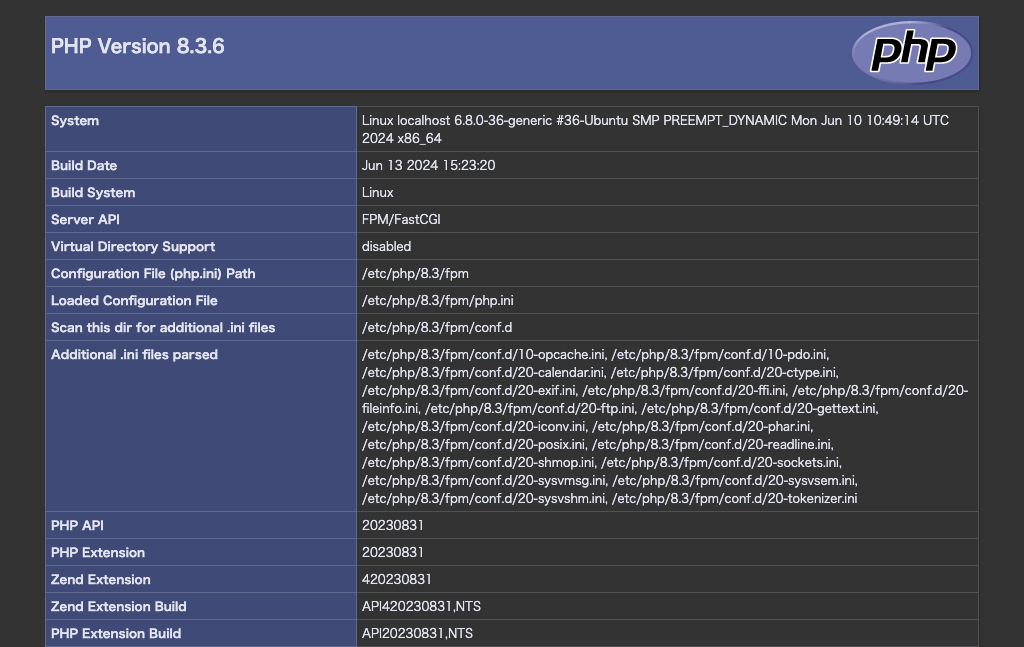
PHP の動作確認を行う為に /var/www/html/index.php を以下の内容で作成します。
Web ブラウザで http://10.0.0.1/ のようにアクセスし、以下のような画面が表示されれば成功です。
参考
デフォルトの設定ファイル
/etc/nginx/sites-available/default
##
# You should look at the following URL's in order to grasp a solid understanding
# of Nginx configuration files in order to fully unleash the power of Nginx.
# https://www.nginx.com/resources/wiki/start/
# https://www.nginx.com/resources/wiki/start/topics/tutorials/config_pitfalls/
# https://wiki.debian.org/Nginx/DirectoryStructure
#
# In most cases, administrators will remove this file from sites-enabled/ and
# leave it as reference inside of sites-available where it will continue to be
# updated by the nginx packaging team.
#
# This file will automatically load configuration files provided by other
# applications, such as Drupal or Wordpress. These applications will be made
# available underneath a path with that package name, such as /drupal8.
#
# Please see /usr/share/doc/nginx-doc/examples/ for more detailed examples.
##

# Default server configuration
#
server {
 listen 80 default_server;
 listen [::]:80 default_server;

 # SSL configuration
 #
 # listen 443 ssl default_server;
 # listen [::]:443 ssl default_server;
 #
 # Note: You should disable gzip for SSL traffic.
 # See: https://bugs.debian.org/773332
 #
 # Read up on ssl_ciphers to ensure a secure configuration.
 # See: https://bugs.debian.org/765782
 #
 # Self signed certs generated by the ssl-cert package
 # Don't use them in a production server!
 #
 # include snippets/snakeoil.conf;

 root /var/www/html;

 # Add index.php to the list if you are using PHP
 index index.html index.htm index.nginx-debian.html;

 server_name _;

 location / {
  # First attempt to serve request as file, then
  # as directory, then fall back to displaying a 404.
  try_files $uri $uri/ =404;
 }

 # pass PHP scripts to FastCGI server
 #
 #location ~ \.php$ {
 # include snippets/fastcgi-php.conf;
 #
 # # With php-fpm (or other unix sockets):
 # fastcgi_pass unix:/run/php/php7.4-fpm.sock;
 # # With php-cgi (or other tcp sockets):
 # fastcgi_pass 127.0.0.1:9000;
 #}

 # deny access to .htaccess files, if Apache's document root
 # concurs with nginx's one
 #
 #location ~ /\.ht {
 # deny all;
 #}
}


# Virtual Host configuration for example.com
#
# You can move that to a different file under sites-available/ and symlink that
# to sites-enabled/ to enable it.
#
#server {
# listen 80;
# listen [::]:80;
#
# server_name example.com;
#
# root /var/www/example.com;
# index index.html;
#
# location / {
#  try_files $uri $uri/ =404;
# }
#}
/etc/systemd/system/multi-user.target.wants/nginx.service
# Stop dance for nginx
# =======================
#
# ExecStop sends SIGQUIT (graceful stop) to the nginx process.
# If, after 5s (--retry QUIT/5) nginx is still running, systemd takes control
# and sends SIGTERM (fast shutdown) to the main process.
# After another 5s (TimeoutStopSec=5), and if nginx is alive, systemd sends
# SIGKILL to all the remaining processes in the process group (KillMode=mixed).
#
# nginx signals reference doc:
# http://nginx.org/en/docs/control.html
#
[Unit]
Description=A high performance web server and a reverse proxy server
Documentation=man:nginx(8)
After=network-online.target remote-fs.target nss-lookup.target
Wants=network-online.target

[Service]
Type=forking
PIDFile=/run/nginx.pid
ExecStartPre=/usr/sbin/nginx -t -q -g 'daemon on; master_process on;'
ExecStart=/usr/sbin/nginx -g 'daemon on; master_process on;'
ExecReload=/usr/sbin/nginx -g 'daemon on; master_process on;' -s reload
ExecStop=-/sbin/start-stop-daemon --quiet --stop --retry QUIT/5 --pidfile /run/nginx.pid
TimeoutStopSec=5
KillMode=mixed

[Install]
WantedBy=multi-user.target
/etc/systemd/system/multi-user.target.wants/php8.3-fpm.service
[Unit]
Description=The PHP 8.3 FastCGI Process Manager
Documentation=man:php-fpm8.3(8)
After=network.target

[Service]
Type=notify
ExecStart=/usr/sbin/php-fpm8.3 --nodaemonize --fpm-config /etc/php/8.3/fpm/php-fpm.conf
ExecStartPost=-/usr/lib/php/php-fpm-socket-helper install /run/php/php-fpm.sock /etc/php/8.3/fpm/pool.d/www.conf 83
ExecStopPost=-/usr/lib/php/php-fpm-socket-helper remove /run/php/php-fpm.sock /etc/php/8.3/fpm/pool.d/www.conf 83
ExecReload=/bin/kill -USR2 $MAINPID

[Install]
WantedBy=multi-user.target
ディレクトリ単位の差分
ディレクトリ単位での比較結果は以下の通りです。
| nginx1 | nginx2 | |
|---|---|---|
| 対象リポジトリ | OS 標準 | Nginx 公式 |
# diff nginx1 nginx2
Common subdirectories: nginx1/conf.d and nginx2/conf.d
Only in nginx1: fastcgi.conf
diff nginx1/fastcgi_params nginx2/fastcgi_params
20d19
< fastcgi_param  REMOTE_USER        $remote_user;
Only in nginx1: koi-utf
Only in nginx1: koi-win
diff nginx1/mime.types nginx2/mime.types
91d90
<     video/ogg                                        ogv;
96d94
<     video/x-matroska                                 mkv;
Only in nginx2: modules
Only in nginx1: modules-available
Only in nginx1: modules-enabled
diff nginx1/nginx.conf nginx2/nginx.conf
1,5d0
< user www-data;
< worker_processes auto;
< pid /run/nginx.pid;
< error_log /var/log/nginx/error.log;
< include /etc/nginx/modules-enabled/*.conf;
7,21c2,3
< events {
<  worker_connections 768;
<  # multi_accept on;
< }
<
< http {
<
<  ##
<  # Basic Settings
<  ##
<
<  sendfile on;
<  tcp_nopush on;
<  types_hash_max_size 2048;
<  # server_tokens off;
---
> user  nginx;
> worker_processes  auto;
23,24c5,6
<  # server_names_hash_bucket_size 64;
<  # server_name_in_redirect off;
---
> error_log  /var/log/nginx/error.log notice;
> pid        /var/run/nginx.pid;
26,27d7
<  include /etc/nginx/mime.types;
<  default_type application/octet-stream;
29,31c9,11
<  ##
<  # SSL Settings
<  ##
---
> events {
>     worker_connections  1024;
> }
33,34d12
<  ssl_protocols TLSv1 TLSv1.1 TLSv1.2 TLSv1.3; # Dropping SSLv3, ref: POODLE
<  ssl_prefer_server_ciphers on;
36,38c14,16
<  ##
<  # Logging Settings
<  ##
---
> http {
>     include       /etc/nginx/mime.types;
>     default_type  application/octet-stream;
40c18,20
<  access_log /var/log/nginx/access.log;
---
>     log_format  main  '$remote_addr - $remote_user [$time_local] "$request" '
>                       '$status $body_bytes_sent "$http_referer" '
>                       '"$http_user_agent" "$http_x_forwarded_for"';
42,44c22
<  ##
<  # Gzip Settings
<  ##
---
>     access_log  /var/log/nginx/access.log  main;
46c24,25
<  gzip on;
---
>     sendfile        on;
>     #tcp_nopush     on;
48,53c27
<  # gzip_vary on;
<  # gzip_proxied any;
<  # gzip_comp_level 6;
<  # gzip_buffers 16 8k;
<  # gzip_http_version 1.1;
<  # gzip_types text/plain text/css application/json application/javascript text/xml application/xml application/xml+rss text/javascript;
---
>     keepalive_timeout  65;
55,57c29
<  ##
<  # Virtual Host Configs
<  ##
---
>     #gzip  on;
59,60c31
<  include /etc/nginx/conf.d/*.conf;
<  include /etc/nginx/sites-enabled/*;
---
>     include /etc/nginx/conf.d/*.conf;
62,83d32
<
<
< #mail {
< # # See sample authentication script at:
< # # http://wiki.nginx.org/ImapAuthenticateWithApachePhpScript
< #
< # # auth_http localhost/auth.php;
< # # pop3_capabilities "TOP" "USER";
< # # imap_capabilities "IMAP4rev1" "UIDPLUS";
< #
< # server {
< #  listen     localhost:110;
< #  protocol   pop3;
< #  proxy      on;
< # }
< #
< # server {
< #  listen     localhost:143;
< #  protocol   imap;
< #  proxy      on;
< # }
< #}
Only in nginx1: proxy_params
Only in nginx1: sites-available
Only in nginx1: sites-enabled
Only in nginx1: snippets
Only in nginx1: win-utf