Python の Click でコマンドライン引数を処理する
Click は argparse のようにコマンドライン引数を処理して、CLI ツールを作ることが出来ます。 今回は Click の簡単な使い方をメモしておきます。
検証環境
| 対象 | バージョン |
|---|---|
| macOS | 14.5 |
| Python | 3.11.9 |
インストール
公式サイトのチュートリアル
サンプルコード
import click


@click.command()
@click.option("--count", default=1, help="Number of greetings.")
@click.option("--name", prompt="Your name", help="The person to greet.")
def hello(count, name):
    """Simple program that greets NAME for a total of COUNT times."""
    for _ in range(count):
        click.echo(f"Hello, {name}!")


if __name__ == "__main__":
    hello()
実行結果
フォントに色を付ける
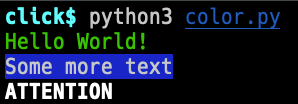
フォントや背景に色を付けることが出来ます。
サンプルコード
import click

click.echo(click.style("Hello World!", fg="green"))
click.echo(click.style("Some more text", bg="blue", fg="white"))
click.echo(click.style("ATTENTION", blink=True, bold=True))
実行結果
ヘルプに docstring を表示する
docstring の内容をヘルプに表示することが出来ます。
サンプルコード
import click


@click.command()
@click.option("--count", default=1, help="number of greetings")
@click.argument("name")
def hello(count, name):
    """This script prints hello NAME COUNT times."""
    for x in range(count):
        click.echo(f"Hello {name}!")


if __name__ == "__main__":
    hello()
実行結果
$ python3 help.py --help
Usage: help.py [OPTIONS] NAME

  This script prints hello NAME COUNT times.

Options:
  --count INTEGER  number of greetings
  --help           Show this message and exit.
サブコマンドを実装する
サブコマンドのことを click では Nesting Commands と呼ぶようです。
サンプルコード
import click


@click.group()
def cli():
    pass


@cli.command()
def initdb():
    click.echo("Initialized the database")


@cli.command()
def dropdb():
    click.echo("Dropped the database")


if __name__ == "__main__":
    cli()