GitHub ActionsからDockerでMkDocsビルドを実行し、Nginxでサイトを公開する
Markdownで記載したコンテンツをGitHub Actionsの(Pagesなどでは無く)Self-Hosted Runnerを使ってMkDocsでビルドし、NginxでWebサイトとして公開する手順をメモしておきます。MkDocs自体はsig9/mkdocs-materialというDockerコンテナを使ってビルドします。
尚、今回はSelf-Hosted Runner側にはx64のUbuntuを利用します。
検証環境
| 対象 | バージョン |
|---|---|
| Ubuntu | 24.04.3 LTS |
| Docker | 28.5.1 |
| Nginx | 1.24.0 |
Dockerのインストール
Ubuntu へ docker をインストールするワンライナーの内容に従ってワンライナーでDockerをインストールします。
Nginxのインストール
Ubuntu 22.04.4LTS へ Nginx をインストールするの手順に従ってUbuntu公式リポジトリからNginxをインストールします。また、同メモ中に記載があるようにドキュメントルートをApache風にしています。
sudo apt install -y nginx && \
sudo rm -f /usr/share/nginx/html/index.html && \
sudo rm -rf /var/www/html/ && \
sudo ln -s /usr/share/nginx/html /var/www/
GitHub Actions用ユーザの作成
Slef-Hosted Runner用のLinuxユーザを作成します。
セキュリティ的には好ましくありませんが、GitHub ActionsでCI/CDする際に権限不足とならないよう、/etc/sudoersに無制限でsudo出来る設定をします。
Self-Hosted Runnerのインストール
Step.1
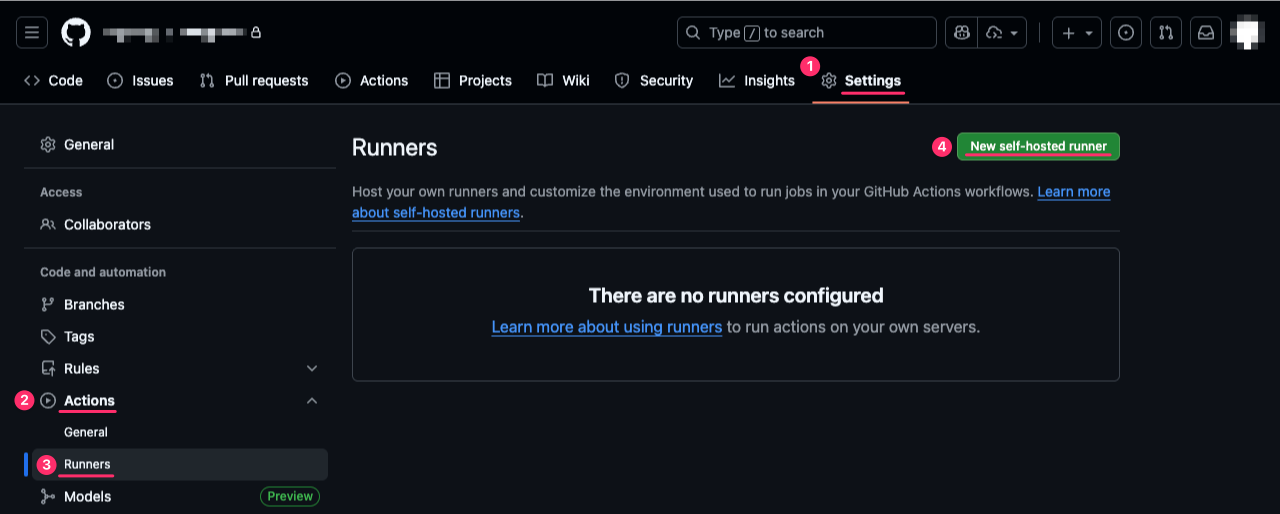
GitHubのリポジトリ画面からSettings→Actions→Runners→New self-hosted runnerをクリックします。
Step.2
今回利用するRunner環境にあわせてRunner ImageにはLinuxを、Architectureにはx64を選択します。次にLinux上でDownloadとConfigureセクションのコマンドを実行します。但し、./run.shは実行せず、その手前で止めます。run.shは一時的にRunnerを起動しますが、OS再起動などを実施するとRunnerは停止状態に戻ります。これでは不便である為、後の手順でRunnerをサービスとしてインストールします。
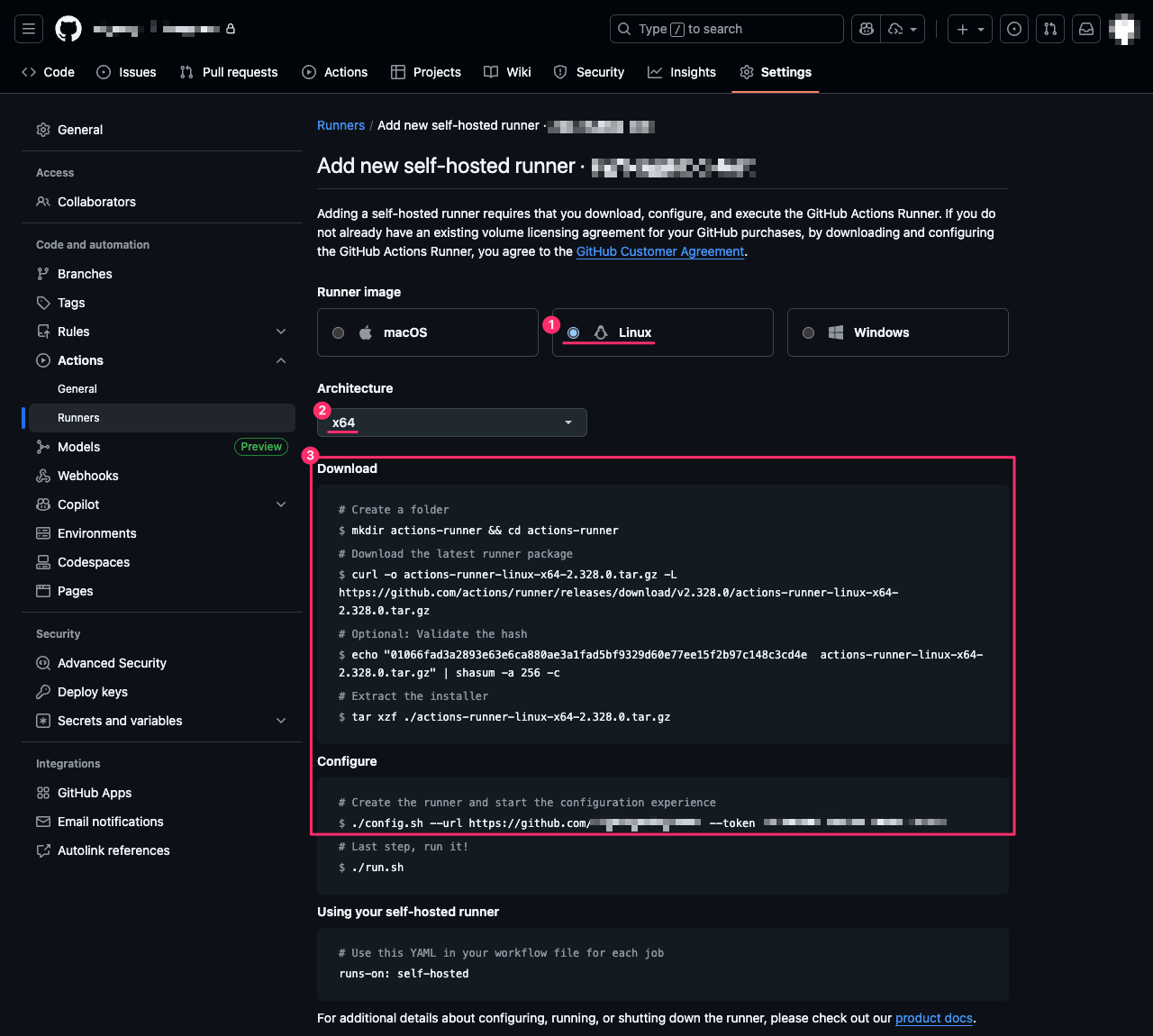
実際の実行例は以下の通りです。rootユーザで作業することは推奨されない為、事前に作成しておいたユーザへ切り替えて作業を行います。
# sudo su - actions-runner
$ mkdir actions-runner && cd actions-runner
$ curl -o actions-runner-linux-x64-2.328.0.tar.gz -L https://github.com/actions/runner/releases/download/v2.328.0/actions-runner-linux-x64-2.328.0.tar.gz
  % Total    % Received % Xferd  Average Speed   Time    Time     Time  Current
                                 Dload  Upload   Total   Spent    Left  Speed
  0     0    0     0    0     0      0      0 --:--:-- --:--:-- --:--:--     0
100  216M  100  216M    0     0  39.9M      0  0:00:05  0:00:05 --:--:-- 38.3M
$ echo "01066fad3a2893e63e6ca880ae3a1fad5bf9329d60e77ee15f2b97c148c3cd4e  actions-runner-linux-x64-2.328.0.tar.gz" | shasum -a 256 -c
actions-runner-linux-x64-2.328.0.tar.gz: OK
$ tar xzf ./actions-runner-linux-x64-2.328.0.tar.gz
$ ./config.sh --url https://github.com/xxxxxxx/yyyyyyyyy --token ZZZZZZZZZZZZZZZZZZZZZZZZZZZZZ

--------------------------------------------------------------------------------
|        ____ _ _   _   _       _          _        _   _                      |
|       / ___(_) |_| | | |_   _| |__      / \   ___| |_(_) ___  _ __  ___      |
|      | |  _| | __| |_| | | | | '_ \    / _ \ / __| __| |/ _ \| '_ \/ __|     |
|      | |_| | | |_|  _  | |_| | |_) |  / ___ \ (__| |_| | (_) | | | \__ \     |
|       \____|_|\__|_| |_|\__,_|_.__/  /_/   \_\___|\__|_|\___/|_| |_|___/     |
|                                                                              |
|                       Self-hosted runner registration                        |
|                                                                              |
--------------------------------------------------------------------------------

# Authentication


√ Connected to GitHub

# Runner Registration

Enter the name of the runner group to add this runner to: [press Enter for Default]

Enter the name of runner: [press Enter for localhost] runner1

This runner will have the following labels: 'self-hosted', 'Linux', 'X64'
Enter any additional labels (ex. label-1,label-2): [press Enter to skip]

√ Runner successfully added
√ Runner connection is good

# Runner settings

Enter name of work folder: [press Enter for _work]

√ Settings Saved.
Step.3
Runnerがインストールされましたが、まだオフライン状態です。
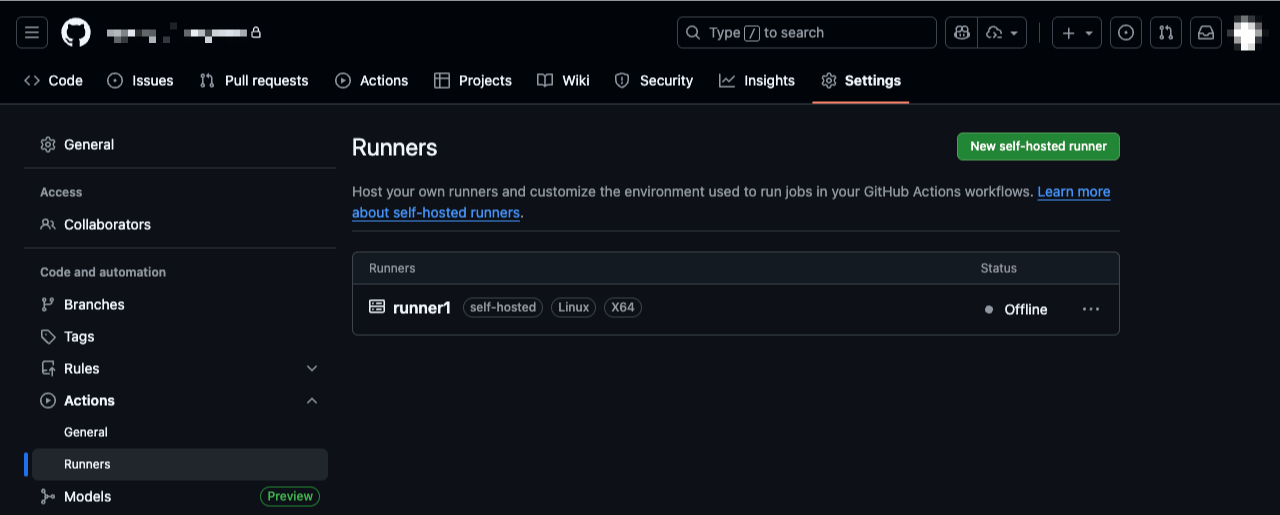
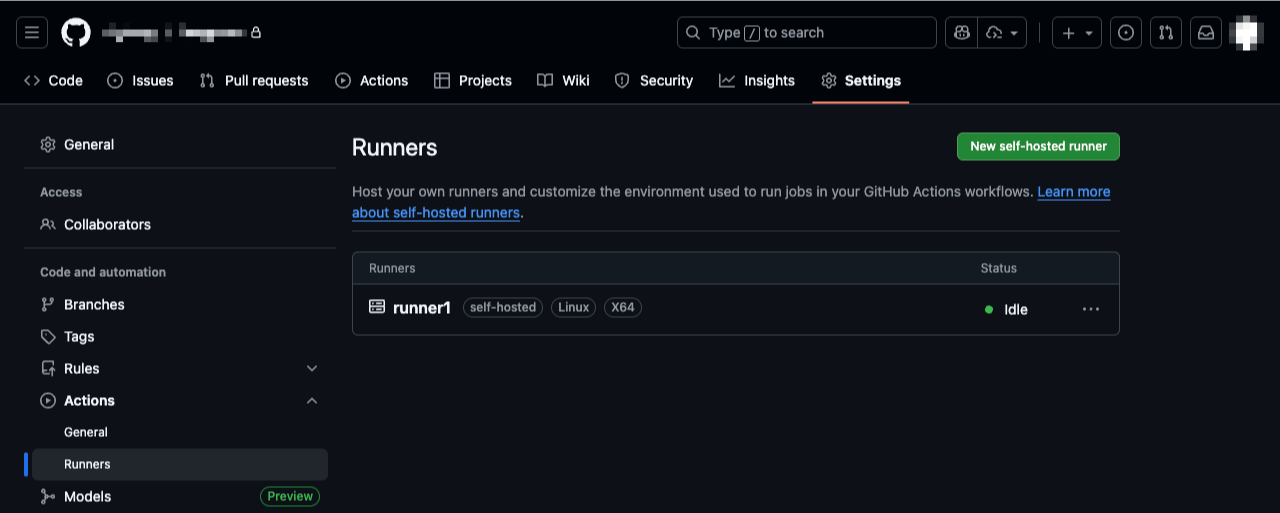
Runnerをサービスとして起動します。初期状態で自動起動設定にはなっていたのですが停止していた為、あわせてサービスを開始します。
これでオンライン状態(Idle)になりました。
Workflowの設定
Gitリポジトリは以下のディレクトリ構造にしました。.github/workflows/ディレクトリ配下にGitHub Actionsで実行させたいWorkflowを定義したYAMLファイルを任意のファイル名で保存します。
├── .github
│   └── workflows
│       └── mkdocs_build.yml
├── .gitignore
├── docs
│   └── index.md
├── mkdocs.yml
└── requirements.txt
今回、Workflowの内容は以下にしました。
name: Build and Deploy MkDocs (Self-Hosted)
on:
  push:
    branches: [main]

jobs:
  build-and-deploy:
    runs-on: self-hosted
    steps:
      - name: Checkout code
        uses: actions/checkout@v5

      - name: Build MkDocs site
        run: |
          sudo docker run --rm \
            -v ${{ github.workspace }}:/root \
            sig9/mkdocs-material:9.6.21 \
            mkdocs build --clean --strict
          sudo chown -R `id -u`:`id -g` ${{ github.workspace }}/site

      - name: Deploy to /var/www/html
        run: |
          sudo rm -rf /var/www/html/*
          sudo cp -r ${{ github.workspace }}/site/* /var/www/html/
          sudo chown -R www-data:www-data /var/www/html
          sudo chmod -R 755 /var/www/html
CI/CDする
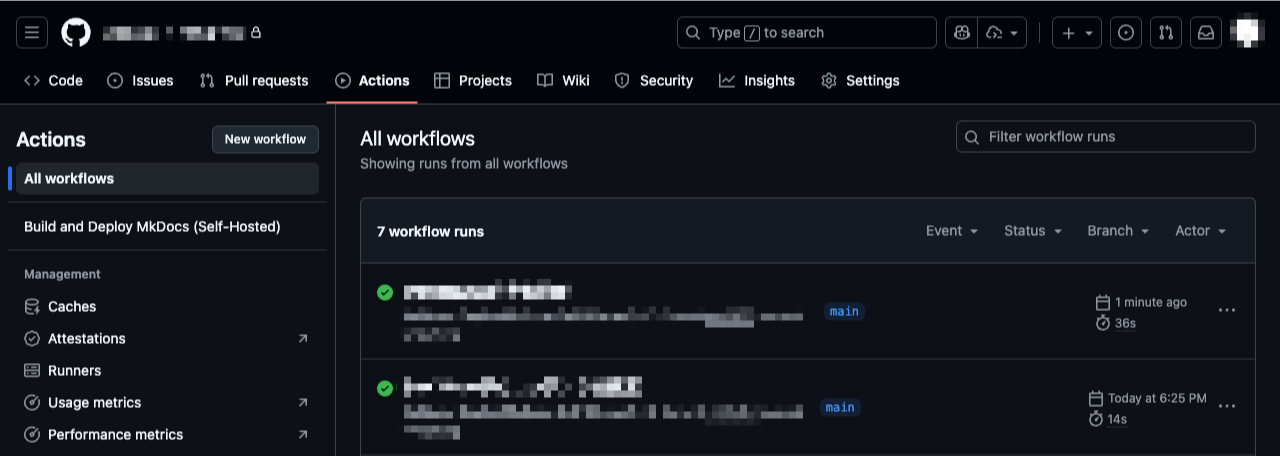
この状態でGitHub上のリポジトリへPushされるとGitHub Actionsが実行されます。
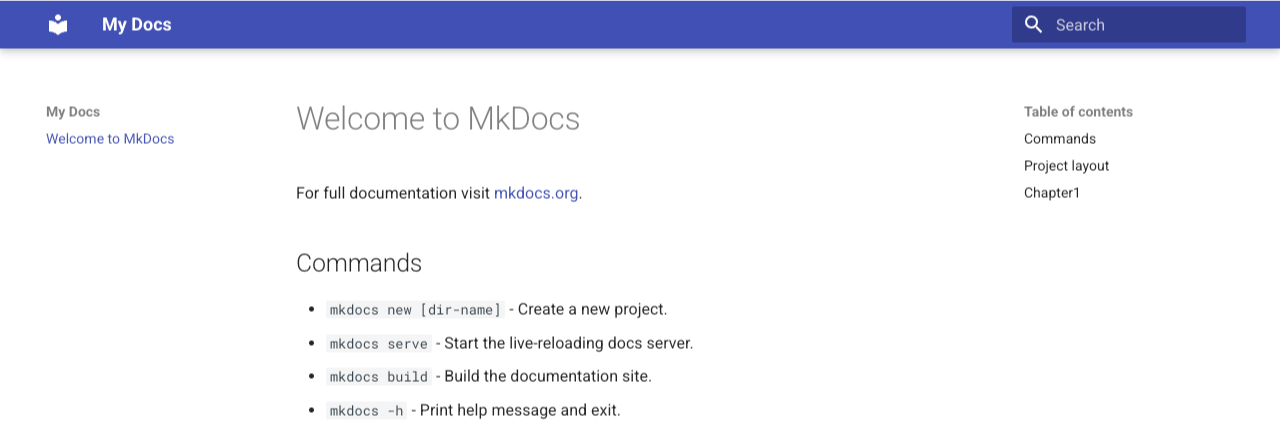
WebブラウザでLinuxサーバへアクセスするとMkDocsでビルドされたサイトが表示されました。
参考
mkdocs buildのヘルプ
# mkdocs build --help
Usage: mkdocs build [OPTIONS]

  Build the MkDocs documentation.

Options:
  -c, --clean / --dirty           Remove old files from the site_dir before building (the default).
  -f, --config-file FILENAME      Provide a specific MkDocs config. This can be a file name, or '-' to read from
                                  stdin.
  -s, --strict / --no-strict      Enable strict mode. This will cause MkDocs to abort the build on any warnings.
  -t, --theme [mkdocs|readthedocs]
                                  The theme to use when building your documentation.
  --use-directory-urls / --no-directory-urls
                                  Use directory URLs when building pages (the default).
  -d, --site-dir PATH             The directory to output the result of the documentation build.
  -q, --quiet                     Silence warnings
  -v, --verbose                   Enable verbose output
  -h, --help                      Show this message and exit.
svc.sh
#!/bin/bash

SVC_NAME="actions.runner.sig9org-blog-test.runner1.service"
SVC_NAME=${SVC_NAME// /_}
SVC_DESCRIPTION="GitHub Actions Runner (sig9org-blog-test.runner1)"

SVC_CMD=$1
arg_2=${2}

RUNNER_ROOT=`pwd`

UNIT_PATH=/etc/systemd/system/${SVC_NAME}
TEMPLATE_PATH=$GITHUB_ACTIONS_RUNNER_SERVICE_TEMPLATE
IS_CUSTOM_TEMPLATE=0
if [[ -z $TEMPLATE_PATH ]]; then
    TEMPLATE_PATH=./bin/actions.runner.service.template
else
    IS_CUSTOM_TEMPLATE=1
fi
TEMP_PATH=./bin/actions.runner.service.temp
CONFIG_PATH=.service

user_id=`id -u`

# systemctl must run as sudo
# this script is a convenience wrapper around systemctl
if [ $user_id -ne 0 ]; then
    echo "Must run as sudo"
    exit 1
fi

function failed()
{
   local error=${1:-Undefined error}
   echo "Failed: $error" >&2
   exit 1
}

if [ ! -f "${TEMPLATE_PATH}" ]; then
    if [[ $IS_CUSTOM_TEMPLATE = 0 ]]; then
        failed "Must run from runner root or install is corrupt"
    else
        failed "Service file at '$GITHUB_ACTIONS_RUNNER_SERVICE_TEMPLATE' using GITHUB_ACTIONS_RUNNER_SERVICE_TEMPLATE env variable is not found"
    fi
fi

#check if we run as root
if [[ $(id -u) != "0" ]]; then
    echo "Failed: This script requires to run with sudo." >&2
    exit 1
fi

function install()
{
    echo "Creating launch runner in ${UNIT_PATH}"
    if [ -f "${UNIT_PATH}" ]; then
        failed "error: exists ${UNIT_PATH}"
    fi

    if [ -f "${TEMP_PATH}" ]; then
      rm "${TEMP_PATH}" || failed "failed to delete ${TEMP_PATH}"
    fi

    # can optionally use username supplied
    run_as_user=${arg_2:-$SUDO_USER}
    echo "Run as user: ${run_as_user}"

    run_as_uid=$(id -u ${run_as_user}) || failed "User does not exist"
    echo "Run as uid: ${run_as_uid}"

    run_as_gid=$(id -g ${run_as_user}) || failed "Group not available"
    echo "gid: ${run_as_gid}"

    sed "s/{{User}}/${run_as_user}/g; s/{{Description}}/$(echo ${SVC_DESCRIPTION} | sed -e 's/[\/&]/\\&/g')/g; s/{{RunnerRoot}}/$(echo ${RUNNER_ROOT} | sed -e 's/[\/&]/\\&/g')/g;" "${TEMPLATE_PATH}" > "${TEMP_PATH}" || failed "failed to create replacement temp file"
    mv "${TEMP_PATH}" "${UNIT_PATH}" || failed "failed to copy unit file"

    # Recent Fedora based Linux (CentOS/Redhat) has SELinux enabled by default
    # We need to restore security context on the unit file we added otherwise SystemD have no access to it.
    command -v getenforce > /dev/null
    if [ $? -eq 0 ]
    then
        selinuxEnabled=$(getenforce)
        if [[ $selinuxEnabled == "Enforcing" ]]
        then
            # SELinux is enabled, we will need to Restore SELinux Context for the service file
            restorecon -r -v "${UNIT_PATH}" || failed "failed to restore SELinux context on ${UNIT_PATH}"
        fi
    fi

    # unit file should not be executable and world writable
    chmod 664 "${UNIT_PATH}" || failed "failed to set permissions on ${UNIT_PATH}"
    systemctl daemon-reload || failed "failed to reload daemons"

    # Since we started with sudo, runsvc.sh will be owned by root. Change this to current login user.
    cp ./bin/runsvc.sh ./runsvc.sh || failed "failed to copy runsvc.sh"
    chown ${run_as_uid}:${run_as_gid} ./runsvc.sh || failed "failed to set owner for runsvc.sh"
    chmod 755 ./runsvc.sh || failed "failed to set permission for runsvc.sh"

    systemctl enable ${SVC_NAME} || failed "failed to enable ${SVC_NAME}"

    echo "${SVC_NAME}" > ${CONFIG_PATH} || failed "failed to create .service file"
    chown ${run_as_uid}:${run_as_gid} ${CONFIG_PATH} || failed "failed to set permission for ${CONFIG_PATH}"
}

function start()
{
    systemctl start ${SVC_NAME} || failed "failed to start ${SVC_NAME}"
    status
}

function stop()
{
    systemctl stop ${SVC_NAME} || failed "failed to stop ${SVC_NAME}"
    status
}

function uninstall()
{
    if service_exists; then
        stop
        systemctl disable ${SVC_NAME} || failed "failed to disable ${SVC_NAME}"
        rm "${UNIT_PATH}" || failed "failed to delete ${UNIT_PATH}"
    else
        echo "Service ${SVC_NAME} is not installed"
    fi
    if [ -f "${CONFIG_PATH}" ]; then
      rm "${CONFIG_PATH}" || failed "failed to delete ${CONFIG_PATH}"
    fi
    systemctl daemon-reload || failed "failed to reload daemons"
}

function service_exists() {
    if [ -f "${UNIT_PATH}" ]; then
        return 0
    else
        return 1
    fi
}

function status()
{
    if service_exists; then
        echo
        echo "${UNIT_PATH}"
    else
        echo
        echo "not installed"
        echo
        exit 1
    fi

    systemctl --no-pager status ${SVC_NAME}
}

function usage()
{
    echo
    echo Usage:
    echo "./svc.sh [install, start, stop, status, uninstall]"
    echo "Commands:"
    echo "   install [user]: Install runner service as Root or specified user."
    echo "   start: Manually start the runner service."
    echo "   stop: Manually stop the runner service."
    echo "   status: Display status of runner service."
    echo "   uninstall: Uninstall runner service."
    echo
}

case $SVC_CMD in
   "install") install;;
   "status") status;;
   "uninstall") uninstall;;
   "start") start;;
   "stop") stop;;
   "status") status;;
   *) usage;;
esac

exit 0