Zensicalでコンテンツにテンプレートを適用する
Zensicalは標準で各ページのコンテンツにテンプレートを適用する機能をもっています。今回はこの機能の使い方をメモします。公式サイトではConfiguring overridesで説明されています。
検証環境
| 対象 | バージョン |
|---|---|
| Zensical | 0.0.8 |
カスタムディレクトリの定義
Zensicalの設定ファイルであるzensical.tomlにカスタムディレクトリ(custom_dir)を定義します。このディレクトリ内にテンプレートを配置することになります。
zensical.toml
[project]
site_name = "Documentation"
site_description = "A new project generated from the default template project."
site_author = "<your name here>"
copyright = """
Copyright © 2025 The authors
"""
[project.theme]
language = "en"
features = [
"announce.dismiss",
"content.code.annotate",
"content.code.copy",
"content.code.select",
"content.footnote.tooltips",
"content.tabs.link",
"content.tooltips",
"navigation.footer",
"navigation.indexes",
"navigation.instant",
"navigation.instant.prefetch",
"navigation.path",
"navigation.sections",
"navigation.top",
"navigation.tracking",
"search.highlight",
]
custom_dir = "overrides"
[[project.theme.palette]]
scheme = "default"
toggle.icon = "lucide/sun"
toggle.name = "Switch to dark mode"
[[project.theme.palette]]
scheme = "slate"
toggle.icon = "lucide/moon"
toggle.name = "Switch to light mode"
テンプレートファイルの用意
カスタムディレクトリ(今回はoverrides)配下に「template1.html」というファイルを用意します。
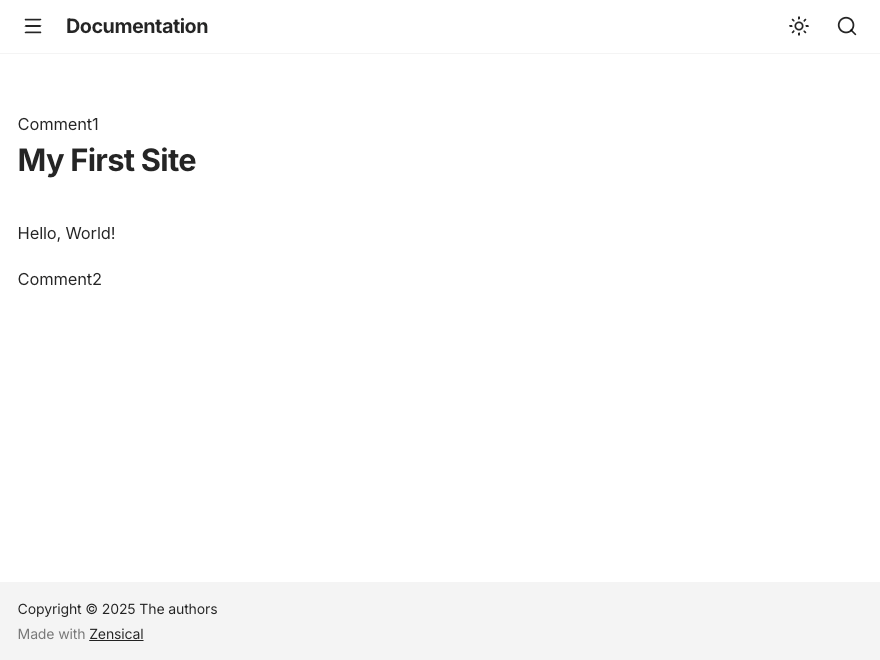
このファイルは以下の内容にしました。{{ super() }}にコンテンツが入りますが、その前後を「Comment1」と「Comment2」という文字列で挟んでみました。
template1.html
{% extends "base.html" %}

{% block content %}
  <div>
      Comment1
  </div>
  {{ super() }}
  <div>
      Comment2
  </div>
{% endblock %}
テンプレートを参照したコンテンツの用意
コンテンツを用意します。ヘッダ部分で「template: template1.html」と宣言し、テンプレートの参照を宣言します。
実際の表示結果
このコンテンツをWebブラウザで表示すると以下のように表示されました。