Ubuntu26.04LTSにZabbix7.4+agent2をインストールする
以前にUbuntu24.04LTS へ Zabbix をインストールするというメモを書きました。今回は以下の組み合わせでインストールする手順をメモしておきます。
- Ubuntu26.04LTS
- Zabbix7.4
- Zabbix Agent2
- MySQL
- Nginx
ダウンロード手順は公式サイトのDownload and install Zabbixで説明されています。
検証環境
| 対象 | バージョン |
|---|---|
| Ubuntu | 26.04LTS |
| Zabbix | 7.4.11 |
| Nginx | 1.28.3 |
| PostgreSQL | 18.4 |
今回のコマンドサマリー
wget https://repo.zabbix.com/zabbix/7.4/release/ubuntu/pool/main/z/zabbix-release/zabbix-release_latest_7.4+ubuntu26.04_all.deb && \
dpkg -i zabbix-release_latest_7.4+ubuntu26.04_all.deb && \
apt update && \
apt install -y \
  php8.5-pgsql \
  postgresql \
  zabbix-agent2 \
  zabbix-frontend-php \
  zabbix-nginx-conf \
  zabbix-server-pgsql \
  zabbix-sql-scripts
以下を実行すると対話的なパスワード入力を求められます。
sudo -u postgres createdb -O zabbix zabbix && \
zcat /usr/share/zabbix/sql-scripts/postgresql/server.sql.gz | sudo -u zabbix psql zabbix && \
sed -i -e "s/# DBPassword=/DBPassword=zabbix/g" /etc/zabbix/zabbix_server.conf
rm /etc/nginx/sites-enabled/default && \
locale-gen ja_JP.UTF-8 && \
systemctl restart zabbix-server zabbix-agent2 nginx php8.5-fpm && \
systemctl enable zabbix-server zabbix-agent2 nginx php8.5-fpm
インストール
公式ページの手順に従ってリポジトリの定義を追加し、必要なパッケージをインストールします。
wget https://repo.zabbix.com/zabbix/7.4/release/ubuntu/pool/main/z/zabbix-release/zabbix-release_latest_7.4+ubuntu26.04_all.deb && \
dpkg -i zabbix-release_latest_7.4+ubuntu26.04_all.deb && \
apt update && \
apt install -y \
  php8.5-pgsql \
  postgresql \
  zabbix-agent2 \
  zabbix-frontend-php \
  zabbix-nginx-conf \
  zabbix-server-pgsql \
  zabbix-sql-scripts
OSの種類・バージョンごとの注意点
同じUbuntuであっても26.04LTS以外の場合はパッケージが異なるようですので注意します。例えばUbuntu24.04LTSであれば、現時点では以下になるようです。
wget https://repo.zabbix.com/zabbix/7.4/release/ubuntu/pool/main/z/zabbix-release/zabbix-release_latest_7.4+ubuntu24.04_all.deb && \
dpkg -i zabbix-release_latest_7.4+ubuntu24.04_all.deb && \
apt update && \
apt install -y \
  php8.3-pgsql \
  postgresql \
  zabbix-agent2 \
  zabbix-frontend-php \
  zabbix-nginx-conf \
  zabbix-server-pgsql \
  zabbix-sql-scripts
プラグインのインストール
任意ですがMongoDBやMSSQL、PostgreSQLも監視したい場合は以下もインストールします。
apt install -y && \
  zabbix-agent2-plugin-mongodb
  zabbix-agent2-plugin-mssql
  zabbix-agent2-plugin-postgresql
データベースの初期設定
PostgreSQLにZabbix用のユーザを作成します。パスワードは任意のものを指定します。
実際の実行例は以下です。
データベースを作成し、初期化します。
sudo -u postgres createdb -O zabbix zabbix && \
zcat /usr/share/zabbix/sql-scripts/postgresql/server.sql.gz | sudo -u zabbix psql zabbix
データベースのパスワードを変更します。以下ではパスワードを「password」にしていますが、これは任意のものへ変更します。
Nginxのデフォルトサイトを無効化
デフォルトのままではインストール完了後にWebブラウザから「LinuxのIPアドレス」へアクセスしても(Zabbixのコンテンツでは無く)Nginxのデフォルトページが表示されてしまいます。これを避ける為にNginxのデフォルトサイトを無効化しておきます。
日本語ロケールを有効化する
必須ではありませんが、日本語ロケールが有効になっていれば後の手順でZabbixの初期セットアップする際、デフォルトの言語として日本語を選択することができます。現在のロケールは以下で確認できます。
日本語ロケールを生成するには以下を実行します。
サービスの開始
この時点では「zabbix-server」が停止した状態でした(「zabbix-agent2」「nginx」「php8.5-fpm」は開始していました)。設定ファイルを修正しているものもある為、関連サービス一式を再起動・自動起動設定します。
systemctl restart zabbix-server zabbix-agent2 nginx php8.5-fpm && \
systemctl enable zabbix-server zabbix-agent2 nginx php8.5-fpm
関連サービス一式が正しく起動していることを確認します。
Zabbixの初期設定
Step.1
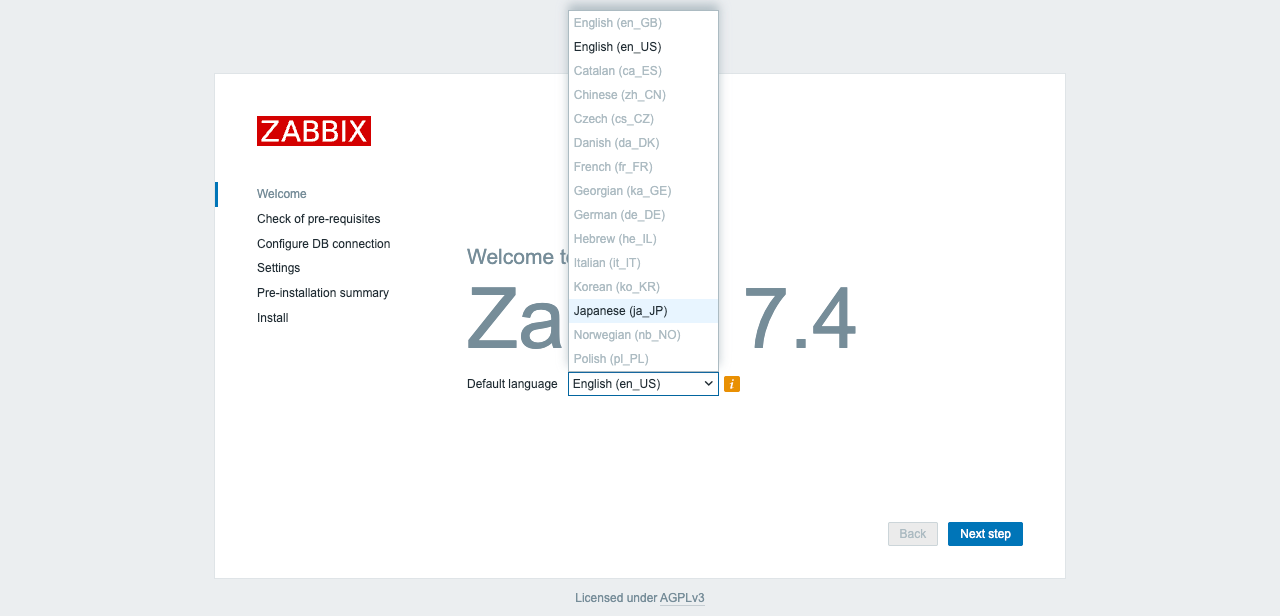
Webブラウザで「http://ADDRESS」へアクセスするとZabbixの初期セットアップ画面が表示されます。「Default Language」を「Japanese (ja_JP)」に設定し、「Next」をクリックします。
Step.2
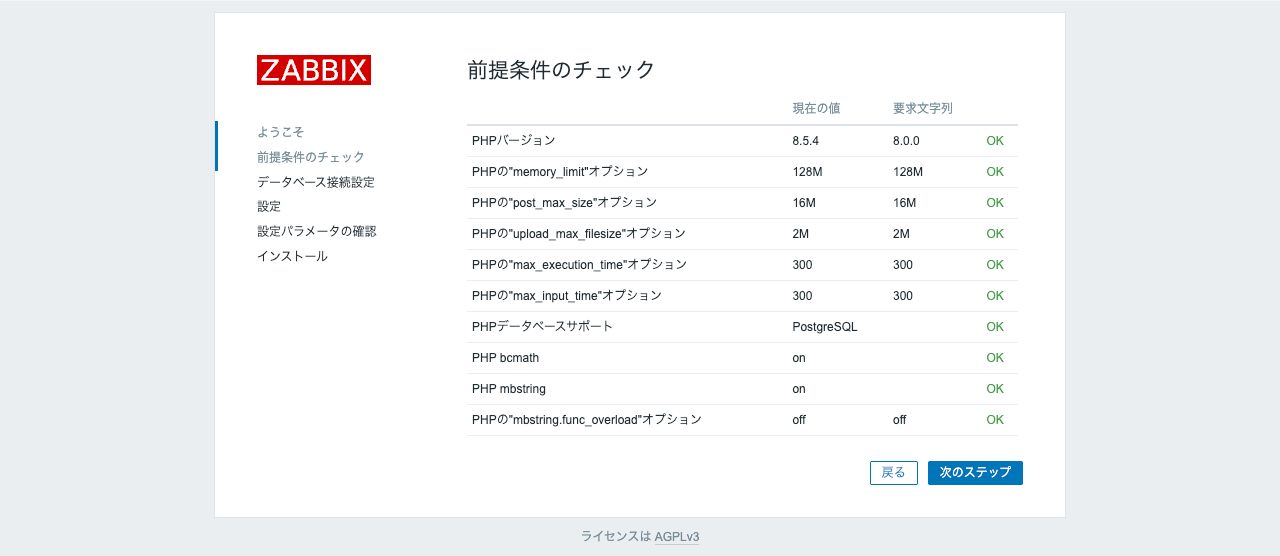
「前提条件のチェック」が全てOKになっていることを確認します。「次のステップ」をクリックします。
Step.3
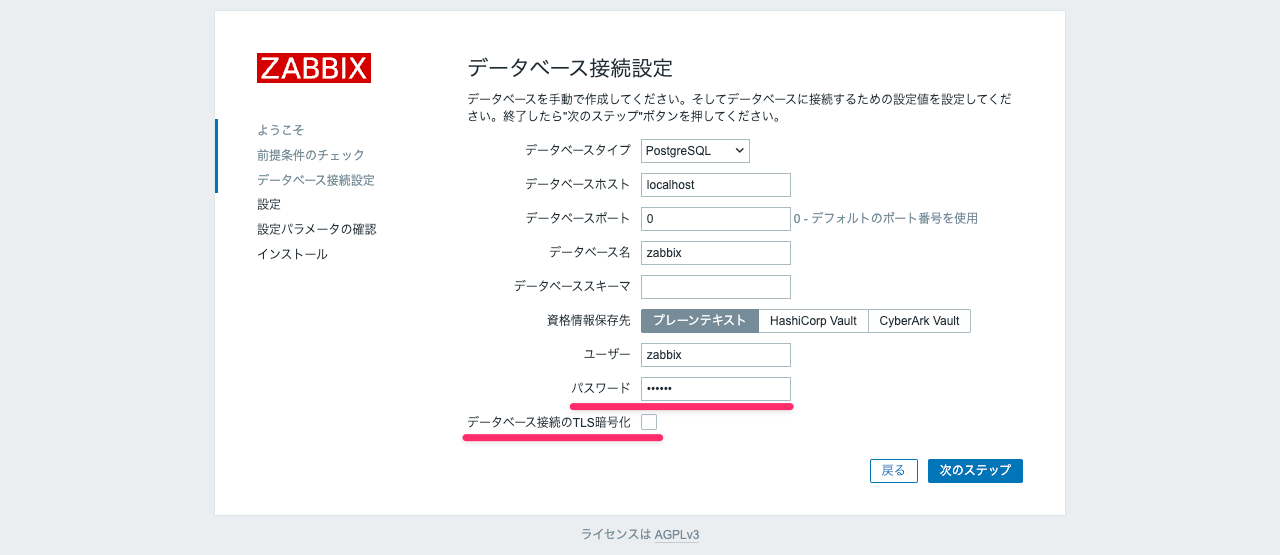
「パスワード」には事前の手順でPostgreSQL上に作成した「zabbix」ユーザのパスワードを入力します。「データベース接続のTLS暗号化」のチェックを外したら「次のステップ」をクリックします。
Step.4
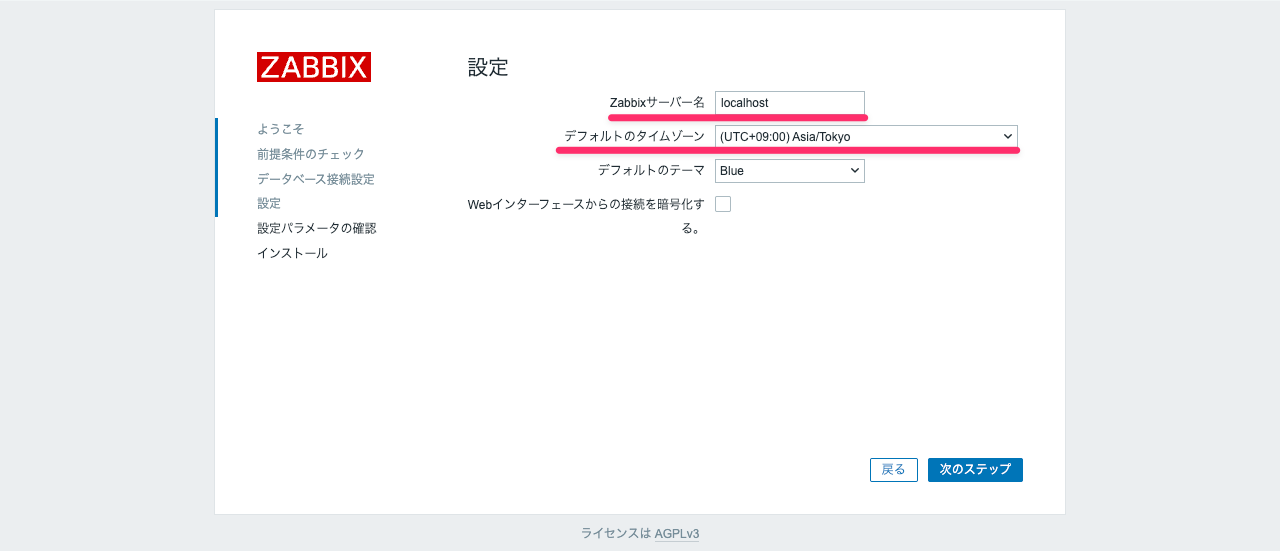
Zabbixサーバー名には「localhost」を入力します。デフォルトのタイムゾーンを「(UTC+09:00) Asia/Tokyo」へ変更し、「次のステップ」をクリックします。
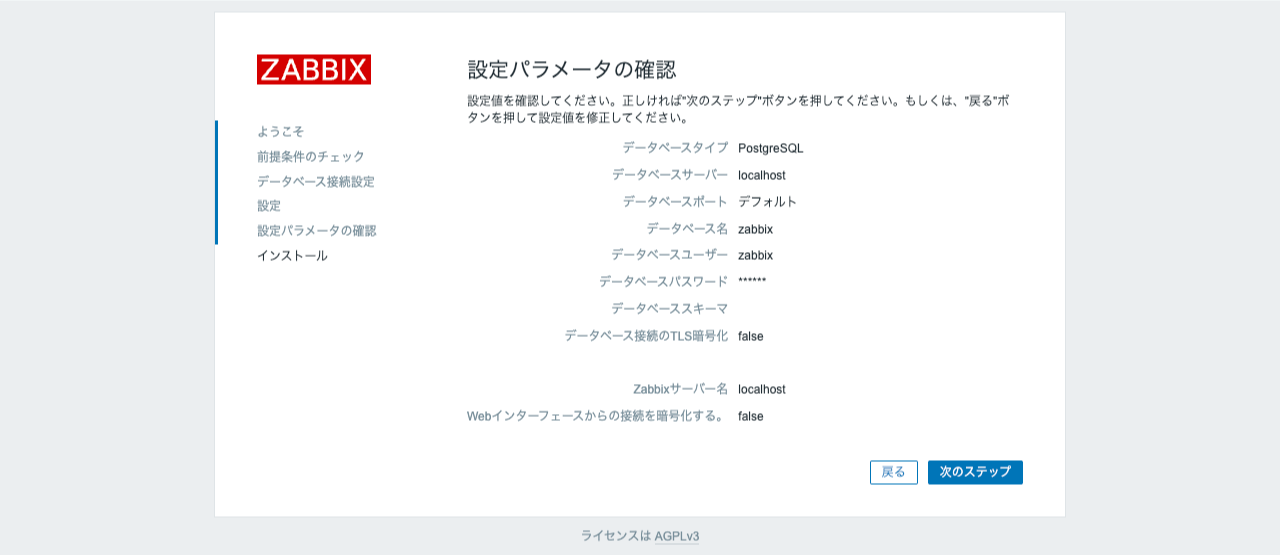
Step.5
ここまでに設定したパラメータが表示されます。意図したものであることを確認したら「次のステップ」をクリックします。
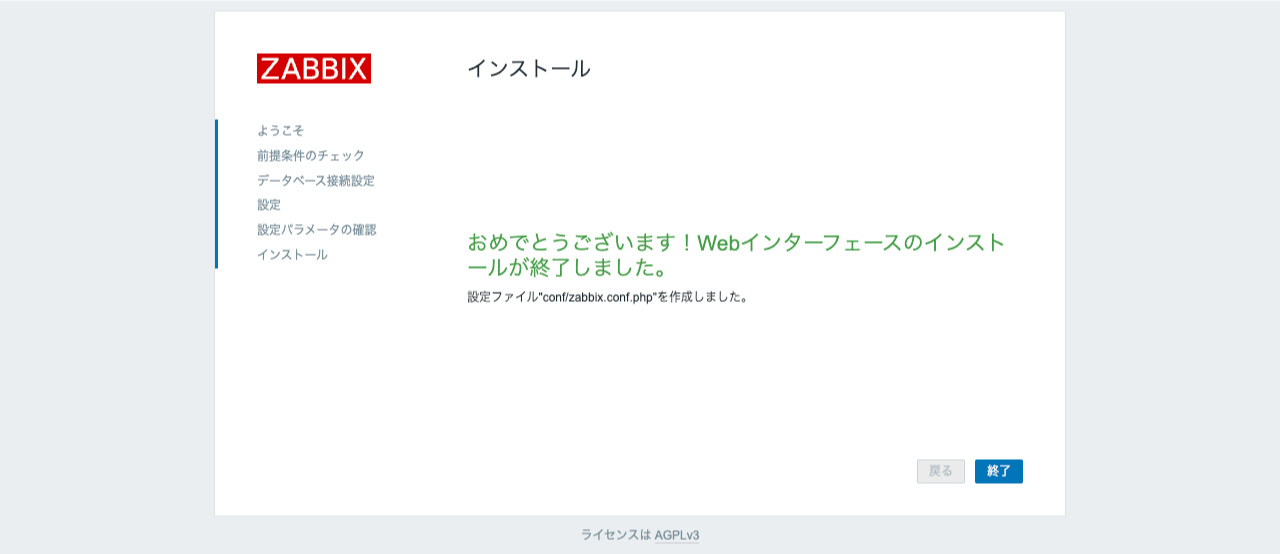
Step.6
これでインストールは完了です。「終了」をクリックします。
Zabbixへログインする
Step.1
Zabbixの初期ユーザ情報は以下です。Zabbixログインフォームへユーザ名・パスワードを入力し、「サインイン」をクリックします。
| ユーザ名 | パスワード |
|---|---|
Admin |
zabbix |

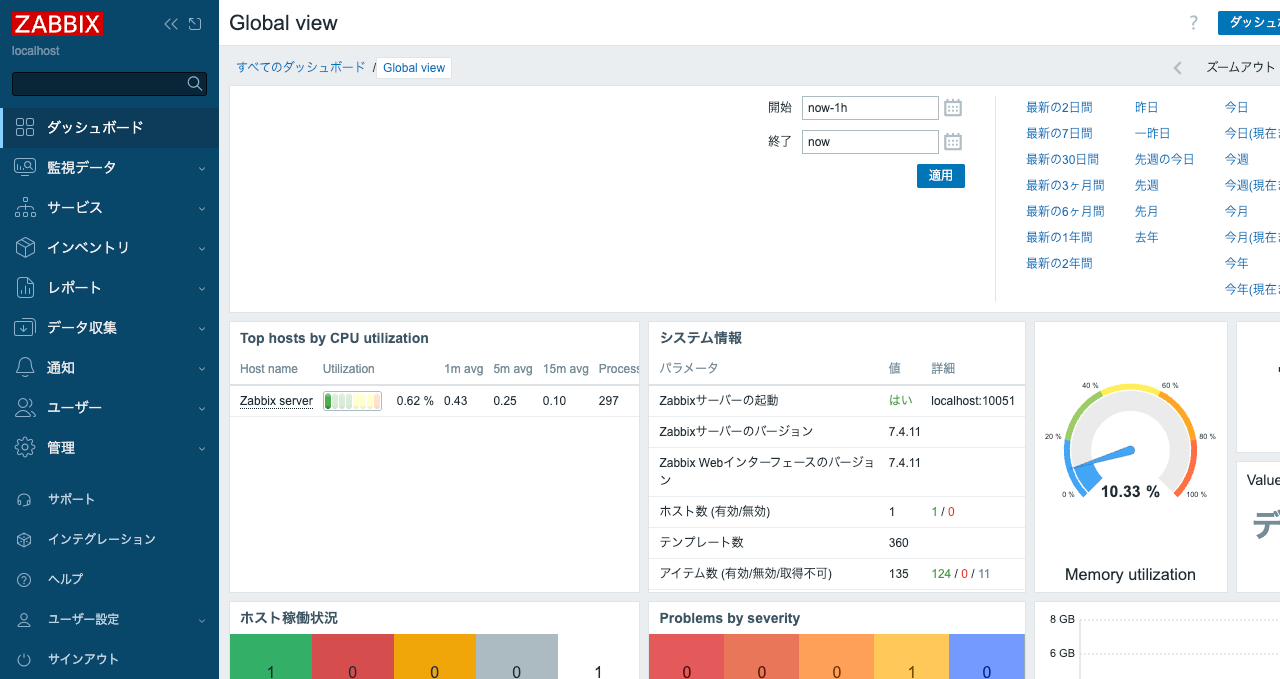
Step.2
Zabbixのダッシュボードが表示されればログイン成功です。
参考
# This is a configuration file for Zabbix server daemon
# To get more information about Zabbix, visit https://www.zabbix.com

############ GENERAL PARAMETERS #################

### Option: ListenPort
#       Listen port for trapper.
#
# Mandatory: no
# Range: 1024-32767
# Default:
# ListenPort=10051

### Option: SourceIP
#       Source IP address for outgoing connections.
#
# Mandatory: no
# Default:
# SourceIP=

### Option: LogType
#       Specifies where log messages are written to:
#               system  - syslog
#               file    - file specified with LogFile parameter
#               console - standard output
#
# Mandatory: no
# Default:
# LogType=file

### Option: LogFile
#       Log file name for LogType 'file' parameter.
#
# Mandatory: yes, if LogType is set to file, otherwise no
# Default:
# LogFile=

LogFile=/var/log/zabbix/zabbix_server.log

### Option: LogFileSize
#       Maximum size of log file in MB.
#       0 - disable automatic log rotation.
#
# Mandatory: no
# Range: 0-1024
# Default:
# LogFileSize=1

LogFileSize=0

### Option: DebugLevel
#       Specifies debug level:
#       0 - basic information about starting and stopping of Zabbix processes
#       1 - critical information
#       2 - error information
#       3 - warnings
#       4 - for debugging (produces lots of information)
#       5 - extended debugging (produces even more information)
#
# Mandatory: no
# Range: 0-5
# Default:
# DebugLevel=3

### Option: PidFile
#       Name of PID file.
#
# Mandatory: no
# Default:
# PidFile=/tmp/zabbix_server.pid

PidFile=/run/zabbix/zabbix_server.pid

### Option: SocketDir
#       IPC socket directory.
#               Directory to store IPC sockets used by internal Zabbix services.
#
# Mandatory: no
# Default:
# SocketDir=/tmp

SocketDir=/run/zabbix

### Option: DBHost
#       Database host name.
#       If set to localhost, socket is used for MySQL.
#       If set to empty string, socket is used for PostgreSQL.
#
# Mandatory: no
# Default:
# DBHost=localhost

### Option: DBName
#       Database name.
#
# Mandatory: yes
# Default:
# DBName=

DBName=zabbix

### Option: DBSchema
#       Schema name. Used for PostgreSQL.
#
# Mandatory: no
# Default:
# DBSchema=

### Option: DBUser
#       Database user.
#
# Mandatory: no
# Default:
# DBUser=

DBUser=zabbix

### Option: DBPassword
#       Database password.
#       Comment this line if no password is used.
#
# Mandatory: no
# Default:
# DBPassword=

### Option: DBSocket
#       Path to MySQL socket.
#
# Mandatory: no
# Default:
# DBSocket=

### Option: DBPort
#       Database port when not using local socket.
#
# Mandatory: no
# Range: 1024-65535
# Default for MySQL: 3306
# Default for PostgreSQL: 5432
# DBPort=

### Option: AllowUnsupportedDBVersions
#       Allow server to work with unsupported database versions.
#       0 - do not allow
#       1 - allow
#
# Mandatory: no
# Default:
# AllowUnsupportedDBVersions=0

### Option: HistoryStorageURL
#       History storage HTTP[S] URL.
#
# Mandatory: no
# Default:
# HistoryStorageURL=

### Option: HistoryStorageTypes
#       Comma separated list of value types to be sent to the history storage.
#
# Mandatory: no
# Default:
# HistoryStorageTypes=uint,dbl,str,log,text

### Option: HistoryStorageDateIndex
#       Enable preprocessing of history values in history storage to store values in different indices based on date.
#       0 - disable
#       1 - enable
#
# Mandatory: no
# Default:
# HistoryStorageDateIndex=0

### Option: ExportDir
#       Directory for real time export of events, history and trends in newline delimited JSON format.
#       If set, enables real time export.
#
# Mandatory: no
# Default:
# ExportDir=

### Option: ExportFileSize
#       Maximum size per export file in bytes.
#       Only used for rotation if ExportDir is set.
#
# Mandatory: no
# Range: 1M-1G
# Default:
# ExportFileSize=1G

### Option: ExportType
#       List of comma delimited types of real time export - allows to control export entities by their
#       type (events, history, trends) individually.
#       Valid only if ExportDir is set.
#
# Mandatory: no
# Default:
# ExportType=events,history,trends

############ ADVANCED PARAMETERS ################

### Option: StartPollers
#       Number of pre-forked instances of pollers.
#
# Mandatory: no
# Range: 0-1000
# Default:
# StartPollers=5

### Option: StartAgentPollers
#       Number of pre-forked instances of asynchronous Zabbix agent pollers. Also see MaxConcurrentChecksPerPoller.
#
# Mandatory: no
# Range: 0-1000
# Default:
# StartAgentPollers=1

### Option: StartHTTPAgentPollers
#       Number of pre-forked instances of asynchronous HTTP agent pollers. Also see MaxConcurrentChecksPerPoller.
#
# Mandatory: no
# Range: 0-1000
# Default:
# StartHTTPAgentPollers=1

### Option: StartSNMPPollers
#       Number of pre-forked instances of asynchronous SNMP pollers. Also see MaxConcurrentChecksPerPoller.
#
# Mandatory: no
# Range: 0-1000
# Default:
# StartSNMPPollers=1

### Option: MaxConcurrentChecksPerPoller
#       Maximum number of asynchronous checks that can be executed at once by each HTTP agent poller or agent poller.
#
# Mandatory: no
# Range: 1-1000
# Default:
# MaxConcurrentChecksPerPoller=1000

### Option: StartIPMIPollers
#       Number of pre-forked instances of IPMI pollers.
#               The IPMI manager process is automatically started when at least one IPMI poller is started.
#
# Mandatory: no
# Range: 0-1000
# Default:
# StartIPMIPollers=0


### Option: StartPreprocessors
#       Number of pre-started instances of preprocessing worker threads should be set to no less than
#       the available CPU core count. More workers should be set if preprocessing is not CPU-bound and has
#       lots of network requests.
# Mandatory: no
# Range: 1-1000
# Default:
# StartPreprocessors=16

### Option: StartConnectors
#       Number of pre-forked instances of connector workers.
#               The connector manager process is automatically started when connector worker is started.
#
# Mandatory: no
# Range: 0-1000
# Default:
# StartConnectors=0

### Option: StartPollersUnreachable
#       Number of pre-forked instances of pollers for unreachable hosts (including IPMI and Java).
#       At least one poller for unreachable hosts must be running if regular, IPMI or Java pollers
#       are started.
#
# Mandatory: no
# Range: 0-1000
# Default:
# StartPollersUnreachable=1

### Option: StartHistoryPollers
#       Number of pre-forked instances of history pollers.
#       Only required for calculated checks.
#       A database connection is required for each history poller instance.
#
# Mandatory: no
# Range: 0-1000
# Default:
# StartHistoryPollers=5

### Option: StartTrappers
#       Number of pre-forked instances of trappers.
#       Trappers accept incoming connections from Zabbix sender, active agents and active proxies.
#       At least one trapper process must be running to display server availability and view queue
#       in the frontend.
#
# Mandatory: no
# Range: 0-1000
# Default:
# StartTrappers=5

### Option: StartPingers
#       Number of pre-forked instances of ICMP pingers.
#
# Mandatory: no
# Range: 0-1000
# Default:
# StartPingers=1

### Option: StartDiscoverers
#       Number of pre-started instances of discovery workers.
#
# Mandatory: no
# Range: 0-1000
# Default:
# StartDiscoverers=5

### Option: StartHTTPPollers
#       Number of pre-forked instances of HTTP pollers.
#
# Mandatory: no
# Range: 0-1000
# Default:
# StartHTTPPollers=1

### Option: StartTimers
#       Number of pre-forked instances of timers.
#       Timers process maintenance periods.
#       Only the first timer process handles host maintenance updates. Problem suppression updates are shared
#       between all timers.
#
# Mandatory: no
# Range: 1-1000
# Default:
# StartTimers=1

### Option: StartEscalators
#       Number of pre-forked instances of escalators.
#
# Mandatory: no
# Range: 1-100
# Default:
# StartEscalators=1

### Option: StartAlerters
#       Number of pre-forked instances of alerters.
#       Alerters send the notifications created by action operations.
#
# Mandatory: no
# Range: 1-100
# Default:
# StartAlerters=3

### Option: JavaGateway
#       IP address (or hostname) of Zabbix Java gateway.
#       Only required if Java pollers are started.
#
# Mandatory: no
# Default:
# JavaGateway=

### Option: JavaGatewayPort
#       Port that Zabbix Java gateway listens on.
#
# Mandatory: no
# Range: 1024-32767
# Default:
# JavaGatewayPort=10052

### Option: StartJavaPollers
#       Number of pre-forked instances of Java pollers.
#
# Mandatory: no
# Range: 0-1000
# Default:
# StartJavaPollers=0

### Option: StartVMwareCollectors
#       Number of pre-forked vmware collector instances.
#
# Mandatory: no
# Range: 0-250
# Default:
# StartVMwareCollectors=0

### Option: VMwareFrequency
#       How often Zabbix will connect to VMware service to obtain a new data.
#
# Mandatory: no
# Range: 10-86400
# Default:
# VMwareFrequency=60

### Option: VMwarePerfFrequency
#       How often Zabbix will connect to VMware service to obtain performance data.
#
# Mandatory: no
# Range: 10-86400
# Default:
# VMwarePerfFrequency=60

### Option: VMwareCacheSize
#       Size of VMware cache, in bytes.
#       Shared memory size for storing VMware data.
#       Only used if VMware collectors are started.
#
# Mandatory: no
# Range: 256K-2G
# Default:
# VMwareCacheSize=8M

### Option: VMwareTimeout
#       Specifies how many seconds vmware collector waits for response from VMware service.
#
# Mandatory: no
# Range: 1-300
# Default:
# VMwareTimeout=10

### Option: SNMPTrapperFile
#       Temporary file used for passing data from SNMP trap daemon to the server.
#       Must be the same as in zabbix_trap_receiver.pl or SNMPTT configuration file.
#
# Mandatory: no
# Default:
# SNMPTrapperFile=/tmp/zabbix_traps.tmp

SNMPTrapperFile=/var/log/snmptrap/snmptrap.log

### Option: StartSNMPTrapper
#       If 1, SNMP trapper process is started.
#
# Mandatory: no
# Range: 0-1
# Default:
# StartSNMPTrapper=0

### Option: ListenIP
#       List of comma delimited IP addresses that the trapper should listen on.
#       Trapper will listen on all network interfaces if this parameter is missing.
#
# Mandatory: no
# Default:
# ListenIP=0.0.0.0

### Option: HousekeepingFrequency
#       How often Zabbix will perform housekeeping procedure (in hours).
#       Housekeeping is removing outdated information from the database.
#       To prevent Housekeeper from being overloaded, no more than 4 times HousekeepingFrequency
#       hours of outdated information are deleted in one housekeeping cycle, for each item.
#       To lower load on server startup housekeeping is postponed for 30 minutes after server start.
#       With HousekeepingFrequency=0 the housekeeper can be only executed using the runtime control option.
#       In this case the period of outdated information deleted in one housekeeping cycle is 4 times the
#       period since the last housekeeping cycle, but not less than 4 hours and not greater than 4 days.
#
# Mandatory: no
# Range: 0-24
# Default:
# HousekeepingFrequency=1

### Option: MaxHousekeeperDelete
#       The table "housekeeper" contains "tasks" for housekeeping procedure in the format:
#       [housekeeperid], [tablename], [field], [value].
#       No more than 'MaxHousekeeperDelete' rows (corresponding to [tablename], [field], [value])
#       will be deleted per one task in one housekeeping cycle.
#       If set to 0 then no limit is used at all. In this case you must know what you are doing!
#
# Mandatory: no
# Range: 0-1000000
# Default:
# MaxHousekeeperDelete=5000

### Option: CacheSize
#       Size of configuration cache, in bytes.
#       Shared memory size for storing host, item and trigger data.
#
# Mandatory: no
# Range: 128K-64G
# Default:
# CacheSize=32M

### Option: CacheUpdateFrequency
#       How often Zabbix will perform update of configuration cache, in seconds.
#
# Mandatory: no
# Range: 1-3600
# Default:
# CacheUpdateFrequency=10

### Option: StartDBSyncers
#       Number of pre-forked instances of DB Syncers.
#
# Mandatory: no
# Range: 1-100
# Default:
# StartDBSyncers=4

### Option: HistoryCacheSize
#       Size of history cache, in bytes.
#       Shared memory size for storing history data.
#
# Mandatory: no
# Range: 128K-16G
# Default:
# HistoryCacheSize=16M

### Option: HistoryIndexCacheSize
#       Size of history index cache, in bytes.
#       Shared memory size for indexing history cache.
#
# Mandatory: no
# Range: 128K-16G
# Default:
# HistoryIndexCacheSize=4M

### Option: TrendCacheSize
#       Size of trend write cache, in bytes.
#       Shared memory size for storing trends data.
#
# Mandatory: no
# Range: 128K-16G
# Default:
# TrendCacheSize=4M

### Option: TrendFunctionCacheSize
#       Size of trend function cache, in bytes.
#       Shared memory size for caching calculated trend function data.
#
# Mandatory: no
# Range: 128K-2G
# Default:
# TrendFunctionCacheSize=4M

### Option: ValueCacheSize
#       Size of history value cache, in bytes.
#       Shared memory size for caching item history data requests.
#       Setting to 0 disables value cache.
#
# Mandatory: no
# Range: 0,128K-64G
# Default:
# ValueCacheSize=8M

### Option: Timeout
#       Specifies how long to wait (in seconds) for establishing connection and exchanging data with Zabbix proxy, agent, web service, and for SNMP checks (except SNMP `walk[OID]` and `get[OID]` items) and `icmpping[*]` item.
#
# Mandatory: no
# Range: 1-30
# Default:
# Timeout=3

Timeout=4

### Option: TrapperTimeout
#       Specifies timeout in seconds for:
#               retrieval of historical data from Zabbix proxy
#               sending configuration data to Zabbix proxy
#               Global script / remote command execution on Zabbix proxy / server
#
# Mandatory: no
# Range: 1-300
# Default:
# TrapperTimeout=300

### Option: UnreachablePeriod
#       After how many seconds of unreachability treat a host as unavailable.
#
# Mandatory: no
# Range: 1-3600
# Default:
# UnreachablePeriod=45

### Option: UnavailableDelay
#       How often host is checked for availability during the unavailability period, in seconds.
#
# Mandatory: no
# Range: 1-3600
# Default:
# UnavailableDelay=60

### Option: UnreachableDelay
#       How often host is checked for availability during the unreachability period, in seconds.
#
# Mandatory: no
# Range: 1-3600
# Default:
# UnreachableDelay=15

### Option: AlertScriptsPath
#       Full path to location of custom alert scripts.
#       Default depends on compilation options.
#       To see the default path run command "zabbix_server --help".
#
# Mandatory: no
# Default:
# AlertScriptsPath=/usr/lib/zabbix/alertscripts

### Option: ExternalScripts
#       Full path to location of external scripts.
#       Default depends on compilation options.
#       To see the default path run command "zabbix_server --help".
#
# Mandatory: no
# Default:
# ExternalScripts=/usr/lib/zabbix/externalscripts

### Option: FpingLocation
#       Location of fping.
#       Make sure that fping binary has root ownership and SUID flag set.
#
# Mandatory: no
# Default:
# FpingLocation=/usr/sbin/fping

FpingLocation=/usr/bin/fping

### Option: Fping6Location
#       Location of fping6.
#       Make sure that fping6 binary has root ownership and SUID flag set.
#       Make empty if your fping utility is capable to process IPv6 addresses.
#
# Mandatory: no
# Default:
# Fping6Location=/usr/sbin/fping6

Fping6Location=/usr/bin/fping6

### Option: SSHKeyLocation
#       Location of public and private keys for SSH checks and actions.
#
# Mandatory: no
# Default:
# SSHKeyLocation=

### Option: LogSlowQueries
#       How long a database query may take before being logged (in milliseconds).
#       Only works if DebugLevel set to 3, 4 or 5.
#       0 - don't log slow queries.
#
# Mandatory: no
# Range: 1-3600000
# Default:
# LogSlowQueries=0

LogSlowQueries=3000

### Option: TmpDir
#       Temporary directory.
#
# Mandatory: no
# Default:
# TmpDir=/tmp

### Option: StartProxyPollers
#       Number of pre-forked instances of pollers for passive proxies.
#
# Mandatory: no
# Range: 0-250
# Default:
# StartProxyPollers=1

### Option: ProxyConfigFrequency
#       How often Zabbix Server sends configuration data to a Zabbix Proxy in seconds.
#       This parameter is used only for proxies in the passive mode.
#
# Mandatory: no
# Range: 1-3600*24*7
# Default:
# ProxyConfigFrequency=10

### Option: ProxyDataFrequency
#       How often Zabbix Server requests history data from a Zabbix Proxy in seconds.
#       This parameter is used only for proxies in the passive mode.
#
# Mandatory: no
# Range: 1-3600
# Default:
# ProxyDataFrequency=1

### Option: StartLLDProcessors
#       Number of pre-forked instances of low level discovery processors.
#
# Mandatory: no
# Range: 1-100
# Default:
# StartLLDProcessors=2

### Option: AllowRoot
#       Allow the server to run as 'root'. If disabled and the server is started by 'root', the server
#       will try to switch to the user specified by the User configuration option instead.
#       Has no effect if started under a regular user.
#       0 - do not allow
#       1 - allow
#
# Mandatory: no
# Default:
# AllowRoot=0

### Option: User
#       Drop privileges to a specific, existing user on the system.
#       Only has effect if run as 'root' and AllowRoot is disabled.
#
# Mandatory: no
# Default:
# User=zabbix

### Option: SSLCertLocation
#       Location of SSL client certificates.
#       This parameter is used in web monitoring and for communication with Vault.
#       Default depends on compilation options.
#       To see the default path run command "zabbix_server --help".
#
# Mandatory: no
# Default:
# SSLCertLocation=${datadir}/zabbix/ssl/certs

### Option: SSLKeyLocation
#       Location of private keys for SSL client certificates.
#       This parameter is used in web monitoring and for communication with Vault.
#       Default depends on compilation options.
#       To see the default path run command "zabbix_server --help".
#
# Mandatory: no
# Default:
# SSLKeyLocation=${datadir}/zabbix/ssl/keys

### Option: SSLCALocation
#       Override the location of certificate authority (CA) files for SSL server certificate verification.
#       If not set, system-wide directory will be used.
#       This parameter is used in web monitoring, SMTP authentication, HTTP agent items and for communication with Vault.
#
# Mandatory: no
# Default:
# SSLCALocation=

### Option: StatsAllowedIP
#       List of comma delimited IP addresses, optionally in CIDR notation, or DNS names of external Zabbix instances.
#       Stats request will be accepted only from the addresses listed here. If this parameter is not set no stats requests
#       will be accepted.
#       If IPv6 support is enabled then '127.0.0.1', '::127.0.0.1', '::ffff:127.0.0.1' are treated equally
#       and '::/0' will allow any IPv4 or IPv6 address.
#       '0.0.0.0/0' can be used to allow any IPv4 address.
#       Example: StatsAllowedIP=127.0.0.1,192.168.1.0/24,::1,2001:db8::/32,zabbix.example.com
#
# Mandatory: no
# Default:
# StatsAllowedIP=
StatsAllowedIP=127.0.0.1

####### LOADABLE MODULES #######

### Option: LoadModulePath
#       Full path to location of server modules.
#       Default depends on compilation options.
#       To see the default path run command "zabbix_server --help".
#
# Mandatory: no
# Default:
# LoadModulePath=${libdir}/modules

### Option: LoadModule
#       Module to load at server startup. Modules are used to extend functionality of the server.
#       Formats:
#               LoadModule=<module.so>
#               LoadModule=<path/module.so>
#               LoadModule=</abs_path/module.so>
#       Either the module must be located in directory specified by LoadModulePath or the path must precede the module name.
#       If the preceding path is absolute (starts with '/') then LoadModulePath is ignored.
#       It is allowed to include multiple LoadModule parameters.
#
# Mandatory: no
# Default:
# LoadModule=

####### TLS-RELATED PARAMETERS #######

### Option: TLSCAFile
#       Full pathname of a file containing the top-level CA(s) certificates for
#       peer certificate verification.
#
# Mandatory: no
# Default:
# TLSCAFile=

### Option: TLSCRLFile
#       Full pathname of a file containing revoked certificates.
#
# Mandatory: no
# Default:
# TLSCRLFile=

### Option: TLSCertFile
#       Full pathname of a file containing the server certificate or certificate chain.
#
# Mandatory: no
# Default:
# TLSCertFile=

### Option: TLSKeyFile
#       Full pathname of a file containing the server private key.
#
# Mandatory: no
# Default:
# TLSKeyFile=

### Option: TLSListen
#       Setting this option enforces that only encrypted connections are accepted by trappers.
#       Supported values:
#               required - accept only TLS connections
# Mandatory: no
# Default:
# TLSListen=

### Option: TLSFrontendAccept
#       What incoming connections to accept from frontend.
#       Multiple values can be specified, separated by comma:
#               unencrypted - accept connections without encryption
#               cert        - accept connections secured with TLS and a certificate
#
# Mandatory: no
# Default:
# TLSFrontendAccept=unencrypted

### Option: FrontendAllowedIP
#       List of comma delimited IP addresses, optionally in CIDR notation, or DNS names of external Zabbix instances.
#       Frontend connection will be accepted only from the addresses listed here if this parameter is set.
#       By default all connections are accepted for frontend requests
#
#       If IPv6 support is enabled then '127.0.0.1', '::127.0.0.1', '::ffff:127.0.0.1' are treated equally
#       and '::/0' will allow any IPv4 or IPv6 address.
#       '0.0.0.0/0' can be used to allow any IPv4 address.
#       Example: FrontendAllowedIP=127.0.0.1,192.168.1.0/24,::1,2001:db8::/32,zabbix.example.com
#
# Mandatory: no
# Default:
# FrontendAllowedIP=

### Option: TLSFrontendCertIssuer
#       Allowed frontend certificate issuer.
#
# Mandatory: no
# Default:
# TLSFrontendCertIssuer=

### Option: TLSFrontendCertSubject
#       Allowed frontend certificate subject.
#
# Mandatory: no
# Default:
# TLSFrontendCertSubject=

####### For advanced users - TLS ciphersuite selection criteria #######

### Option: TLSCipherCert13
#       Cipher string for OpenSSL 1.1.1 or newer in TLS 1.3.
#       Override the default ciphersuite selection criteria for certificate-based encryption.
#
# Mandatory: no
# Default:
# TLSCipherCert13=

### Option: TLSCipherCert
#       GnuTLS priority string or OpenSSL (TLS 1.2) cipher string.
#       Override the default ciphersuite selection criteria for certificate-based encryption.
#       Example for GnuTLS:
#               NONE:+VERS-TLS1.2:+ECDHE-RSA:+RSA:+AES-128-GCM:+AES-128-CBC:+AEAD:+SHA256:+SHA1:+CURVE-ALL:+COMP-NULL:+SIGN-ALL:+CTYPE-X.509
#       Example for OpenSSL:
#               EECDH+aRSA+AES128:RSA+aRSA+AES128
#
# Mandatory: no
# Default:
# TLSCipherCert=

### Option: TLSCipherPSK13
#       Cipher string for OpenSSL 1.1.1 or newer in TLS 1.3.
#       Override the default ciphersuite selection criteria for PSK-based encryption.
#       Example:
#               TLS_CHACHA20_POLY1305_SHA256:TLS_AES_128_GCM_SHA256
#
# Mandatory: no
# Default:
# TLSCipherPSK13=

### Option: TLSCipherPSK
#       GnuTLS priority string or OpenSSL (TLS 1.2) cipher string.
#       Override the default ciphersuite selection criteria for PSK-based encryption.
#       Example for GnuTLS:
#               NONE:+VERS-TLS1.2:+ECDHE-PSK:+PSK:+AES-128-GCM:+AES-128-CBC:+AEAD:+SHA256:+SHA1:+CURVE-ALL:+COMP-NULL:+SIGN-ALL
#       Example for OpenSSL:
#               kECDHEPSK+AES128:kPSK+AES128
#
# Mandatory: no
# Default:
# TLSCipherPSK=

### Option: TLSCipherAll13
#       Cipher string for OpenSSL 1.1.1 or newer in TLS 1.3.
#       Override the default ciphersuite selection criteria for certificate- and PSK-based encryption.
#       Example:
#               TLS_AES_256_GCM_SHA384:TLS_CHACHA20_POLY1305_SHA256:TLS_AES_128_GCM_SHA256
#
# Mandatory: no
# Default:
# TLSCipherAll13=

### Option: TLSCipherAll
#       GnuTLS priority string or OpenSSL (TLS 1.2) cipher string.
#       Override the default ciphersuite selection criteria for certificate- and PSK-based encryption.
#       Example for GnuTLS:
#               NONE:+VERS-TLS1.2:+ECDHE-RSA:+RSA:+ECDHE-PSK:+PSK:+AES-128-GCM:+AES-128-CBC:+AEAD:+SHA256:+SHA1:+CURVE-ALL:+COMP-NULL:+SIGN-ALL:+CTYPE-X.509
#       Example for OpenSSL:
#               EECDH+aRSA+AES128:RSA+aRSA+AES128:kECDHEPSK+AES128:kPSK+AES128
#
# Mandatory: no
# Default:
# TLSCipherAll=

### Option: DBTLSConnect
#       Setting this option enforces to use TLS connection to database.
#       required    - connect using TLS
#       verify_ca   - connect using TLS and verify certificate
#       verify_full - connect using TLS, verify certificate and verify that database identity specified by DBHost
#                     matches its certificate
#       On MySQL starting from 5.7.11 and PostgreSQL following values are supported: "required", "verify_ca" and
#       "verify_full".
#       On MariaDB starting from version 10.2.6 "required" and "verify_full" values are supported.
#       Default is not to set any option and behavior depends on database configuration
#
# Mandatory: no
# Default:
# DBTLSConnect=

### Option: DBTLSCAFile
#       Full pathname of a file containing the top-level CA(s) certificates for database certificate verification.
#       Supported only for MySQL and PostgreSQL
#
# Mandatory: no
#       (yes, if DBTLSConnect set to one of: verify_ca, verify_full)
# Default:
# DBTLSCAFile=

### Option: DBTLSCertFile
#       Full pathname of file containing Zabbix server certificate for authenticating to database.
#       Supported only for MySQL and PostgreSQL
#
# Mandatory: no
# Default:
# DBTLSCertFile=

### Option: DBTLSKeyFile
#       Full pathname of file containing the private key for authenticating to database.
#       Supported only for MySQL and PostgreSQL
#
# Mandatory: no
# Default:
# DBTLSKeyFile=

### Option: DBTLSCipher
#       The list of encryption ciphers that Zabbix server permits for TLS protocols up through TLSv1.2
#       Supported only for MySQL
#
# Mandatory no
# Default:
# DBTLSCipher=

### Option: DBTLSCipher13
#       The list of encryption ciphersuites that Zabbix server permits for TLSv1.3 protocol
#       Supported only for MySQL, starting from version 8.0.16
#
# Mandatory no
# Default:
# DBTLSCipher13=

### Option: Vault
#       Specifies vault:
#               HashiCorp - HashiCorp KV Secrets Engine - Version 2
#               CyberArk  - CyberArk Central Credential Provider
#
# Mandatory: no
# Default:
# Vault=HashiCorp

### Option: VaultToken
#       Vault authentication token that should have been generated exclusively for Zabbix server with read only permission
#       to paths specified in Vault macros and read only permission to path specified in optional VaultDBPath
#       configuration parameter.
#       It is an error if VaultToken and VAULT_TOKEN environment variable are defined at the same time.
#
# Mandatory: no
#       (yes, if Vault is explicitly set to HashiCorp)
# Default:
# VaultToken=

### Option: VaultURL
#       Vault server HTTP[S] URL. System-wide CA certificates directory will be used if SSLCALocation is not specified.
#
# Mandatory: no
# Default:
# VaultURL=https://127.0.0.1:8200

### Option: VaultPrefix
#       Custom prefix for Vault path or query depending on the Vault.
#       Most suitable defaults will be used if not specified.
#       Note that 'data' is automatically appended after mountpoint for HashiCorp if VaultPrefix is not specified.
#       Example prefix for HashiCorp:
#               /v1/secret/data/zabbix/
#       Example prefix for CyberArk:
#               /AIMWebService/api/Accounts?
# Mandatory: no
# Default:
# VaultPrefix=

### Option: VaultDBPath
#       Vault path or query depending on the Vault from where credentials for database will be retrieved by keys.
#       Keys used for HashiCorp are 'password' and 'username'.
#               Example path with VaultPrefix=/v1/secret/data/zabbix/:
#               database
#               Example path without VaultPrefix:
#                       secret/zabbix/database
#       Keys used for CyberArk are 'Content' and 'UserName'.
#       Example query:
#                       AppID=zabbix_server&Query=Safe=passwordSafe;Object=zabbix_server_database
#       This option can only be used if DBUser and DBPassword are not specified.
#
# Mandatory: no
# Default:
# VaultDBPath=

### Option: VaultTLSCertFile
#       Name of the SSL certificate file used for client authentication. The certificate file must be in PEM1 format.
#       If the certificate file contains also the private key, leave the SSL key file field empty. The directory
#       containing this file is specified by configuration parameter SSLCertLocation.
#
# Mandatory: no
# Default:
# VaultTLSCertFile=

### Option: VaultTLSKeyFile
#       Name of the SSL private key file used for client authentication. The private key file must be in PEM1 format.
#       The directory containing this file is specified by configuration parameter SSLKeyLocation.
#
# Mandatory: no
# Default:
# VaultTLSKeyFile=

### Option: StartReportWriters
#       Number of pre-forked report writer instances.
#
# Mandatory: no
# Range: 0-100
# Default:
# StartReportWriters=0

### Option: WebServiceURL
#       URL to Zabbix web service, used to perform web related tasks.
#       Example: http://localhost:10053/report
#
# Mandatory: no
# Default:
# WebServiceURL=

### Option: ServiceManagerSyncFrequency
#       How often Zabbix will synchronize configuration of a service manager (in seconds).
#
# Mandatory: no
# Range: 1-3600
# Default:
# ServiceManagerSyncFrequency=60

### Option: ProblemHousekeepingFrequency
#       How often Zabbix will delete problems for deleted triggers (in seconds).
#
# Mandatory: no
# Range: 1-3600
# Default:
# ProblemHousekeepingFrequency=60

## Option: StartODBCPollers
#       Number of pre-forked ODBC poller instances.
#
# Mandatory: no
# Range: 0-1000
# Default:
# StartODBCPollers=1

### Option: EnableGlobalScripts
#    Enable global scripts on Zabbix server.
#       0 - disable
#       1 - enable
#
# Mandatory: no
# Default:
# EnableGlobalScripts=1
EnableGlobalScripts=0

# Option: AllowSoftwareUpdateCheck
#       Allow Zabbix UI to receive information about software updates from zabbix.com
#       0 - disable software update checks
#       1 - enable software update checks
#
# Mandatory: no
# Default:
# AllowSoftwareUpdateCheck=1

### Option: SMSDevices
#       List of comma delimited modem files allowed to use Zabbix server
#       SMS sending not possible if this parameter is not set
#       Example: SMSDevices=/dev/ttyUSB0,/dev/ttyUSB1
#
# Mandatory: no
# Default:
# SMSDevices=

####### For advanced users - TCP-related fine-tuning parameters #######

## Option: ListenBacklog
#       The maximum number of pending connections in the queue. This parameter is passed to
#       listen() function as argument 'backlog' (see "man listen").
#
# Mandatory: no
# Range: 0 - INT_MAX (depends on system, too large values may be silently truncated to implementation-specified maximum)
# Default: SOMAXCONN (hard-coded constant, depends on system)
# ListenBacklog=


####### High availability cluster parameters #######

## Option: HANodeName
#       The high availability cluster node name.
#       When empty, server is working in standalone mode; a node with empty name is registered with address for the frontend to connect to.
#
# Mandatory: no
# Default:
# HANodeName=

## Option: NodeAddress
#       IP or hostname with optional port to specify how frontend should connect to the server.
#       Format: <address>[:<port>]
#
#       If IP or hostname is not set, then ListenIP value will be used. In case ListenIP is not set, localhost will be used.
#       If port is not set, then ListenPort value will be used. In case ListenPort is not set, 10051 will be used.
#       This option can be overridden by address specified in frontend configuration.
#
# Mandatory: no
# Default:
# NodeAddress=localhost:10051

####### Browser monitoring #######

### Option: WebDriverURL
#       WebDriver interface HTTP[S] URL. For example http://localhost:4444 used with Selenium WebDriver standalone server.
#
# Mandatory: no
# Default:
# WebDriverURL=

### Option: StartBrowserPollers
#       Number of pre-forked instances of browser item pollers.
#
# Mandatory: no
# Range: 0-1000
# Default:
# StartBrowserPollers=1

####### Additional configuration files  #######

### Option: Include
#       You may include individual files or all files in a directory in the configuration file.
#       Installing Zabbix will create include directory in /usr/local/etc, unless modified during the compile time.
#
# Mandatory: no
# Default:
# Include=

Include=/etc/zabbix/zabbix_server.d/*.conf

# Include=/usr/local/etc/zabbix_server.general.conf
# Include=/usr/local/etc/zabbix_server.conf.d/
# Include=/usr/local/etc/zabbix_server.conf.d/*.conf
/etc/nginx/conf.d/zabbix.conf
server {
#        listen          8080;
#        server_name     example.com;

        root    /usr/share/zabbix/ui;

        index   index.php;

        client_max_body_size 5m;

        location = /favicon.ico {
                log_not_found   off;
        }

        location / {
                try_files       $uri $uri/ =404;
        }

        location /assets {
                access_log      off;
                expires         10d;
        }

        location ~ /\.ht {
                deny            all;
        }

        location ~ /(api\/|conf[^\.]|include|locale) {
                deny            all;
                return          404;
        }

        location /vendor {
                deny            all;
                return          404;
        }

        location ~ [^/]\.php(/|$) {
                fastcgi_pass    unix:/var/run/php/zabbix.sock;
                fastcgi_split_path_info ^(.+\.php)(/.+)$;
                fastcgi_index   index.php;

                fastcgi_param   DOCUMENT_ROOT   /usr/share/zabbix/ui;
                fastcgi_param   SCRIPT_FILENAME /usr/share/zabbix/ui$fastcgi_script_name;
                fastcgi_param   PATH_TRANSLATED /usr/share/zabbix/ui$fastcgi_script_name;

                include fastcgi_params;
                fastcgi_param   QUERY_STRING    $query_string;
                fastcgi_param   REQUEST_METHOD  $request_method;
                fastcgi_param   CONTENT_TYPE    $content_type;
                fastcgi_param   CONTENT_LENGTH  $content_length;

                fastcgi_intercept_errors        on;
                fastcgi_ignore_client_abort     off;
                fastcgi_connect_timeout         60;
                fastcgi_send_timeout            180;
                fastcgi_read_timeout            180;
                fastcgi_buffer_size             128k;
                fastcgi_buffers                 4 256k;
                fastcgi_busy_buffers_size       256k;
                fastcgi_temp_file_write_size    256k;
        }
}